Social Robots: San Pellegrino and Coca-Cola

Social Robots: San Pellegrino and Coca-Cola

In 2011, Andes Beer in Argentina used robots in their campaign to enable people to virtually experience a real-life event. Fast forward to 2013 and social robots show up again, this time in campaigns from Italy and Israel. Here, “social robots” means telepresence robots used as remote-controlled avatars at live events.

When “social” becomes physical

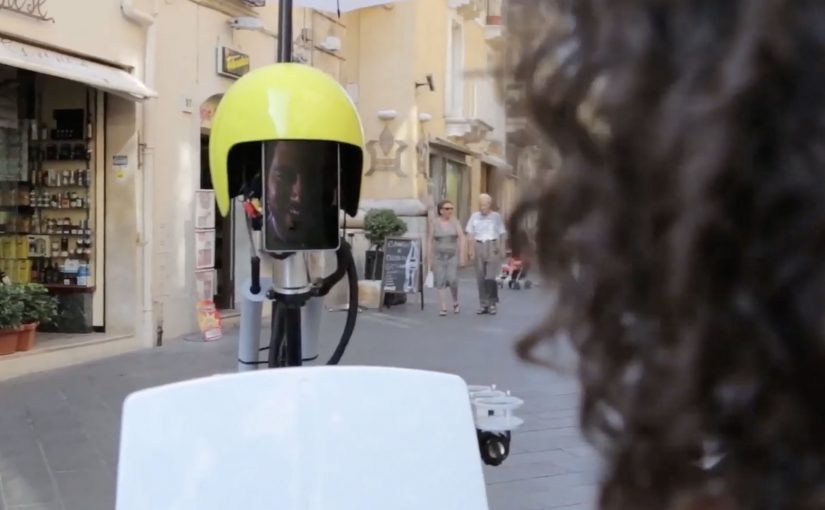
The mechanism in both examples is telepresence. A robot with a webcam and microphone acts as a movable avatar in a real location. People at home control where it goes, what it looks at, and who it talks to, turning a distant event into something they can actively explore rather than passively watch.

In experiential marketing, telepresence robots let brands scale a place-bound moment to remote audiences without reducing it to a simple livestream.

Why the robot format lands

This works because it restores a missing ingredient of remote content. Presence. You are not only consuming footage. You are choosing what to look at, moving through the environment, and having real-time interactions that feel personal. Because telepresence combines viewer control with two-way contact, it turns remote viewing into participation. Telepresence is worth the operational hassle only when “being there” is the product. The real question is whether your remote audience needs presence, not just access.

Extractable takeaway: If your brand moment is tied to a physical place, give remote audiences viewer control over a live viewpoint. Even small control makes the experience feel earned, and earned experiences get talked about.

Three minutes in Italy

San Pellegrino invited Facebook fans to discover the Sicilian village of Taormina and explore its cobblestone streets via a webcam and microphone enabled robot controlled from their own computer.

Coca-Cola Summer Love 2013

Coca-Cola Summer Love is the annual summer event for Israeli teenagers. Not everyone can join in person, so Coca-Cola created robots that allowed teens to be part of the camp without leaving their homes. The robots carried webcams and microphones and were controlled by users who could not physically be there.

Users could navigate around the campus, talk with friends, watch shows, participate in competitions, and be part of the experience. The robots were welcomed, danced with, and treated like real attendees, becoming the “stars” and a natural media magnet inside the event.

Practical steals for telepresence events

  • Make control the feature. Remote access becomes meaningful when people can choose what happens next.
  • Keep interactions human-scale. Let remote users talk to real people, not just watch a feed.
  • Time-box the experience. Constraints like “three minutes” create urgency and reduce operational load.
  • Design for friendliness. The robot should invite social acceptance in the space, not disrupt it.

A few fast answers before you act

What is a “social robot” in these campaigns?

A telepresence robot that carries a live camera and microphone, letting a remote person control movement and interact with people on-site in real time.

Why is telepresence more compelling than a normal livestream?

Because it adds viewer control and two-way interaction. Control makes the experience feel personal, and two-way contact makes it feel like participation rather than content consumption.

What is the main operational risk?

Latency, connectivity, and crowd behavior. If the robot is hard to control or gets blocked, the magic disappears quickly.

Where does this pattern fit best?

Events, tourism, launches, and experiences where the value is being “there,” and where remote audiences have strong motivation but limited ability to attend physically.

How do you keep the robot from becoming a distraction?

Set simple on-site rules, give the robot a friendly presence, and design short, guided interactions so crowds do not block or hijack it.
Coca-Cola: Personal Road

Coca-Cola: Personal Road

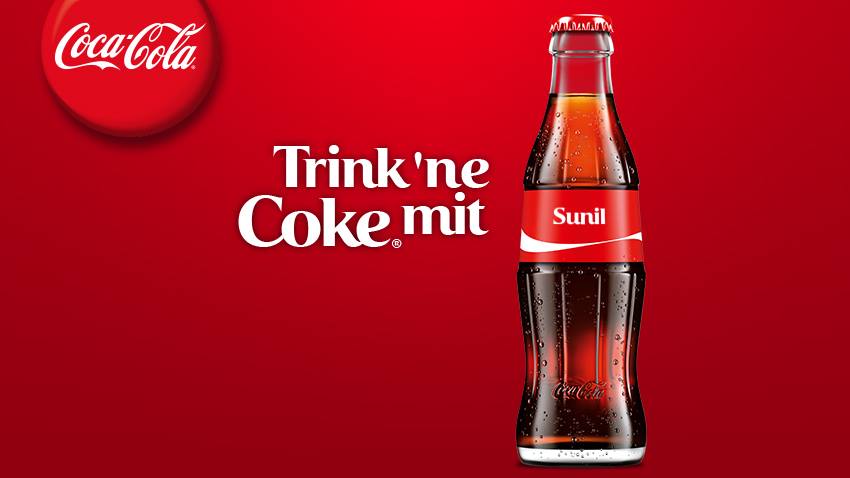
Coca-Cola has an ongoing global campaign that allows consumers to personalise bottles and cans…

The real question is how you extend a personalization promise beyond the package without turning it into a gimmick.

Enjoy a Coke with Sunil

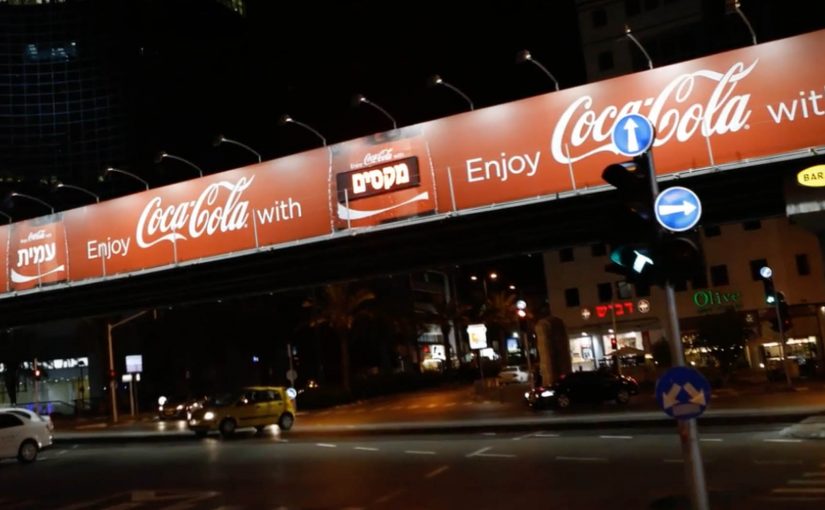
Building on the success of this campaign Coca-Cola Israel decided to take the idea further with personalised billboards.

A mobile app was developed where consumers could enter their name. Then using geo-fence technology, the Coca-Cola billboard displayed the name when it was approached. Geofencing here means the app detects when you enter a defined area around the billboard. The same trigger also sends a phone message, which is what makes the public moment feel personal and easy to share.

In global consumer brands running mass-personalization campaigns, this kind of simple, location-triggered reveal is a clean way to turn a name into a real-world moment.

Since its launch the app has reached 100,000 downloads and is currently ranked #1 in Israel’s app store.

Why this extension makes sense

It keeps the original “Share a Coke” promise intact, then amplifies it with one visible surprise that is immediately confirmed on the device you are already holding.

Extractable takeaway: If you want personalization to stick, pair one unmistakably personal output people can see with one immediate confirmation they can keep.

  • It keeps the personalization promise. The name is not only on the package. It shows up in the world around you.
  • Location makes it feel “for me”. The moment you approach the billboard, the experience becomes uniquely yours.
  • Mobile closes the loop. The phone notification confirms the moment and turns it into something you can share.

The reusable pattern

Start with a personalization mechanic people already understand. Then add a single “surprise and confirm” moment in the real world, powered by location and a simple mobile action.

  • Keep the input tiny. Ask for one thing, like a name, and make it obvious what happens next.
  • Make the output public and specific. Put the person’s name somewhere they cannot miss in the real world.
  • Confirm on mobile. Send a message at the same moment so the experience is memorable and shareable.

A few fast answers before you act

What is Coca-Cola “Personal Road”?

It is a Coca-Cola Israel extension of the personalised-name campaign that uses a mobile app and geofencing so a billboard displays your name as you approach, and your phone notifies you.

How does the billboard know when to show a name?

The app uses geo-fence technology to detect proximity, then triggers the personalised billboard moment when the user approaches.

Why pair the billboard moment with a smartphone message?

The message confirms what just happened and makes it easy for the consumer to capture and share the experience.

What is the key takeaway for location-based campaigns?

Make the rule simple and the payoff instant: one input from the consumer, one visible personalised output, and one mobile confirmation that seals the memory.

A New Kind of Catalog 2: IKEA’s AR catalog

A New Kind of Catalog 2: IKEA’s AR catalog

Last year Ikea re-imagined their catalog via a visual recognition app that brought its pages to life through inspirational videos, designer stories, “x-ray” views that peek inside furniture, and more.

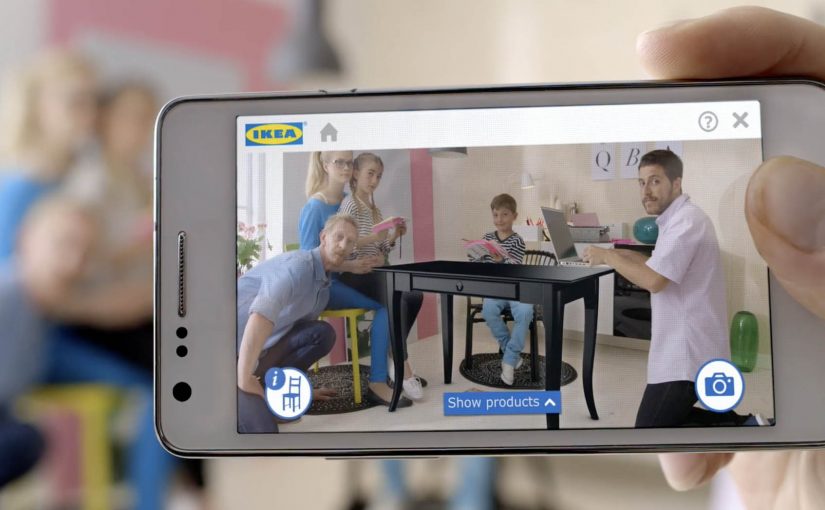
Now, for the 2014 IKEA catalogue, they push that idea into something far more useful: you can place virtual furniture directly into your home by putting the printed IKEA catalogue where you want the furniture to appear, then viewing the result through your phone or tablet using augmented reality (AR), meaning digital objects layered onto a live camera view of your real space.

The simple mechanic that makes a paper catalogue feel like a showroom

The experience design is almost disarmingly straightforward. The catalogue is not just media. It becomes the physical reference point that tells the app where “here” is, and roughly how big “life-size” should be. Because that reference point anchors position and scale, the placement feels believable enough to support a buying decision.

  • Open the IKEA catalogue app on a phone or tablet.
  • Scan a supported product page.
  • Close the catalogue and place it on the floor (or surface) where you want the item to “live.”
  • Watch the furniture appear in-context, then explore alternatives by browsing within the app.

In global retail and consumer brands, this kind of print-to-mobile AR, where the printed catalogue acts as the marker for the AR view, works because it turns “can you picture it?” into “can you see it here?” at the exact moment people are deciding.

Why it lands: utility beats novelty

AR marketing often dies as a gimmick because the “reveal” is entertaining but irrelevant. Here, the reveal is practical: scale, placement, and fit are exactly what shoppers worry about most.

Extractable takeaway: If emerging tech does not reduce a real decision friction, treat it as a distraction, not a strategy.

Even when the rendering is not perfect, the direction is clear. Reduce uncertainty. Help people make a confident choice. And if it cuts down on “it looked smaller online” returns, that utility is measurable, not just shareable.

What IKEA is really doing with this catalogue

This is a classic “bridge” play, a deliberate handoff between inspiration and purchase. IKEA keeps the reach and habit of a paper catalogue, then uses mobile interactivity to remove friction at the decision stage.

The real question is whether it removes enough doubt to change a purchase decision, not whether the AR looks impressive.

AR is worth investing in when it behaves like decision support, not when it just decorates a story.

It also quietly reinforces a brand position: IKEA is not only about affordable design. It is also about smart, accessible tools that help you plan and live better at home.

How to design an AR catalog people reuse

  • Make the printed piece part of the interface. Treat paper as a trigger, a marker, a controller. Not a dead-end.
  • Reward the scan with decision support. The “wow” should reduce doubt: sizing, configuration, compatibility, placement, or proof.
  • Design for fast repetition. The real value comes when people try multiple options in minutes, not once for curiosity.
  • Keep the action close to purchase. The best AR demos shorten the path from consideration to “yes” without feeling like a hard sell.

A few fast answers before you act

What is IKEA doing differently with the 2014 catalogue?

They extend the catalogue beyond scan-to-watch content by letting people place virtual furniture into their real home environment using AR.

How does the AR placement work in simple terms?

You scan a supported page, place the physical catalogue where you want the item to appear, and the app overlays a furniture model into the live camera view.

Why is a printed catalogue useful in an AR flow?

The catalogue becomes a physical reference point for position and approximate scale, making placement feel more believable than a free-floating 3D object.

What business problem does this help solve?

It reduces purchase hesitation by letting people judge fit and placement earlier, and it can help lower the risk of dissatisfaction and returns.

What’s the key lesson for marketers using emerging tech?

Build the experience around utility that supports a decision. Novelty may earn a try. Utility earns repeat use and moves people toward purchase.