
AR Cinema: London Movie Scenes on iPhone

AR Cinema: London Movie Scenes on iPhone

Turn London into a living movie map

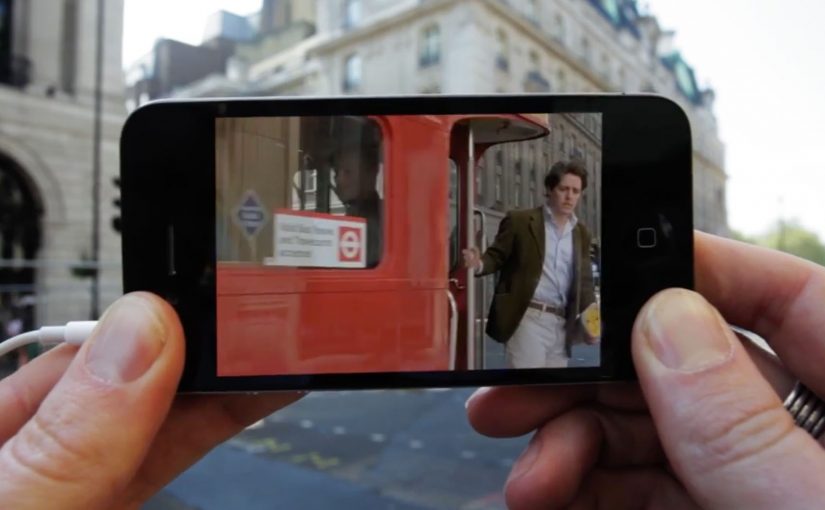
The Augmented Reality Cinema app for the iPhone allows you to walk around London and discover all the places where movies have been shot. Just point your iPhone in the direction of a sweetspot, and get a replay of the movie scene that was shot there. Here, a “sweetspot” is simply a nearby filming-location marker the app points you to.

The app is currently a work in progress prototype. But if and when it does see the light of day, I am sure it will make a great gizmo for all the movie buffs out there.

The magic is not AR. It is time travel

The clever part is the juxtaposition. You stand in the real location. Then you pull the filmed moment back into that exact space. That overlap between “here” and “then” is what makes the concept feel instantly shareable and instantly fun. The AR layer should stay secondary. The scene is the hero.

City exploration experiences land best when they turn real-world wandering into a lightweight mission with an instant payoff.

In European city tourism and cultural discovery, experiences like this work when they reward curiosity without changing how people naturally move.

The real question is whether you can make a place feel different in ten seconds, with one gesture, without breaking the walk.

Why this fits the way people explore cities

It turns wandering into a mission without forcing a route. You move naturally, and the city rewards curiosity with a scene. That is a strong mechanic for tourists and locals alike because it makes discovery feel personal.

Extractable takeaway: If your experience can turn “I am here” into “I was there” with a single action, the user will do the sharing for you.

What this prototype is really aiming for

A new kind of location-based entertainment. Part guided walk, part trivia, part nostalgia. Built around the simplest action. Point. Watch. Move on.

Steal this pattern for AR city walks

  • Real place first. Anchor the experience to real places people already want to visit.
  • One gesture unlocks payoff. Give the user one simple gesture that unlocks the payoff. Point and replay.
  • Use “before vs now” contrast. Use “before vs now” contrast as the hook. It creates emotion without heavy storytelling.

A few fast answers before you act

What does the Augmented Reality Cinema app do?

It lets you walk around London, point your iPhone toward a location “sweetspot,” and replay the movie scene filmed there.

Is the app available?

The post describes it as a work-in-progress prototype.

Who is it for?

Movie buffs and anyone who enjoys exploring film locations while walking the city.

What is the core mechanic?

Location-based discovery paired with an AR replay that overlays a movie scene onto the real place where it was shot.

Why does this feel like “time travel” rather than AR?

Because the payoff is the filmed moment mapped back onto the real location, so you experience “here” and “then” at the same time.
Fiat Street Evo

Fiat Street Evo

Leo Burnett Iberia has launched a new app called Fiat Street Evo, described as a “not-printed” car catalogue. A catalogue that is virtually on every street in your city.

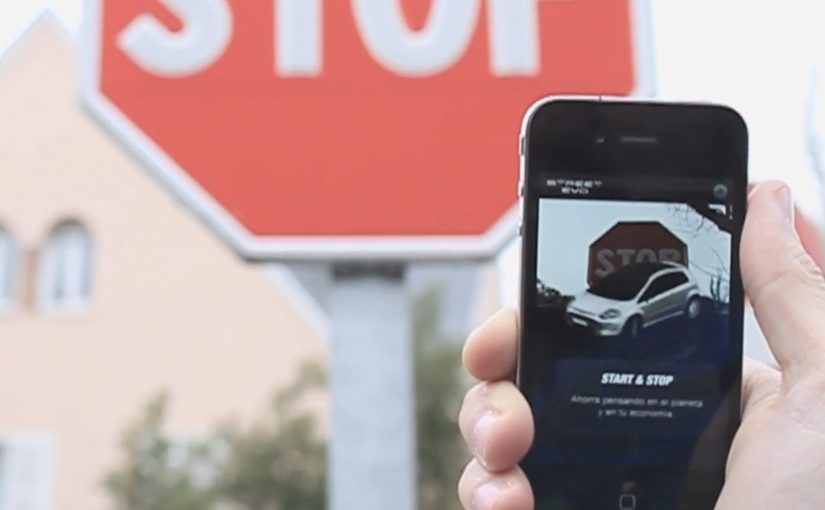
Fiat Street Evo recognises traffic signs as if they were QR codes and associates each sign with a feature of the new Fiat Punto Evo. For example, a STOP sign points you to braking. A curve-ahead sign points you to intelligent lighting that guides you through bends. The list continues across the everyday signage you pass without noticing.

When street furniture becomes a product demo

The mechanism is a neat inversion of the usual brochure logic. Instead of printing a catalogue and hoping people keep it, the city becomes the index. Your camera becomes the browser, and the sign becomes the trigger. Here, “street furniture” means the signs and fixtures already in public space.

In automotive launch marketing, the strongest mobile ideas turn the real world into media without asking people to change their routine.

Why it lands

It reframes “specs and features” as discovery. You do not read a list. You unlock a feature in context, tied to a symbol you already understand. That makes the catalogue feel lighter, and it makes exploration feel like play rather than research. This pattern is stronger than a brochure-style feature list because it earns attention through context, not interruption.

Extractable takeaway: Product education travels further when it is organised around familiar cues in the environment, not around the brand’s feature taxonomy.

What Fiat is really trying to achieve

The real question is whether you can make the phone the first place curiosity goes by attaching product education to cues people already recognise. This kind of execution is doing two jobs at once. It builds attention for a new model, and it makes the phone the first place curiosity goes. That matters because the intent moment is not always at a dealership. It is often on the street, in motion, and in between other tasks.

Patterns to borrow for mobile launch marketing

  • Borrow existing symbols. Traffic signs already carry meaning. Use that meaning as your information architecture.
  • Keep the mapping intuitive. The sign-to-feature link should feel obvious, or people will drop the experience.
  • Design for quick sessions. One sign. One feature. One payoff. Repeat when you feel like it.
  • Make “catalogue” feel like exploration. A sense of discovery beats a long scroll of specifications.
  • Use the city as distribution. When the triggers are everywhere, frequency becomes effortless.

A few fast answers before you act

What is Fiat Street Evo in one sentence?

It is a mobile catalogue concept that recognises traffic signs and uses each sign to reveal a related Fiat Punto Evo feature.

Why call it a “not-printed car catalogue”?

Because the “pages” are distributed across the city as street signs. The phone becomes the reader, and the street becomes the catalogue.

What makes the sign-to-feature mapping important?

The mapping is the comprehension layer. If the association feels natural, users keep going. If it feels random, the idea collapses into novelty.

What is the biggest execution risk?

Recognition reliability. If the app struggles to identify signs in real conditions, people will not persist beyond the first attempt.

What should you measure in a pilot?

Successful recognitions per session, repeat usage, time-to-first-payoff, and whether the experience increases search, dealership visits, or brochure requests.

Volkswagen Norway: Test drive in a print ad

Volkswagen Norway: Test drive in a print ad

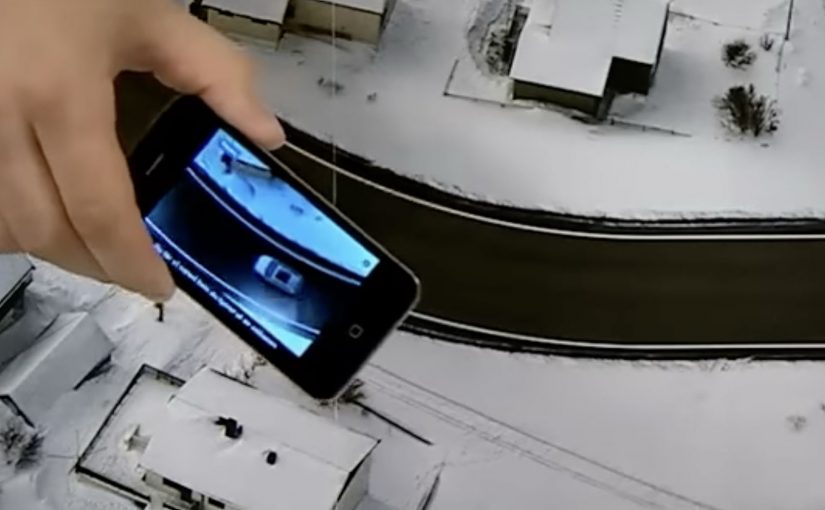
You open a magazine and see a long, empty road. Then you hover an iPhone over the printed page and a Volkswagen appears to “drive” along that road on your screen. It is a test drive that happens inside a print ad, with summer and winter road versions depending on the magazine insert.

Volkswagen Norway builds this as a hybrid print and mobile experience. Readers are prompted to download an app, developed by Mobiento, that turns the printed road into a track. The phone becomes the controller and the page becomes the environment. The payoff is simple viewer control. You move the phone. The car moves with you.

An augmented reality print ad is a piece of print that a camera can recognize as a trigger. Once recognized, an app overlays a digital layer onto the page, anchored to the printed design so the interaction feels connected to the physical medium.

In European automotive marketing, the hardest part is making driver-assist feel concrete without getting people behind the wheel.

The experience is designed to demo three features in a way print usually cannot. Lane assist, adaptive lights, and cruise control. It is not a real test drive, but it is a clear and surprisingly tactile explanation of systems that are otherwise hard to “feel” from a magazine spread.

Why this works as an explanation engine

By “explanation engine” I mean a format that lets someone experience a feature benefit in seconds, not just read about it. Driver-assist features are abstract until you see them respond to a road situation, and this setup works because the printed road plus the phone’s motion becomes a simple input loop the viewer can control. This kind of demo is worth doing when the feature’s value is easier to show than to describe.

Extractable takeaway: When the benefit is behavioural, make the user’s motion the control and the physical asset the scenario.

What the campaign is really doing for the brand

This is a positioning move as much as a product demo. It says Volkswagen brings technology into everyday life and it does it with familiar media, not only with future-facing formats. Print becomes the doorway into a mobile experience, and that contrast makes both feel more interesting.

The real question is whether your media choice can carry the product story without needing a live demo.

What to steal for your own print-to-mobile idea

  • Make the printed asset the interface. The road is not decoration. It is the input surface.
  • Choose features that benefit from simulation. Assist systems and “smart” behaviours are ideal for quick demos.
  • Keep the interaction one-step. Download, point, move. Anything more kills curiosity.
  • Provide two contexts. Summer and winter versions make the concept feel robust and replayable.

A few fast answers before you act

What is “test drive in a print ad” in simple terms?

It is a magazine ad that works with an iPhone app. When you hover the phone over the printed road, the app overlays a car on screen and lets you simulate driving along the page.

What features does the VW print-ad test drive demonstrate?

The experience is built around lane assist, adaptive lights, and cruise control, using the printed road as the scenario that triggers the system behaviours.

Why is this better than a normal print ad for tech features?

Because it shows behaviour, not descriptions. The viewer sees the system respond in a road context, which is more memorable than reading about it.

Is it accurate to call it the world’s first?

Volkswagen Norway bills it that way, and the work is widely described as an early example of augmented reality applied to print as a functional “test road”.

What is the main risk with print-to-app activations?

Friction. If install or recognition is slow, people stop. The first payoff has to arrive quickly so the novelty turns into understanding.