
Renault Espace: iPad 360° View

The Renault Espace is a large MPV from French car-maker Renault. With a new iPad app, Renault gives users an onboard view of the Espace like never before.

The application is a 360 degree interactive video. All you need to do is tilt your iPad and explore different angles as if you were right there.

A virtual showroom that behaves like your head

The mechanism is refreshingly direct. The app uses the iPad’s motion sensors to map physical movement to viewpoint changes inside the car. Instead of tapping through static photos, you “look around” by moving the device. It is a smart use of motion sensing because it keeps the interface invisible and the focus on the cabin.

In automotive consideration journeys, anything that increases spatial understanding of the interior helps bridge the gap between online browsing and a test drive.

Why it lands

Interior experience is one of the hardest things to communicate in standard car marketing. This solves that by letting the user control perspective. It also creates a calmer kind of interactivity. No menus, no instructions, no friction. Just tilt and explore.

Extractable takeaway: When your product has a strong spatial component, give people viewer control over perspective. It builds confidence faster than adding more copy.

What Renault is really trying to achieve

The real question is whether this kind of “tilt to explore” experience reduces uncertainty enough to make a showroom visit feel worth it.

This is a digital test-sit, a lightweight simulation of sitting in the cabin so you can judge layout and comfort before a showroom visit. It is designed to make the Espace feel accessible before a showroom visit, and to reduce uncertainty about cabin layout, visibility, and perceived comfort. Done well, it also keeps attention longer than a typical brochure flow.

Steal this for spatial product demos

  • Use motion as navigation. If the device supports it, motion control can feel more natural than UI controls.
  • Keep the interaction single-mode. One behaviour. Tilt to look. That simplicity is the feature.
  • Prioritise the interior. For family vehicles, cabin experience often sells more than exterior styling.
  • Let curiosity drive. Give users freedom to explore, rather than forcing a predetermined tour.
  • Make it fast to load. Interactive video dies when buffering becomes the dominant experience.

A few fast answers before you act

What is this Renault Espace iPad app in one sentence?

It is an iPad experience that uses a 360 degree interactive onboard video so users can tilt the device to explore the Espace interior from different angles.

Why use 360 video instead of a standard photo gallery?

Because it communicates space and layout more effectively. Users can look where they want, which reduces uncertainty faster than scrolling images.

What makes “tilt to explore” feel intuitive?

It mirrors how people look around in real life. Physical movement maps directly to viewpoint changes, so interaction feels natural.

What is the main execution risk?

Performance. If motion tracking feels laggy, or the video quality is poor, users will abandon quickly and the experience will feel like a gimmick.

What should you measure if you ship this type of experience?

Time spent, percentage of users who explore multiple viewpoints, completion rate, repeat sessions, and whether it correlates with test-drive requests or dealer inquiries.
Volkswagen Norway: Test drive in a print ad

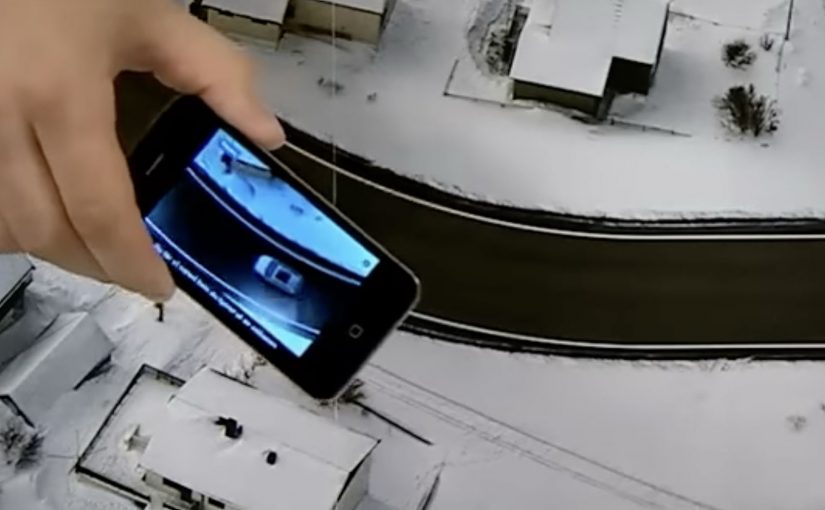
You open a magazine and see a long, empty road. Then you hover an iPhone over the printed page and a Volkswagen appears to “drive” along that road on your screen. It is a test drive that happens inside a print ad, with summer and winter road versions depending on the magazine insert.

Volkswagen Norway builds this as a hybrid print and mobile experience. Readers are prompted to download an app, developed by Mobiento, that turns the printed road into a track. The phone becomes the controller and the page becomes the environment. The payoff is simple viewer control. You move the phone. The car moves with you.

An augmented reality print ad is a piece of print that a camera can recognize as a trigger. Once recognized, an app overlays a digital layer onto the page, anchored to the printed design so the interaction feels connected to the physical medium.

In European automotive marketing, the hardest part is making driver-assist feel concrete without getting people behind the wheel.

The experience is designed to demo three features in a way print usually cannot. Lane assist, adaptive lights, and cruise control. It is not a real test drive, but it is a clear and surprisingly tactile explanation of systems that are otherwise hard to “feel” from a magazine spread.

Why this works as an explanation engine

By “explanation engine” I mean a format that lets someone experience a feature benefit in seconds, not just read about it. Driver-assist features are abstract until you see them respond to a road situation, and this setup works because the printed road plus the phone’s motion becomes a simple input loop the viewer can control. This kind of demo is worth doing when the feature’s value is easier to show than to describe.

Extractable takeaway: When the benefit is behavioural, make the user’s motion the control and the physical asset the scenario.

What the campaign is really doing for the brand

This is a positioning move as much as a product demo. It says Volkswagen brings technology into everyday life and it does it with familiar media, not only with future-facing formats. Print becomes the doorway into a mobile experience, and that contrast makes both feel more interesting.

The real question is whether your media choice can carry the product story without needing a live demo.

What to steal for your own print-to-mobile idea

  • Make the printed asset the interface. The road is not decoration. It is the input surface.
  • Choose features that benefit from simulation. Assist systems and “smart” behaviours are ideal for quick demos.
  • Keep the interaction one-step. Download, point, move. Anything more kills curiosity.
  • Provide two contexts. Summer and winter versions make the concept feel robust and replayable.

A few fast answers before you act

What is “test drive in a print ad” in simple terms?

It is a magazine ad that works with an iPhone app. When you hover the phone over the printed road, the app overlays a car on screen and lets you simulate driving along the page.

What features does the VW print-ad test drive demonstrate?

The experience is built around lane assist, adaptive lights, and cruise control, using the printed road as the scenario that triggers the system behaviours.

Why is this better than a normal print ad for tech features?

Because it shows behaviour, not descriptions. The viewer sees the system respond in a road context, which is more memorable than reading about it.

Is it accurate to call it the world’s first?

Volkswagen Norway bills it that way, and the work is widely described as an early example of augmented reality applied to print as a functional “test road”.

What is the main risk with print-to-app activations?

Friction. If install or recognition is slow, people stop. The first payoff has to arrive quickly so the novelty turns into understanding.

Skoda Yeti: Park Assist in Your Pocket

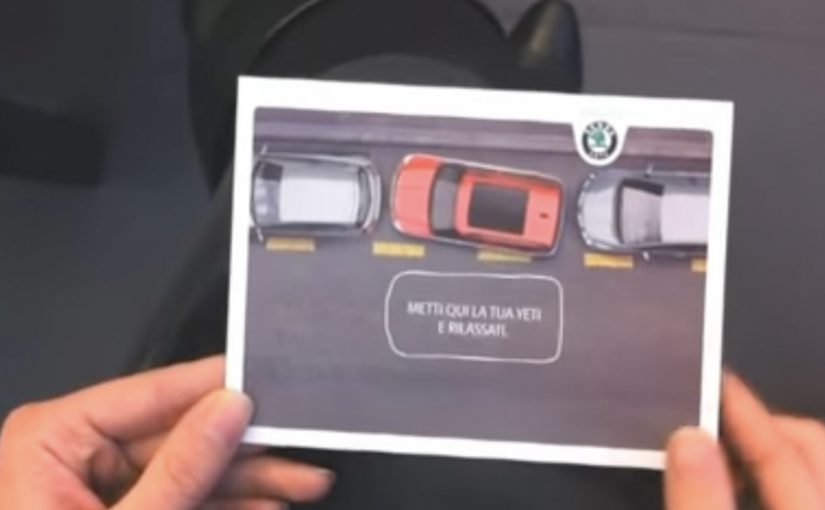
The new Skoda Yeti comes with Park Assist, a driver-assistance feature designed to help the vehicle steer into a parking space. Cayenne Milan came up with a simple idea to show the benefit in a way you can understand instantly. A card that demonstrates “parking without the driver.” The card in the video is described as being distributed at the Bologna Motor Show.

A postcard that explains the feature in seconds

The brilliance is that it does not try to teach the technology. It teaches the outcome. You interact with a physical object and immediately get the promise: the car can handle the parking maneuver for you.

In European auto shows and showroom marketing, tactile direct marketing often outperforms brochures because it delivers the feature benefit in the hand, not as a paragraph of explanation.

The real question is whether your feature can be understood through a one-step interaction before anyone explains it.

A strong feature demo does two jobs at once. It reduces cognitive load to one obvious takeaway, and it gives the audience a story they can retell without technical vocabulary. Outcome-first demos should be the default when the audience has seconds, not minutes.

Why this lands at an auto show

Auto shows are crowded with claims. Faster. safer. smarter. Most of them blur together. A direct mail object creates a private moment in the middle of a public environment, and that moment makes the feature memorable.

Extractable takeaway: If your feature benefit cannot be demonstrated as a simple interaction that survives a noisy environment, it will get flattened into “just another claim.”

  • It is self-explanatory. No staff pitch required.
  • It is portable. The idea travels with the visitor after they leave the booth.
  • It is repeatable. People can show it to someone else and replay the explanation.

And here is the video showing how the Skoda Yeti can actually park itself

The second film shifts from metaphor to proof. It shows the Park Assist function as a real maneuver, reinforcing that the postcard is not just a clever visual. It is pointing at a real capability.

Outcome-first moves for feature launches

  • Demo the outcome, not the mechanism. People buy benefits. Engineers buy systems.
  • Use a physical prop to earn attention. Something you can hold cuts through show-floor noise.
  • Pair metaphor with proof. One piece that makes it simple, one piece that makes it believable.
  • Design for pass-along. If visitors can show it to friends, your booth message keeps working off-site.

A few fast answers before you act

What is Park Assist in this context?

A driver-assistance feature designed to help the vehicle steer into a parking space, reducing the manual effort and stress of parking.

Why use a postcard instead of a normal leaflet?

Because interaction teaches faster than reading. A simple physical demo makes the benefit obvious in seconds.

Why include a second video after the postcard film?

The postcard creates understanding. The feature demonstration creates belief. Together they cover both comprehension and credibility.

What kind of features benefit most from this approach?

Features with a clear, visible outcome. Parking. safety assists. convenience automation. Anything a person can recognize immediately when shown.

What is the biggest risk with “clever prop” marketing?

If the prop is memorable but the feature link is weak, people remember the gimmick and forget the product. The prop must map cleanly to the benefit.