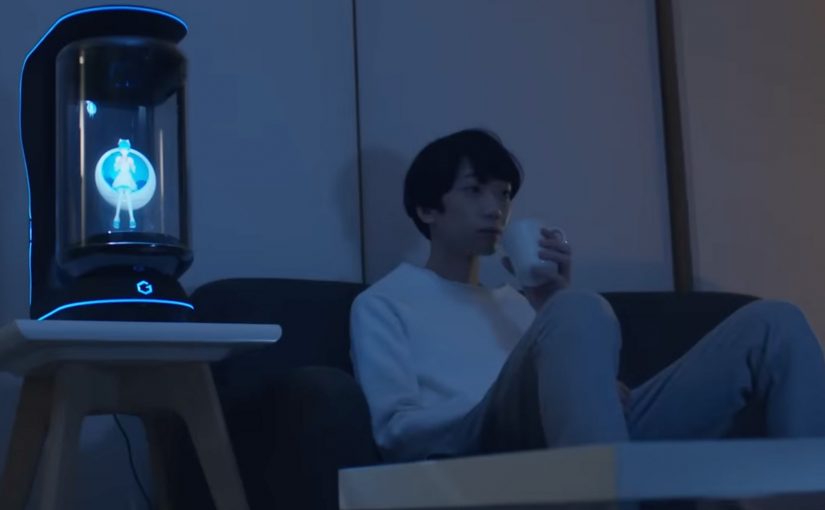
You come home after work and someone is waiting for you. Not a speaker. Not a disembodied voice. A character in a glass tube that looks up, recognizes you, and says “welcome back.” She can wake you up in the morning, remind you what you need to do today, and act as a simple control layer for your smart home.
That is the proposition behind Gatebox. It positions itself as a virtual home robot, built around a fully interactive holographic character called Azuma Hikari. Here, “virtual home robot” means a stationary device that uses a character interface to run simple routines and smart home control, rather than a mobile physical robot. The pitch is not only automation. It is companionship plus utility. Face recognition. Voice recognition. Daily routines. Home control. A “presence” that turns a smart home from commands into a relationship.
What makes Gatebox different from Alexa, Siri, and Cortana
Gatebox competes on a different axis than mainstream voice assistants.
Voice assistants typically behave like tools. You ask. They answer. You command. They execute.
Gatebox leans into a different model:
- Character-first interface. A persistent persona you interact with, not just a voice endpoint.
- Ambient companionship. It is designed to greet you, nudge you, and keep you company, not only respond on demand.
- Smart home control as a baseline. Home automation is part of the offer, not the story.
The result is a product that feels less like a speaker and more like a “someone” in the room.
In consumer smart homes, the interface layer matters as much as the devices, because it shapes whether automation feels like commands or companionship.
Why the “holographic companion” framing matters
A lot of smart home innovation focuses on features. Gatebox focuses on behavior. By keeping a persistent character in your peripheral vision, it turns prompts into small social cues, which is why it can feel relational rather than transactional.
Extractable takeaway: If you want technology to be used every day, design for a lightweight loop of interaction that stays alive between commands, not just for perfect answers on demand.
It is designed around everyday moments:
- waking you up
- reminding you what to remember
- welcoming you home
- keeping a simple loop of interaction alive across the day
That is not just novelty. It is a design bet that people want technology to feel relational, not transactional.
What the product is, in practical terms
At its most basic, Gatebox:
- controls smart home equipment
- recognizes your face and your voice
- runs lightweight daily-life interactions through the Azuma Hikari character
It is currently available for pre-order for Japanese-speaking customers in Japan and the USA, at around $2,600 per unit. For more details, visit gatebox.ai.
The business bet behind a companion interface
The real question is whether your home interface should be a command surface, or a companion that maintains a simple relationship across the day.
The intent is straightforward: keep the interaction loop alive so “smart home control” becomes a daily habit, not a feature you try once and forget.
Character-first companions are a stronger interaction bet than voice-only assistants when you want sustained engagement, as long as utility stays the default.
The bigger signal for interface design
Instead of:
- screens everywhere
- apps for everything
- menus and settings
It bets on:
- a single persistent companion interface
- a character that anchors interaction
- a device that makes “home AI” feel present, not hidden in the cloud
That is an important shift for anyone building consumer interaction models. The interface is not the UI. The interface is the relationship.
Four patterns to borrow for companion interfaces
- Design for in-between moments. Build a lightweight loop of greetings, nudges, and routines that persists between explicit commands.
- Make utility the baseline, not the punchline. The companion framing works only if home control and reminders stay reliable and fast.
- Anchor interaction in one persistent “someone”. A stable persona reduces friction compared to hopping between apps, menus, and settings.
- Use presence to change behavior. A visible, ambient interface shifts usage from “ask when needed” to “engage because it is there”.
A few fast answers before you act
What is Gatebox in one sentence?
Gatebox is a virtual home robot that combines smart home control with a holographic companion character, designed for everyday interaction.
Who is Azuma Hikari?
Azuma Hikari is Gatebox’s first character, presented as an interactive holographic girl that acts as the interface for utility and companionship.
What can it do at a basic level?
At a basic level, it can control smart home equipment, recognize face and voice, and run daily routines like wake-up, reminders, and greetings.
Why compare it to Alexa, Siri, and Cortana?
The comparison helps clarify positioning. Gatebox frames itself as more than a voice assistant, using a character-first, companion-style interface instead of a purely voice-first tool.
What is the commercial status?
It is described as available for pre-order for Japanese-speaking customers in Japan and the USA, at around $2,600 per unit.