
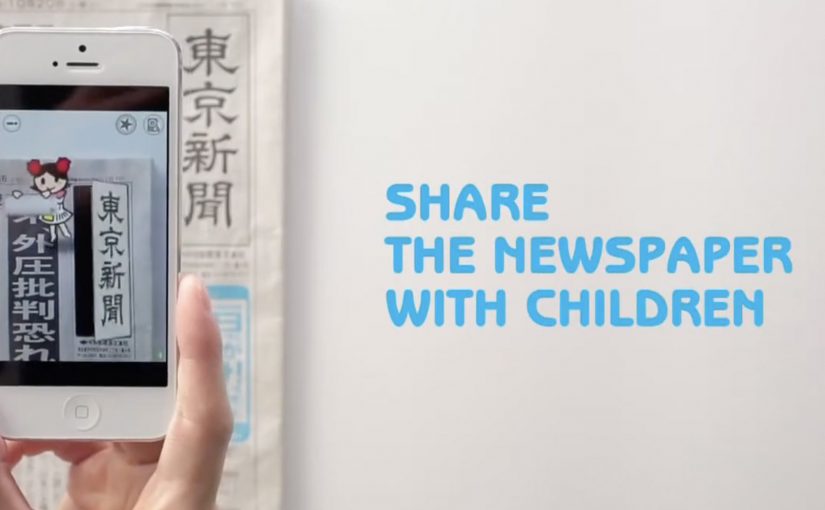
Tokyo Shimbun: AR Reader App for Kids

A kid points a smartphone at a newspaper article and the page starts “talking back”. Characters pop up, headlines simplify, and the story becomes easier to understand without leaving print.

Connected devices such as smartphones and tablets have contributed to an explosion in digital media consumption. As these devices gain adoption, print newspapers around the world are seen suffering from declining readership and revenue. To combat this, Tokyo Shimbun, along with Dentsu Tokyo, came up with a new way to connect with readers. An augmented reality reader app brings the newspaper to life by overlaying educational, kid-friendly versions of selected articles.

How the newspaper becomes a “teaching layer”

The mechanism is straightforward. The app uses the phone camera to recognize specific articles, then overlays animated commentary, simplified explanations, and visual cues on top of the printed page so kids can follow along. Here, “teaching layer” means this AR overlay that translates the printed article into simpler language and guided visuals. Because the overlay sits directly on the printed article, kids do not have to leave the page to get context, which lowers friction and keeps attention on the story.

In publishing and media brands that still rely on print touchpoints, augmented reality can turn paper into an entry point for younger audiences without abandoning the physical ritual of reading.

Why this lands with parents and kids

It respects the newspaper as a shared household object, but removes the comprehension barrier for children. The child gets a friendly “translator”. The parent gets a moment of joint attention that feels educational, not like more screen time for its own sake.

Extractable takeaway: If you want kids to adopt a legacy touchpoint, use the digital layer to reduce comprehension friction first and add spectacle second.

What the business intent looks like

This is not only a novelty layer. It is a retention and habit play. If children can engage with a paper alongside adults, the newspaper has a better chance of staying present in the home and staying relevant as a family product.

The real question is whether the AR layer builds repeat, family co-reading habits, not whether it feels novel the first time.

Practical moves for print-plus-AR translation

  • Overlay explanation, not just effects. Make the digital layer add clarity, not only animation.
  • Choose a narrow trigger set. Start with selected stories that benefit most from translation and context.
  • Design for “family co-use”. Make it easy for a parent to participate without taking over the phone.
  • Keep the print object central. The magic works best when the page remains the interface.

A few fast answers before you act

What does the Tokyo Shimbun AR reader app do?

It lets kids scan selected newspaper articles with a smartphone and see animated, kid-friendly explanations layered on top of the print page.

Why pair augmented reality with a newspaper at all?

Because the newspaper is still a household touchpoint. AR can lower comprehension barriers for kids while keeping the shared reading ritual intact.

Is this mainly entertainment or education?

The strongest value is educational translation. The animations act as attention hooks, but the real utility is simplifying and explaining complex topics.

What makes this different from sending kids to a website?

The entry point stays on the printed page. The experience is anchored in the article the family is already holding, which supports shared attention.

What is the biggest execution risk?

If scanning is finicky or the overlays feel gimmicky, kids will not repeat the behavior and parents will not recommend it.

Dentsu London and BERG: Making Future Magic

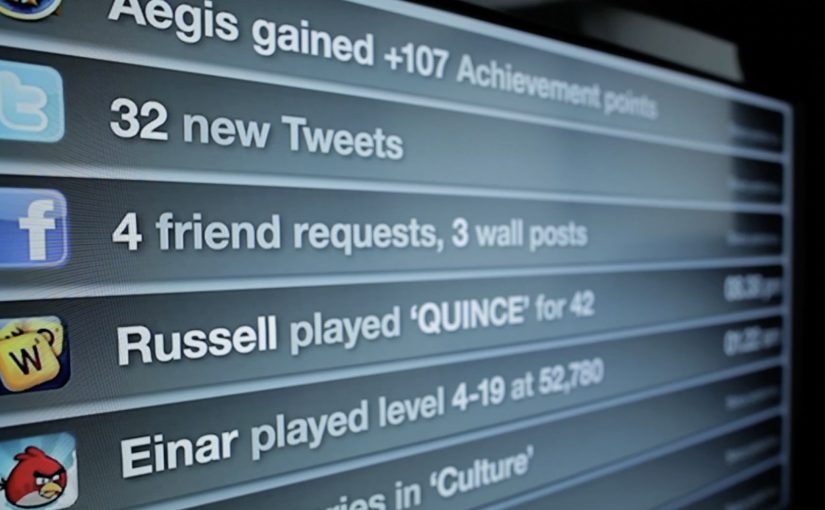
Dentsu London has made two films with BERG as part of an ongoing collaboration to bring their “Making Future Magic” strategy to life. Both films treat the growing number and variety of media surfaces as a canvas.

Here, “media surfaces” means everyday objects and touchpoints that can carry useful information without behaving like traditional screens or ads.

Incidental Media sketches a near future where media surfaces are everywhere, but used to be playful, informative, and better at connecting you to friends and family.

The Journey shifts the same thinking into travel, focusing on opportunities in stations and on trains.

What the “media surfaces” idea actually proposes

The mechanic is a design-fiction approach. Instead of inventing new hardware, the films show existing surfaces behaving differently. Receipts, windows, clocks, tickets, and public displays become quieter, more contextual, and more useful. Small pieces of information appear where they help, then fade back into the background.

In urban, mobile-first consumer environments, the most effective ambient media tends to be context-aware, lightweight, and respectful of attention.

Why it lands

It feels plausible because it is built from things we already recognize. The films do not pitch a sci-fi leap. They demonstrate a series of small shifts in how content could live on everyday surfaces, and that makes the future feel “next door” rather than distant.

Extractable takeaway: If you want people to believe a future-facing strategy, show it as a set of concrete, everyday interactions on familiar surfaces. Keep the behaviors small, specific, and repeatable.

What Dentsu London is really doing with this work

This is strategy communication as an artifact. The films give teams and clients a shared mental model for what “Making Future Magic” could mean in practice, and they do it in a format that is easy to circulate, discuss, and reuse in planning conversations.

The real question is how you make a future-facing strategy tangible enough that teams and clients can picture it, discuss it, and reuse it.

This is a stronger way to communicate future experience thinking than leaving it as abstract language in a deck.

How to make future concepts feel usable

  • Show, then explain. Start with a believable vignette before you introduce principles.
  • Use familiar surfaces. Credibility rises when the canvas is already part of everyday life.
  • Prioritize quiet utility. Ambient media works best when it helps without demanding constant input.
  • Design for context shifts. Travel, waiting, and transition moments are rich canvases for information that matters.

A few fast answers before you act

What is “Incidental Media” in one sentence?

A near-future sketch where everyday surfaces carry small, useful pieces of media that are playful and contextual rather than loud and interruptive.

What does “The Journey” focus on?

Travel contexts like stations and trains, showing how ambient, contextual media could reduce friction and improve the experience of moving through transport systems.

Why use concept films instead of a written strategy deck?

Because films make the future tangible. They align teams faster by letting everyone see the same interactions, not just read abstractions.

Why does this future feel believable instead of sci-fi?

Because the films build from ordinary surfaces and small behavior shifts. That makes the idea feel adjacent to current life rather than dependent on a radical technology jump.

What is the main risk in copying this approach?

Staying too high-level. If the vignettes are not specific enough to feel real, the work becomes mood, not a usable model for decisions.

Dentsu: iButterfly Location-Based Coupons

Coupons with wings: iButterfly turns deals into a mobile hunt

Here is a great example of Online, Mobile and Shopper Marketing converging with Augmented Reality (AR), where the phone camera view becomes the backdrop while digital objects are overlaid and tied to location signals like GPS. Integrated Marketing literally put into the hands of the people.

Japanese ad agency Dentsu has started this experimental coupon download platform called iButterfly on the iPhone. The free iPhone app transforms the habit of collecting coupons into a fun little game using AR and the device’s GPS.

The mechanic: catch a butterfly, unlock a coupon

The app tasks its users with catching virtual butterflies that are flying around, each representing one or more coupons. You can even share “butterflies” with your friends via Bluetooth.

In this context, the phone camera view becomes the backdrop, while digital objects, here butterflies, are overlaid and tied to location signals like GPS.

In retail and FMCG shopper marketing, the value of this approach is that promotions become a location-linked experience, not a passive download.

Why this format works for targeted promotions

The key shift is motivation. People are not “clipping” coupons. They are playing a simple collecting game, and the reward is a deal that feels earned. That feeling is why the offer holds attention long enough to drive action.

Extractable takeaway: When an offer is packaged as a collectible tied to place and moment, it feels context-aware rather than generic. Treat location as part of the experience, and keep the capture-to-redemption path short so the “find” turns into a real reward.

What Dentsu is really prototyping here

This is less about novelty AR and more about a new distribution behavior. Turning offers into collectible objects changes how often users open the app, how long they stay in it, and how naturally they talk about it with friends.

The real question is whether your promotion can create a repeat habit, not just a one-time redemption.

This format is worth copying when you can tie the reward to a real place and keep redemption friction near zero.

It is also a rare example where “share with a friend” is not a marketing CTA. It is a gameplay action that carries the promotion with it.

Shopper activation moves to copy from iButterfly

  • Make the reward immediate. Catch. Unlock. Redeem. Long funnels kill the game loop, the simple repeat cycle of catch, unlock, redeem.
  • Use location as a story, not a filter. Place rewards where people already go, so the map feels meaningful.
  • Let sharing be part of the mechanic. A tradable object beats a generic “share this” button.
  • Keep the collection simple. If users need a manual, they will not hunt.

A few fast answers before you act

What is iButterfly?

iButterfly is a mobile coupon platform that turns deal collection into a location-based AR game. Users catch virtual butterflies on their phone and unlock coupons as rewards.

How does the AR coupon mechanic work?

Users view the real world through the phone camera. Virtual butterflies appear and can be “caught”. Each butterfly contains one or more offers, which unlock after capture.

Why is this relevant for shopper marketing?

It shifts promotions from passive browsing to active discovery. Location and gameplay increase attention, repeat usage, and the likelihood of in-the-moment redemption.

What makes it feel targeted rather than random?

Butterflies can be tied to locations and contexts via GPS. That links the offer to where the shopper is, not just who they are.

What is the biggest execution risk?

If redemption is hard or the rewards feel weak, the novelty wears off fast. The game loop only survives when the payoff is clear and friction stays low.