
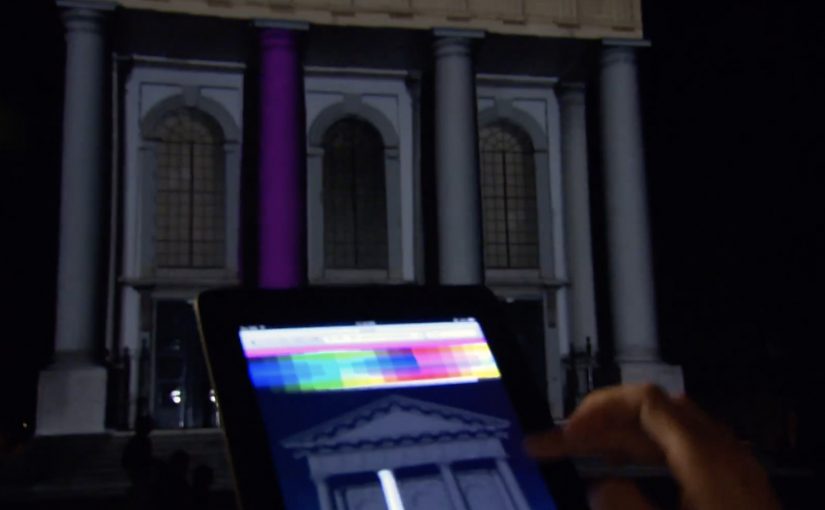
NuFormer: Interactive 3D video mapping test

NuFormer, after executing 3D video mapping projections onto objects and buildings worldwide, adds interactivity to the mix in this test.

Here the spectators become the controller and interact with the building in real time using gesture-based tracking (Kinect). People influence the projected content using an iPad, iPhone, or a web-based application available on both mobile and desktop. For this test, Facebook interactivity is used, but the idea is that other social media signals can also be incorporated.

From mapped surface to live interface

Projection mapping usually works like a film played on architecture. This flips it into a live system. The building is still the canvas, but the audience becomes an input layer. Gesture tracking drives the scene changes, and second-screen control, meaning a phone or browser used as a remote, extends participation beyond the people standing closest to the sensor.

Extractable takeaway: Interactive mapping is most compelling when the control model, the set of simple inputs people can learn instantly (wave, move, tap), is legible at a glance and the projection responds quickly enough that people trust the cause-and-effect.

In large-scale public brand experiences, projection mapping becomes more than spectacle when it gives the crowd meaningful viewer control instead of a one-way show.

Why the “crowd as controller” move matters

Interactivity changes what people remember. A passive crowd remembers visuals. An active crowd remembers ownership. The moment someone realises their movement, phone, or social input changes the facade, the projection stops being “content” and becomes “play.”

The real question is whether your interaction model makes people feel in control within seconds, or confused for minutes.

Because the facade responds immediately to a person’s input, the crowd shifts from watching to experimenting, which keeps people around long enough to teach each other and try again.

That also changes the social dynamics around the installation. People look for rules, teach each other controls, and stick around to try again. The result is longer dwell time and more organic filming, because participation is the story.

What brands can do with this, beyond a tech demo

As described in coverage and in NuFormer’s own positioning, branded content, logos, or product placement can be incorporated into interactive projection applications. The strategic upside is that you can design a brand moment that is co-created by the crowd, rather than merely watched.

When social signals are part of the input (Facebook in this case), the experience can also create a bridge between the physical venue and online participation. That hybrid loop is where campaigns can scale.

Patterns for your next mapping brief

  • Pick one primary control. Gesture, phone, or web. Then add a secondary layer only if it increases participation rather than confusion.
  • Make feedback immediate. The projection must respond fast or people assume it is fake or broken.
  • Design for “spectator comprehension.” Bystanders should understand what changed and why, from a distance.
  • Use social inputs carefully. Keep the mapping between input and output obvious so it feels fair, not random.
  • Plan for crowd flow. Interactive mapping is choreography. Sensors, sightlines, and safe space matter as much as visuals.

A few fast answers before you act

What is “interactive projection mapping” in this NuFormer test?

It is 3D projection mapping where the projected content changes in real time based on audience input. Here that input includes Kinect gesture tracking plus control via iPad, iPhone, and web interfaces.

Why add phones and web control when you already have gesture tracking?

Gesture tracking usually limits control to people near the sensor. Second-screen control expands participation to more people and enables a clearer “turn-taking” interaction model.

How does Facebook interactivity fit into a projection experience?

It acts as an additional input stream, letting social actions influence what appears on the building. The key is to make the mapping from social action to visual change understandable.

What is the biggest failure mode for interactive mapping?

Latency and ambiguity. If the response is slow or the control rules are unclear, crowds disengage quickly because they cannot tell whether their input matters.

What should a brand measure in an interactive mapping activation?

Dwell time, participation rate (people who trigger changes), repeat interaction, crowd size over time, and the volume and quality of user-captured video shared during the event window.

VGT: Fur iAd that bleeds when you swipe

VGT (an association combating animal factories), working with Austrian agency Demner, Merlicek & Bergmann, created an iAd, an interactive tablet ad unit, for the iPad edition of DATUM magazine.

The iAd shows a young woman wearing a fur coat. When the iPad user tries to continue browsing with the familiar finger-wipe movement, each swipe leaves a blood stain on the fur. The more you try, the more blood appears, turning a simple “next page” gesture into the message.

A navigation gesture that becomes the accusation

The clever part is that nothing “extra” is required from the user. No quiz. No mini game. No new behaviour. The iAd hijacks the most natural behaviour on the device. Swiping to move on. That is why it feels so sticky. The ad does not ask for attention. It punishes avoidance.

The mechanism: friction by design

Most advertising tries to reduce friction. This does the opposite. It introduces deliberate friction at the exact moment the audience normally exits. That choice forces a small pause, and that pause is where the ethical point lands. For tablet units, this kind of purposeful friction beats bolt-on interactivity that can be ignored.

In tablet-first media environments, gesture-based interactivity can turn a standard placement into a moral confrontation.

The real question is whether your interaction makes the viewer complicit, or merely entertained.

Why it lands even if you dislike shock tactics

This is not shock for spectacle. It is shock attached to an action the viewer chooses. You create the stains. That’s what makes the experience uncomfortable in a more personal way than a static image could. It also matches the medium. The iPad is intimate. It’s held close.

Extractable takeaway: When touch is the medium, tie consequence to a habitual gesture so the argument is felt in the hand, not just read on the screen.

How to borrow this for tablet units

  • Exploit a native gesture. Swipe, pinch, tap, drag. If the gesture is already habitual, the learning curve disappears.
  • Make the interaction mean something. The response should be the argument, not just a visual flourish.
  • Use friction sparingly and intentionally. Only add resistance when the resistance is the point.
  • Design for instant comprehension. The first swipe should explain the whole idea.
  • Earn the discomfort. If you push people emotionally, the payoff must be clarity, not confusion.

A few fast answers before you act

What is the VGT iAd concept in one sentence?

An iPad iAd that prevents an easy page swipe by leaving blood stains on a fur coat every time you try to move on.

Why use the swipe gesture instead of a video or a static image?

Because swiping is an action the user performs. When the consequence appears immediately, the viewer feels involved rather than merely informed.

Is this an example of “interactive storytelling” or “interactive persuasion”?

Both. The story is minimal, but the persuasion is embodied. The interaction itself carries the moral logic.

When does this kind of tactic backfire?

When the shock feels disconnected from the cause, when the friction blocks people without a clear point, or when the execution reads as manipulation rather than meaning.

What is the simplest way to apply this pattern ethically?

Use a familiar gesture, create an immediate consequence tied to the message, and ensure the user can still exit once the point is delivered.

Renault Espace: iPad 360° View

The Renault Espace is a large MPV from French car-maker Renault. With a new iPad app, Renault gives users an onboard view of the Espace like never before.

The application is a 360 degree interactive video. All you need to do is tilt your iPad and explore different angles as if you were right there.

A virtual showroom that behaves like your head

The mechanism is refreshingly direct. The app uses the iPad’s motion sensors to map physical movement to viewpoint changes inside the car. Instead of tapping through static photos, you “look around” by moving the device. It is a smart use of motion sensing because it keeps the interface invisible and the focus on the cabin.

In automotive consideration journeys, anything that increases spatial understanding of the interior helps bridge the gap between online browsing and a test drive.

Why it lands

Interior experience is one of the hardest things to communicate in standard car marketing. This solves that by letting the user control perspective. It also creates a calmer kind of interactivity. No menus, no instructions, no friction. Just tilt and explore.

Extractable takeaway: When your product has a strong spatial component, give people viewer control over perspective. It builds confidence faster than adding more copy.

What Renault is really trying to achieve

The real question is whether this kind of “tilt to explore” experience reduces uncertainty enough to make a showroom visit feel worth it.

This is a digital test-sit, a lightweight simulation of sitting in the cabin so you can judge layout and comfort before a showroom visit. It is designed to make the Espace feel accessible before a showroom visit, and to reduce uncertainty about cabin layout, visibility, and perceived comfort. Done well, it also keeps attention longer than a typical brochure flow.

Steal this for spatial product demos

  • Use motion as navigation. If the device supports it, motion control can feel more natural than UI controls.
  • Keep the interaction single-mode. One behaviour. Tilt to look. That simplicity is the feature.
  • Prioritise the interior. For family vehicles, cabin experience often sells more than exterior styling.
  • Let curiosity drive. Give users freedom to explore, rather than forcing a predetermined tour.
  • Make it fast to load. Interactive video dies when buffering becomes the dominant experience.

A few fast answers before you act

What is this Renault Espace iPad app in one sentence?

It is an iPad experience that uses a 360 degree interactive onboard video so users can tilt the device to explore the Espace interior from different angles.

Why use 360 video instead of a standard photo gallery?

Because it communicates space and layout more effectively. Users can look where they want, which reduces uncertainty faster than scrolling images.

What makes “tilt to explore” feel intuitive?

It mirrors how people look around in real life. Physical movement maps directly to viewpoint changes, so interaction feels natural.

What is the main execution risk?

Performance. If motion tracking feels laggy, or the video quality is poor, users will abandon quickly and the experience will feel like a gimmick.

What should you measure if you ship this type of experience?

Time spent, percentage of users who explore multiple viewpoints, completion rate, repeat sessions, and whether it correlates with test-drive requests or dealer inquiries.