Skoda Fabia RS: Augmented Reality Test Drive

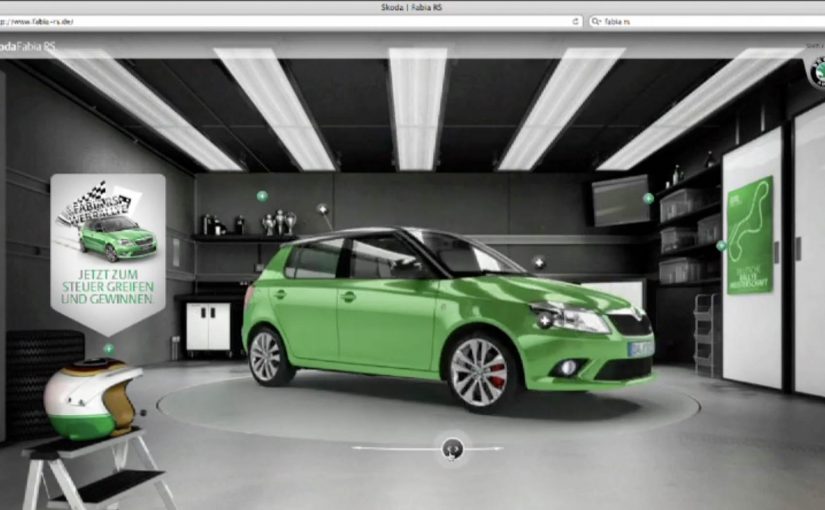
Skoda has just released a rally-based, augmented reality test drive for the Fabia RS. Here, “augmented reality test drive” means an AR overlay combined with a live webcam feed so you appear inside the cockpit view. The hook is simple and instantly personal: you become the driver, right down to a helmet view that pulls your face in via the webcam.

A rally fantasy built on a very real webcam

The execution borrows the language of motorsport. Helmet cam framing, tight cockpit perspective, and the feeling that you are inside the run rather than watching an ad.

Mechanically, the idea is an AR layer plus a live camera feed. The interface does not just show the car. It places you into the experience so the “test drive” feels like a game you are starring in.

In European automotive launch teams, webcam-first interactivity can differentiate faster than another spec-led asset.

In automotive launches where feature parity is high, interactive test drives create faster differentiation than another spec sheet or beauty film.

Why the helmet view is the smartest detail

Most virtual test drives keep the viewer outside the car. This one pulls the viewer into the cockpit, which changes the emotional contract. You are no longer evaluating. You are participating.

Extractable takeaway: Move the viewer from evaluator to participant, and the demo becomes something they remember and share without being asked.

That participation is what makes the concept naturally shareable, even without shouting for shares. People want to show the version where their own face is in the helmet view, because it is proof they “did the thing.”

What the brand is really reinforcing

The real question is whether the experience makes performance identity feel personal, not just visible.

On the surface, it is a playful rally twist. Underneath, it signals performance identity. The Fabia RS is framed as a car with motorsport DNA, not just a faster trim level.

The AR wrapper also makes an implicit promise: this is a modern car for people who like modern interfaces. The experience becomes a proxy for the product personality.

How to borrow the webcam POV trick

  • Make the viewer the protagonist, not just the audience. Webcam and POV tricks do more than cinematic polish.
  • Choose one unmistakable motif that communicates the category story fast, here it is rally and helmet cam.
  • Turn “try” into “play” so the time spent feels like entertainment, not evaluation.
  • Design a single talkable detail people can retell in one sentence, for example “it pulls your face into the helmet view.”

A few fast answers before you act

Is this more ad or more game?

It sits in the middle. The structure behaves like a lightweight game, while every element points back to a single product identity, rally performance.

What is the core mechanism that makes it work?

Personalization through webcam plus a strong point-of-view frame. The experience feels like it is happening to you, not in front of you.

Why does AR help here, instead of just a normal virtual drive?

AR adds “presence.” It creates the feeling of being inside the moment, which is harder to achieve with a standard video or configurator flow.

What is the biggest execution risk with webcam-based experiences?

Friction and permission. If setup is clunky or people feel uncertain about using the camera, completion drops fast. The first 10 seconds must feel safe and effortless.

What is the transferable lesson for other categories?

Put a real person into the proof. When the viewer’s face, voice, or choices become part of the demo, the demo becomes content people want to share.

3D projection mapping on a Toyota Auris

Instead of projecting onto a building, Glue Isobar projects a CG car directly onto a real Toyota Auris Hybrid. Here, projection mapping means aligning animated visuals to the contours of a physical object so the imagery appears built into the car itself. With seven projectors working together, the result is a true 3D, 360-degree projection mapping experience on all sides of the car. You can walk around it and experience the visuals from any angle.

What makes this projection mapping different

The twist is the surface. A real car brings complex curves, edges, and reflections. Mapping to that shape, and keeping the illusion consistent as people move around it, is the challenge that makes this feel genuinely new.

How the experience is delivered

The work uses a mix of keyframe, 2D, 3D, algorithmic, and dynamic animation to deliver the experience. The projection setup supports a 360-degree view, which is why the story holds up from multiple angles instead of depending on a single “best seat”.

In live auto launches and showroom-style reveals, this matters because the product demo and the spectacle happen in the same physical moment.

Why this lands as a launch moment

This format turns a product reveal into a live event. It gives people a reason to stop, watch, walk around, and talk. The real question is not whether the projection looks advanced, but whether the launch makes the car feel worth approaching, discussing, and remembering. The business job of a launch moment is not passive viewing but active attention that carries into conversation and recall. This is stronger than a static display because it turns the car itself into the source of attention.

Extractable takeaway: When the product becomes the performance surface, the launch works harder because the spectacle and the proof of product presence happen in the same place.

What to steal for live product reveals

  • Make the product the canvas. When the object carries the story, the experience feels specific and harder to copy.
  • Design for movement in the crowd. A 360-degree setup keeps the illusion intact even when people walk around and viewpoints change.
  • Use complexity where it creates visible payoff. Multiple projectors are justified when they unlock surfaces and angles a single beam cannot cover.
  • Treat it as a performance, not a display. The reveal works best when the product appears to “do something”, not just sit there.

A few fast answers before you act

What is 3D projection mapping in this example?

It is the technique of projecting animated visuals onto a physical object, aligned to its shape so the imagery appears to belong to the object rather than a flat screen.

Why use seven projectors?

To cover the full vehicle and maintain the illusion across multiple surfaces, including areas you can only see when walking around the car.

Why project onto the car instead of a separate screen?

Because the effect feels more product-specific. The visuals appear attached to the vehicle, which makes the reveal more memorable than showing the same animation beside it.

What makes “360-degree” important for live audiences?

People do not stand in one spot. If the experience works from many angles, it feels real in a public space and stays compelling as crowds move.

What is the main lesson for product launches?

Make the product the stage. When the object itself becomes the canvas, the experience feels specific, memorable, and inherently shareable.

Fits.me: Virtual Fitting Room

One of the main problems with buying clothes online is simple. You cannot feel the fit. So you guess, the parcel arrives, and the return loop starts again.

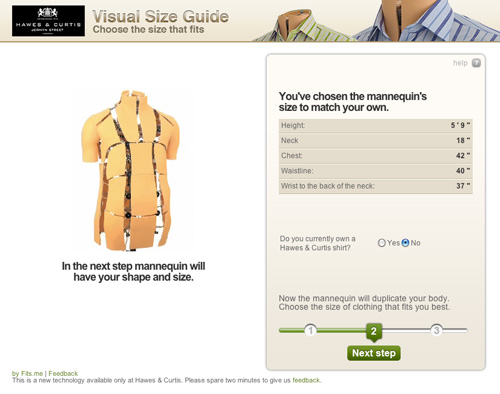
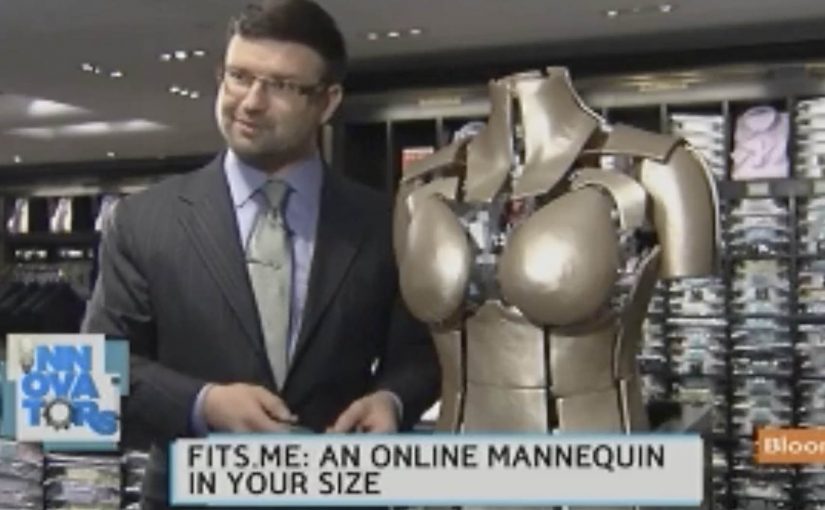
Fits.me, an Estonian company, builds a Virtual Fitting Room around a shape-shifting robotic mannequin. Instead of trying to “predict” fit with a size chart, the mannequin physically changes form to match your body dimensions, letting you preview how different sizes sit on a body shaped like yours.

A mannequin that changes shape so the garment can do the explaining

The mechanism is a robotic mannequin, often referred to as a FitBot, a shape-adjustable mannequin that can be tuned across a wide range of body measurements. Clothing is photographed on the mannequin in multiple sizes, and the shopper can compare how the same item behaves as size changes, on a body that resembles their own. Because the garment is shown on the same body shape across sizes, the comparison makes fit differences visible and reduces guesswork.

A robotic mannequin providing a Visual Size Guide.

In online apparel retail, fit uncertainty drives returns and suppresses conversion, so anything that reduces sizing doubt tends to outperform its surface-level novelty.

Why this approach feels more “real” than a size chart

What makes it persuasive is that it turns sizing into a visual comparison instead of a number. The real question is whether you can help a shopper see the trade-offs between sizes before checkout, without asking them to trust a black-box recommendation. If you have that problem, this is the right pattern to use. You are not being told “you are a Medium.” You are shown what Small, Medium, and Large look like on a similar shape, which is closer to the in-store decision process.

Extractable takeaway: When a purchase decision depends on a physical sensation you cannot deliver online, replace the missing sensation with a repeatable visual proof that helps shoppers compare options, not just read recommendations.

What the rollout says about where the pain is

At the time, the system is positioned around a male mannequin first, with Fits.me saying it is planning to unveil a female version in November. That sequencing is a reminder that “who we can fit well” is often a product constraint, not a marketing choice, especially when the technology depends on physical ranges and repeatable photography.

For more information visit www.fits.me.

What to steal from Fits.me’s FitBot

  • Make fit a comparison, not a verdict. Let shoppers see multiple sizes side by side on a body-like reference instead of outputting a single “recommended” size.
  • Design for confidence, then measure it. Track size changes after viewing, conversion on fitted items, and return-rate shifts by category.
  • Respect constraint sequencing. If the system only fits certain body ranges well at first, be explicit about where it is reliable and expand the range as the asset library grows.

A few fast answers before you act

What is a “Virtual Fitting Room” in this Fits.me context?

It is a system that uses a shape-adjustable robotic mannequin to model how garments look across sizes on a body shaped to match the shopper’s measurements, so shoppers can compare fit visually before buying.

Why does this reduce returns in theory?

Because it reduces guesswork. When shoppers can see how different sizes drape and sit, they are less likely to buy multiple sizes “just in case,” and less likely to be surprised when the item arrives.

What is the key difference versus typical size charts or recommendation widgets?

This approach is comparison-first. It shows a garment on a body-like reference across multiple sizes, rather than outputting a single recommended size and asking the shopper to trust it.

When does a visual fit tool like this not help much?

It helps most with size uncertainty, but it cannot fully replace tactile judgments like fabric feel or personal comfort preferences, so some returns will still be driven by “feel” rather than fit.

What should retailers measure if they deploy something like this?

Engagement with the fitting experience, size-selection changes after viewing, conversion lift on fitted products, and return-rate reduction by category and by first-time versus repeat shoppers.