
Ford C-Max Augmented Reality

A shopper walks past a JCDecaux Innovate mall “six-sheet” screen and stops. Instead of watching a looped video, they raise their hands and the Ford Grand C-MAX responds. They spin the car 360 degrees, open the doors, fold the seats flat, and flip through feature demos like Active Park Assist. No printed marker. No “scan this” prompt. Just gesture and immediate feedback.

What makes this outdoor AR execution different

This is where augmented reality in advertising moves from a cool, branded desktop experience to a marker-less, educational interaction in public space. The campaign, created by Ogilvy & Mather with London production partner Grand Visual, runs on JCDecaux Innovate’s mall digital screens in UK shopping centres and invites passers-by to explore the product, not just admire it.

The interaction model, in plain terms

Instead of asking people to download an app or scan a code, the screen behaves like a “walk-up showroom.”

  • Hands up. The interface recognises the user and their gestures.
  • Virtual buttons. On-screen controls let people change colour, open doors, fold seats, rotate the car, and trigger feature demos.
  • Learning by doing. The experience is less about spectacle and more about understanding what the 7-seat Grand C-MAX offers in a few seconds.

How the marker-less AR works here

The technical leap is the move away from printed markers or symbols as the anchor for interaction. The interface is based on natural movement and hand gestures, so any passer-by can start immediately without instructions.

Under the hood, a Panasonic D-Imager camera measures real-time spatial depth, and Inition’s augmented reality software merges the live footage with a 3D, photo-real model of the Grand C-MAX on screen.

In retail and out-of-home environments, interactive screens win when they eliminate setup friction and teach the product in seconds.

Why this matters for outdoor digital

If you care about outdoor and retail-media screens as more than “digital posters,” this is a strong pattern:

  • Lower friction beats novelty. The magic is not AR itself. The magic is that the user does not need to learn anything first.
  • Gesture makes the screen feel “alive.” The moment the passer-by sees the car respond, the display stops being media and becomes a product interface.
  • Education scales in public space. Showing how seats fold, how doors open, or what a feature demo looks like is hard to compress into a static ad. Interaction solves that.

Practical takeaways if you want to build something like this

  • Design for instant comprehension. Assume 3 seconds of attention before you earn more. Lead with one obvious gesture and one obvious payoff.
  • Keep the control set small. Colour, rotate, open, fold. A few high-value actions beat a deep menu.
  • Treat it like product UX, not campaign UX. The success metric is “did I understand the car better,” not “did I watch longer.”
  • Instrument it. Track starts, completions, feature selections, and drop-offs. Outdoor can behave like a funnel if you design it that way.

A few fast answers before you act

What is the core innovation here?

Marker-less, gesture-driven AR on mall digital screens that lets passers-by explore product features without scanning a code or using a printed marker.

What does the user actually do?

They raise their hands to start, then use on-screen controls to change colour, open doors, fold seats, rotate the car, and trigger feature demos like Active Park Assist.

What technology enables it?

A depth-imaging camera measures real-time spatial depth, and AR software merges live footage with a 3D model of the vehicle.

Why does “marker-less” matter in public spaces?

Because it removes setup friction. Anyone walking by can immediately interact through natural movement and gestures.
Honda Jazz Interactive TV Ad

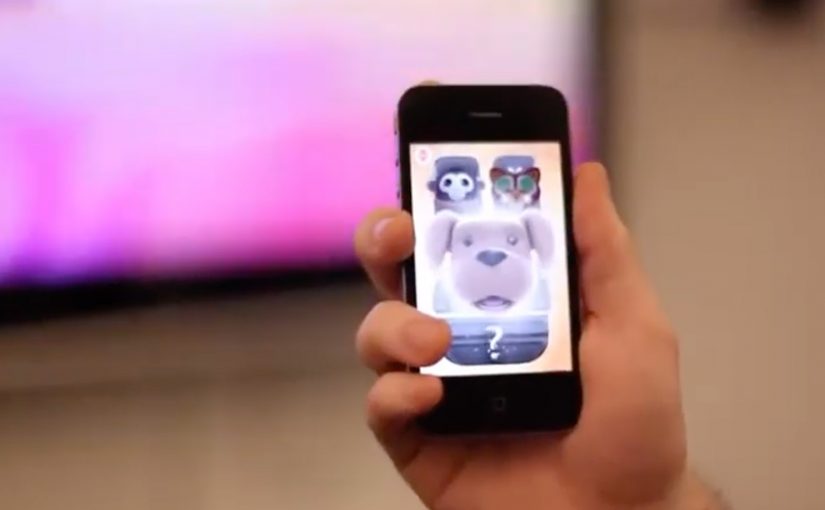
You watch the Honda Jazz “This Unpredictable Life” TV spot. At the same time, you open a companion iPhone app and literally “grab” what is happening in the ad. A character jumps onto your phone in the exact moment it appears on TV. Then you take that character with you and keep playing after the commercial ends.

Wieden + Kennedy London is behind this interactive TV campaign for the new Honda Jazz. The idea is simple and sharp. Use the iPhone as a second screen that syncs to the broadcast and turns a passive spot into a real-time experience.

What the iPhone app does while the ad plays

The mechanic is “screen hopping.” The iPhone app recognises the sound from the TV ad and matches it to predefined audio fingerprints. That timing tells the app exactly which character or moment is live in the commercial, so it can surface the right interactive content on your phone in real time.

What happens after you “grab” a character

Once a character lands on your iPhone, you interact with it away from the TV. You can trigger behaviours and mini-interactions, including singing into the phone to make characters react and dance. The TV spot becomes the gateway. The mobile experience becomes the engagement layer you keep.

Why this matters for interactive advertising

This is a clear step toward campaigns that treat broadcast as the launchpad and mobile as the control surface. When the second screen is tightly synchronised, you can design moments that feel native to the content people are already watching, rather than forcing a separate “go online later” call-to-action.

This is also not the first time an iPhone engagement model starts to bridge media and action. A related example uses a similar iPhone-led interaction pattern for coupons and augmented reality: location based augmented reality coupons.


A few fast answers before you act

What is “screen hopping” in advertising?

Screen hopping is when content “jumps” from one screen to another during a live experience. Here, the TV spot triggers synchronized content on an iPhone so viewers can capture and interact with elements of the ad.

How does the Honda Jazz app sync to the TV commercial?

The app uses audio recognition. It matches the ad’s sound to predefined audio patterns so it knows what is playing at any moment and can show the right character or interaction on the phone.

What is the value of a second-screen experience like this?

It extends a short broadcast moment into a longer engagement loop. The ad becomes a gateway. The phone becomes the interactive layer that continues before, during, and after the spot.

What should a brand get right to make this work?

Timing and simplicity. The sync must feel instant, the interaction must be obvious, and the “reward” for participating must be fun enough to carry beyond the TV moment.

Gesture Sharing using Microsoft Surface

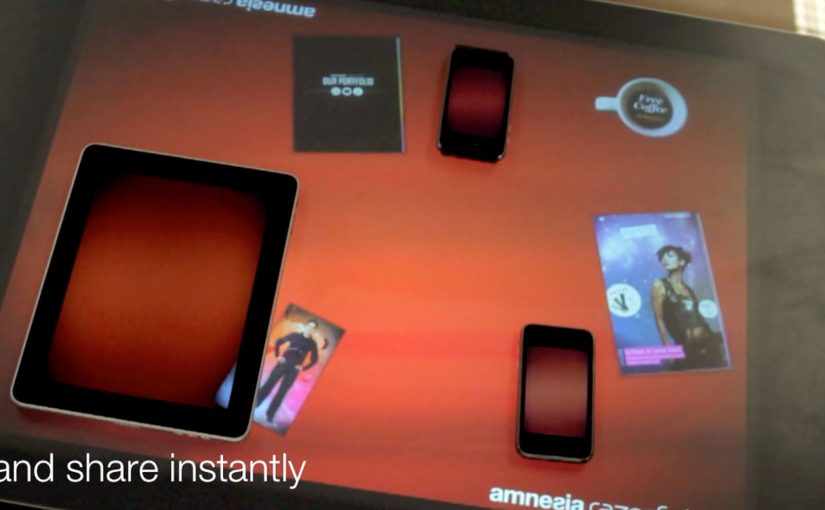
You place two iPhones and an iPad around a Microsoft Surface table. With a single gesture, a photo slides off one device, travels across the tabletop, and drops into another device. The transfer is instant, and the UI makes it feel like content is physically moving between screens.

Amnesia Razorfish is back in the news with the launch of Amnesia Connect. It is software that enables instant, seamless sharing and transfer of content, including photos, music, and embedded apps, between multiple handheld devices using a Microsoft Surface table and a single gesture.

How the “single gesture” illusion works

In the moment, the Surface table connects devices over WiFi and shares in real time. The table tracks each object’s position, so the visual effect stays locked to the device placement. Content appears to move in and out of the iPad and iPhone exactly where they sit on the table.

What is supported right now, and what comes next

The software works with Apple iOS devices, and it is being developed to work with Android, Windows Phone, and BlackBerry smartphones. The concept scales anywhere multiple devices need to share quickly without cables, menus, or friction.

Why brands care about gesture-based sharing

As smartphones become omnipresent, this kind of interaction opens a different design space for brand experiences. It makes sharing visible, social, and fast. Instead of asking people to “send” something, you let them move it, together, in plain sight.


A few fast answers before you act

What is gesture sharing in a multi-device experience?

Gesture sharing is when users move content between devices through physical gestures, like swiping an item from one screen to another, rather than using menus, Bluetooth pairing, or file dialogs.

How does a Microsoft Surface table enable this?

The table tracks where devices sit and aligns the interface to that physical layout. It also supports real-time connectivity so content can transfer while the visuals stay spatially consistent.

What makes this feel “seamless” to users?

The key is removing steps. No selecting recipients, no attaching files, no waiting screens. The motion itself becomes the transfer, and the UI reinforces that mental model.

Where can brands apply this pattern?

Anywhere shared exploration matters. Retail demonstrations, event installations, collaborative product discovery, and multi-screen storytelling all benefit when “sharing” becomes a visible group interaction.