
Görtz: Virtual Shoe Fitting

Görtz: Virtual Shoe Fitting

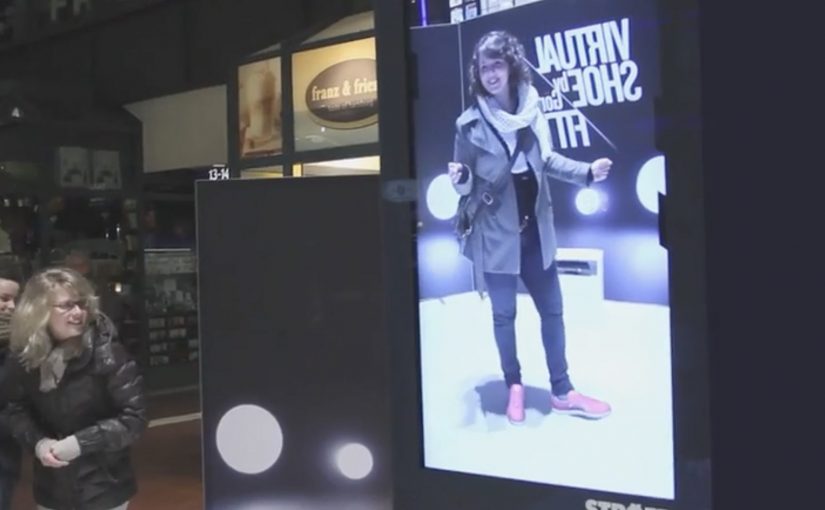
In September last year I had written about a Nike Sneaker Customization concept from Miami Ad School. Since then, ad agency kempertrautmann, along with German shoe retailer Görtz, creates the same virtual shoe store at Hamburg Central Station and transforms a digital billboard into a point of sale for shoes.

A station billboard that behaves like a shop window

Using Microsoft Kinect gesture controls, the shopper’s feet are scanned and reproduced on the screen. A selection of shoes is then presented to try on and compare virtually. A social component lets shoppers share a snapshot of themselves with the shoes on Facebook. Those who decide to buy receive a QR code that leads to a mobile checkout, with next-day delivery.

Virtual shoe fitting is an interactive retail experience that overlays a chosen shoe style onto a live on-screen view of your feet, so you can judge look and proportion before purchasing.

In European retail environments where commuters split time between offline browsing and mobile checkout, the strongest executions connect fast “try” moments to a low-friction purchase path.

Why it lands: it compresses the path from curiosity to checkout

The idea removes the biggest barrier in out-of-home retail, which is the gap between “that looks interesting” and “I can actually get it”. The Kinect scan creates a personal moment, the virtual try-on creates confidence, and the QR code turns intent into an immediate transaction rather than a promise to remember later. That matters because each step reduces the drop-off that usually happens between public interest and private purchase.

Extractable takeaway: If you want digital out-of-home to sell, not just impress, design the experience so the last step is not “find us later”. Make the last step “buy now”, with the minimum possible handoff friction.

What the campaign is really proving

The real question is whether a public screen can do enough selling work in the moment to replace the need for a later retail visit.

It is less about tech novelty and more about role change. The billboard stops being a broadcast surface and starts behaving like a staffed shop assistant. It recognizes you, helps you evaluate options, and hands you a clear next step to purchase.

This works best when the technology serves the buying decision, not when it becomes the point of the experience.

What this retail screen gets right

  • Personalize instantly: a scan, a fit, a quick moment that feels made for the passer-by.
  • Keep choices bounded: a curated range beats a full catalog when people are in a hurry.
  • Build a shareable artifact: snapshots extend the experience beyond the station.
  • Make the handoff obvious: QR-to-checkout should feel like the natural next click, not a separate journey.
  • Promise something operationally real: next-day delivery turns “stunt” into “service”.

A few fast answers before you act

What is the core idea?

A digital billboard in a train station becomes a virtual shoe store. Shoppers try on shoes using gesture control, then complete purchase on mobile via a QR code.

Why use Kinect in a public space?

Because it enables hands-free interaction and creates a personal “fit” moment without requiring an app download or typing in a rushed environment.

What makes this different from a normal QR poster?

The poster does not only link out. It provides evaluation first. The virtual try-on is the persuasion layer, and the QR code is the conversion layer.

What is the biggest execution risk?

Latency and calibration. If the scan feels inaccurate or the overlay looks wrong, the experience loses trust and the checkout step will not happen.

What should you measure?

Interaction starts, completed try-ons, QR scans, checkout completion rate, and next-day delivery satisfaction. Those metrics show whether the billboard is acting as a true point of sale.
Windows of Opportunity: Smart Car Windows

Windows of Opportunity: Smart Car Windows

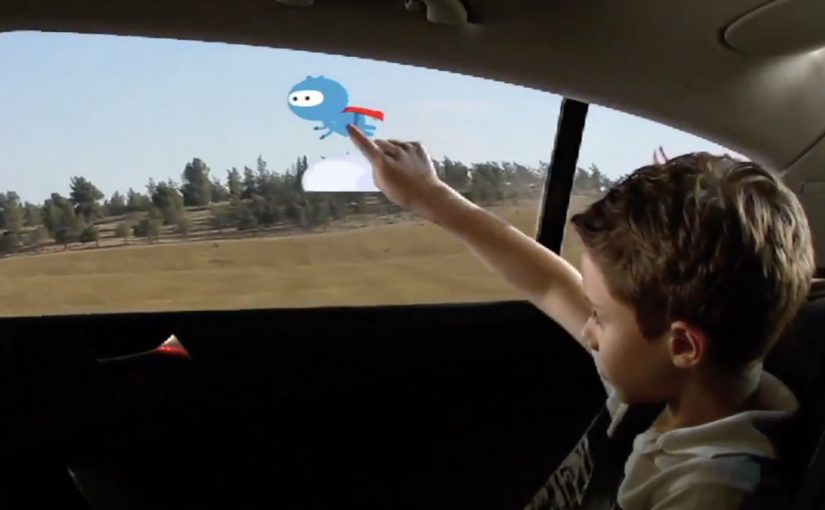
Got backseat boredom? DVD players and Game Boys are so five years ago, but a concept in rear-seat entertainment that uses the windows themselves could replace squirming and snoozing with interactive scribbling, sweeping, and pinching.

General Motors Research and Development put up a challenge to researchers and students from the Future Lab at Bezalel Academy of Art and Design in Israel. The task was to conceptualize new ways to help rear-seat passengers, particularly children, have a richer experience on the road.

The outcome is shown below, even though GM is described as having no immediate plans to put this smart glass technology into vehicles. Here, “smart glass” means the window can act as a display surface and detect touch or gestures.

When the window becomes the interface

The mechanism is simple to grasp. Treat the rear side window as a transparent display surface, then add touch and gesture interaction so passengers can draw, play, and manipulate content directly on the glass while still looking out at the world passing by. Because it is the same surface passengers already look through, the interaction stays outward-facing rather than becoming another head-down screen.

In family car journeys, rear-seat attention is a hard constraint, and experiences that keep kids engaged without isolating them from the ride reduce friction for everyone.

What the brief is really asking for

This is not “more screens”. It is a different relationship between passengers and their surroundings. The concept is described as using the outside view as the canvas. Instead of escaping the trip, you interact with it.

The real question is whether you can turn the outside world into content without disconnecting passengers from the journey.

Why it lands

The idea feels fresh because it upgrades a dead surface into something active without adding another device to hold or another head-down screen to stare at. It also creates a shared backseat dynamic. Multiple passengers can point, draw, and react together, which changes the feel of long trips. This is the right direction for in-car entertainment because it replaces device-based distraction with shared, context-linked play.

Extractable takeaway: The best in-car entertainment does not only distract. It connects passengers to the context they are already in, and makes the journey itself part of the experience.

What GM is buying by running a concept challenge

Even without production intent, the exercise is useful. It expands the idea space around “smart glass” and passenger experience, and it generates prototypes and interaction patterns that can later inform other interfaces, materials, and interior design decisions.

Practical steals for smart-glass passenger UX

  • Use the environment as content. Overlay and interact with what is already outside rather than inventing a separate world.
  • Design for low instruction. If it cannot be understood in seconds, kids will abandon it and parents will ignore it.
  • Favor shared play. Multi-user interactions create calm through engagement, not through isolation.
  • Keep interaction lightweight. Short loops beat long missions in a moving vehicle.
  • Prototype early. Concepts like this live or die on latency, glare, and ergonomics, not on storyboard polish.

A few fast answers before you act

What is “Windows of Opportunity” in one sentence?

It is a GM concept project that turns rear side windows into interactive “smart glass” displays so passengers can draw, play, and explore during the ride.

Why use windows instead of adding more screens?

Because windows are already where passengers look. Turning them interactive can keep attention outward and shared, rather than head-down and isolated.

What makes this feel useful for families?

It targets the real pain point, keeping children engaged on long journeys, while preserving a sense of connection to the trip and to each other.

What are the biggest practical risks?

Glare and readability in daylight, touch accuracy on glass, latency, durability, and avoiding distraction for the driver through reflections or overly bright visuals.

What would you measure in a pilot?

Engagement duration, repeat use, whether it reduces restlessness and conflict, and whether it avoids unintended driver distraction in real driving conditions.

Ford C-Max Augmented Reality

Ford C-Max Augmented Reality

A shopper walks past a JCDecaux Innovate mall “six-sheet” screen (poster-format) and stops. Instead of watching a looped video, they raise their hands and the Ford Grand C-MAX responds. They spin the car 360 degrees, open the doors, fold the seats flat, and flip through feature demos like Active Park Assist. No printed marker. No “scan this” prompt. Just gesture and immediate feedback.

What makes this outdoor AR execution different

This is where augmented reality in advertising moves from a cool, branded desktop experience to a marker-less, educational interaction in public space. Marker-less here means the experience does not need a printed marker or “scan this” prompt to start. The campaign, created by Ogilvy & Mather with London production partner Grand Visual, runs on JCDecaux Innovate’s mall digital screens in UK shopping centres and invites passers-by to explore the product, not just admire it.

The interaction model, in plain terms

Instead of asking people to download an app or scan a code, the screen behaves like a “walk-up showroom.”

  • Hands up. The interface recognises the user and their gestures.
  • Virtual buttons. On-screen controls let people change colour, open doors, fold seats, rotate the car, and trigger feature demos.
  • Learning by doing. The experience is less about spectacle and more about understanding what the 7-seat Grand C-MAX offers in a few seconds.

How the marker-less AR works here

The technical leap is the move away from printed markers or symbols as the anchor for interaction. The interface is based on natural movement and hand gestures, so any passer-by can start immediately without instructions.

Under the hood, a Panasonic D-Imager camera measures real-time spatial depth, and Inition’s augmented reality software merges the live footage with a 3D, photo-real model of the Grand C-MAX on screen.

Because the interface responds to natural hand movement, the interaction starts without instruction and keeps the focus on learning the product, not learning the UI.

In retail and out-of-home environments, interactive screens win when they eliminate setup friction and teach the product in seconds.

The real question is whether your outdoor screen is a passive impression machine or a walk-up product experience that teaches in under 30 seconds.

Why this matters for outdoor digital

If you care about outdoor and retail-media screens as more than “digital posters,” this is a strong pattern. This pattern is worth copying: design for viewer control and fast product education, not just looping impressions.

Extractable takeaway: Remove setup friction first, then use a small set of high-value interactions to teach one product truth quickly.

  • Lower friction beats novelty. The magic is not AR itself. The magic is that the user does not need to learn anything first.
  • Gesture makes the screen feel “alive.” The moment the passer-by sees the car respond, the display stops being media and becomes a product interface.
  • Education scales in public space. Showing how seats fold, how doors open, or what a feature demo looks like is hard to compress into a static ad. Interaction solves that.

Practical takeaways if you want to build something like this

  • Design for instant comprehension. Assume 3 seconds of attention before you earn more. Lead with one obvious gesture and one obvious payoff.
  • Keep the control set small. Colour, rotate, open, fold. A few high-value actions beat a deep menu.
  • Treat it like product UX, not campaign UX. The success metric is “did I understand the car better,” not “did I watch longer.”
  • Instrument it. Track starts, completions, feature selections, and drop-offs. Outdoor can behave like a funnel if you design it that way.

A few fast answers before you act

What is the core innovation here?

Marker-less, gesture-driven AR on mall digital screens that lets passers-by explore product features without scanning a code or using a printed marker.

What does the user actually do?

They raise their hands to start, then use on-screen controls to change colour, open doors, fold seats, rotate the car, and trigger feature demos like Active Park Assist.

What technology enables it?

A depth-imaging camera measures real-time spatial depth, and AR software merges live footage with a 3D model of the vehicle.

Why does “marker-less” matter in public spaces?

Because it removes setup friction. Anyone walking by can immediately interact through natural movement and gestures.

What should you measure to know it worked?

Track starts, completions, feature selections, and drop-offs so you can see which interactions people choose and where they bail out.