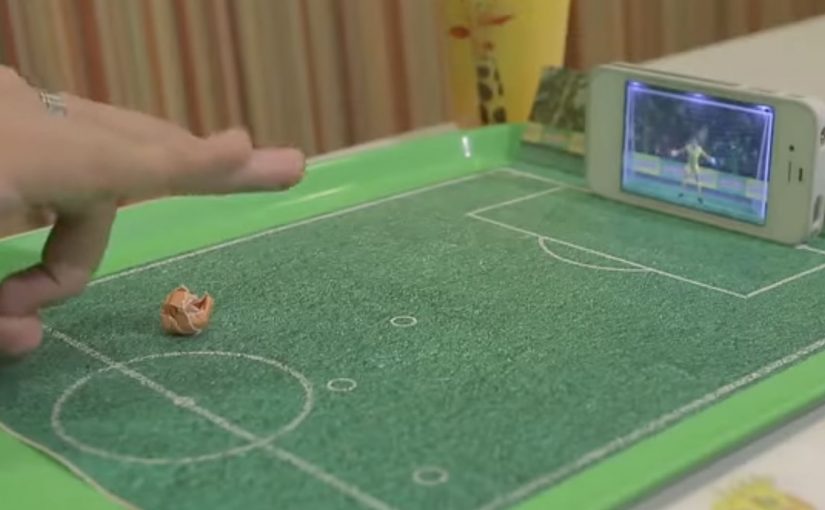
To capitalize on the lead up to the 2014 FIFA World Cup, Brazilian fast food chain Giraffas creates a mobile game that turns their tray papers into a virtual soccer field. To play, consumers rip the side of the paper tray, make a paper ball, and flick it into their mobile screens.
7 million tray papers are printed, and the game is made possible by using the smartphone camera to recognize the ball distance, the accelerometer to identify the trajectory of the kick, and the microphone to recognize the area of impact.
A game that bridges paper and screen
The mechanism is a simple physical ritual, meaning a repeatable action with objects already on the tray, that unlocks a digital experience. The tray liner provides the “pitch”. The paper ball provides the input. The phone turns sensors into a referee, translating distance, direction, and contact into gameplay.
That matters because the tray liner and paper ball remove setup friction, so the leap from noticing the idea to trying it stays almost instant.
In quick-service restaurants, the strongest interactive ideas add value during the waiting and eating moment, without requiring staff training or extra hardware at the counter.
The real question is how little effort a brand can ask of people before play feels easier than ignoring it.
Why it lands
The strongest part of the idea is not the World Cup tie-in. It is the packaging mechanic that makes play feel native to the meal. This works because it turns a disposable surface into a reason to play, and it makes participation feel immediate. It is not “download an app for later”. It is “play right now, with what you already have, while you are here”. The World Cup context supplies motivation, but the in-store simplicity supplies repeatability.
Extractable takeaway: When you want in-the-moment engagement, design a physical trigger that is already in the customer’s hands, then use the phone only as the translator. The fewer steps between curiosity and action, the more people actually try it.
What to borrow from this tray-to-screen mechanic
- Use packaging as the interface. If your brand owns a surface (tray liners, cups, wrappers), it can become the entry point.
- Make the first attempt effortless. Rip, roll, flick. Three verbs. No instructions wall required.
- Exploit phone sensors, not novelty tech. Camera, accelerometer, and microphone are scalable because they are already everywhere.
- Anchor to a cultural moment, but keep it evergreen. The event creates urgency, the mechanic creates habit.
A few fast answers before you act
What is “The Goal Screen” for Giraffas?
It is an in-store mobile game that turns Giraffas tray papers into a virtual soccer field, using a paper ball that customers flick into their phone screen.
Why does the paper tray matter to the experience?
The tray paper acts as the physical “pitch” and the trigger for play, making the game feel native to the restaurant moment.
How does the phone detect the kick?
The setup is described as using the camera for distance, the accelerometer for trajectory, and the microphone for impact area.
What is the marketing objective behind this kind of mechanic?
To make the in-store visit more entertaining and memorable, and to create a reason to interact with the brand during the meal.
What is the transferable lesson for other brands?
Turn a ubiquitous brand touchpoint into a play surface, then use the phone as a lightweight sensor hub that makes the interaction feel “magical” without added hardware.