
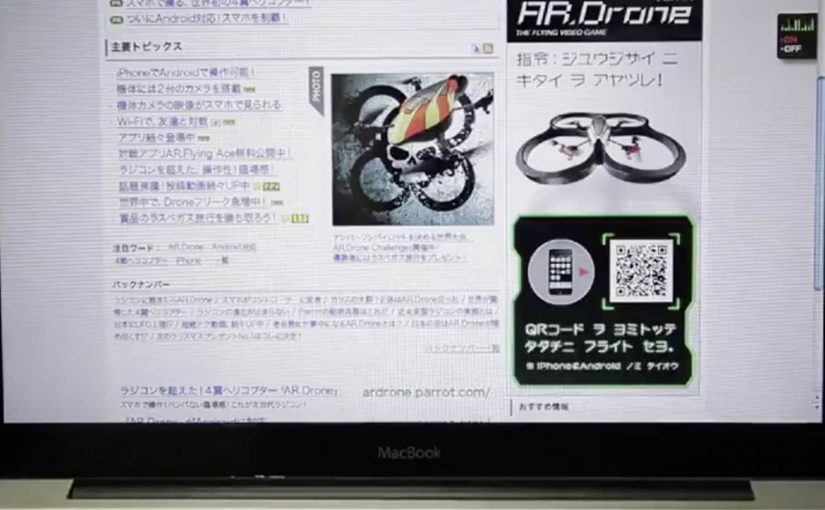
Parrot AR.Drone: The Flying Banner

The Parrot AR.Drone is a quadrotor you can control with an iPhone or iPad. Instead of explaining that in copy, Beacon Communications Tokyo built an interactive web banner that lets people experience the idea.

The banner displays a QR code. Scan it and your phone becomes the controller for a virtual AR.Drone that appears inside the banner. You pilot it around the screen using your smartphone, effectively turning the ad into a small playable product demo.

Why this banner stands out

Most banners talk about what a product can do. This one makes the product behaviour the message. If the AR.Drone is “controlled by your phone,” the ad is controlled by your phone. That direct mapping makes the idea instantly believable. For interface-led products, this is the right pattern: let people try the interface, not read about it.

Extractable takeaway: If your product is an interface, let the audience use that interface inside the ad unit, even in a simplified form.

The mechanic: QR to second screen control

The QR code is not decoration. It is the bridge that turns a passive placement into a two-device experience. Here, “second-screen control” means the desktop shows the scene while the phone acts as the controller. The banner stays on the desktop screen. Control moves to the phone. That split makes the interaction feel closer to the real product, and it also creates a small sense of “this is special” because the ad is no longer self-contained.

In consumer electronics launches, the most persuasive interactive advertising is a playable demo that mirrors the product experience in seconds.

The real question is whether the viewer can feel the core control loop before they decide to care.

How it creates attention without shouting

As described in industry coverage, users could fly the drone around the page and even “blast” parts of the site to reveal the full-screen message. That gives the interaction a purpose and a payoff. It is not just movement. It is progression.

Beacon also reported unusually strong click-through performance compared to typical expectations for the placement. In this case, that makes sense. People do not click because they were interrupted. They click because they were already playing.

Second-screen demo moves to copy

  • Replicate the product, do not describe it. A short, real interaction beats a long explanation.
  • Use one clear bridge between devices. QR works here because it is immediate and simple.
  • Design an obvious payoff. A reveal, a score, a result. Give the interaction a reason.
  • Keep the controls teachable. If people cannot learn it in seconds, the banner loses them.
  • Make it readable for spectators. Movement on the main screen helps others understand what is happening fast.

A few fast answers before you act

What is “The Flying Banner” for Parrot AR.Drone?

It is an interactive web banner where scanning a QR code turns your smartphone into a controller for a virtual AR.Drone that you can pilot inside the banner.

Why is this a stronger demo than a normal video ad?

Because it lets people feel the core promise. Phone-controlled flight, through direct interaction, not description.

What role does the QR code play in the experience?

It is the handoff mechanism from desktop to phone. The desktop shows the “world.” The phone becomes the controller, matching how the real product is used.

What is the biggest risk with multi-device banner ideas?

Drop-off. If the connection step is slow, confusing, or unreliable, most users abandon before they experience the payoff.

How would you modernize this mechanic today?

Keep the principle of second-screen control, but reduce friction. Use a fast connect flow and ensure the experience is still satisfying even if someone chooses not to connect a phone.
Lacta: Love Messages on Real Bars

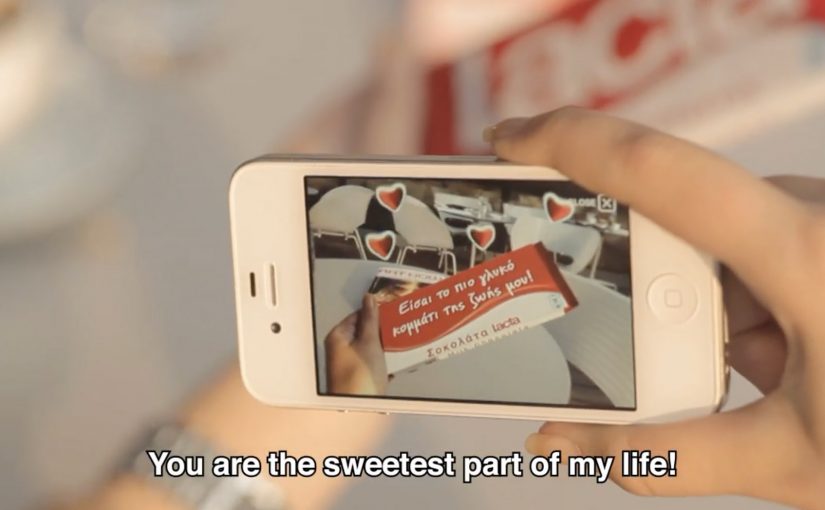
OgilvyOne Athens created another innovative campaign for Lacta Chocolate. This time, people write their own love messages and see them appear on real Lacta bars through an augmented reality mobile app.

The twist is that the message is not “published” online first. It is revealed on the physical product when the receiver scans the wrapper with the app, which turns a simple bar of chocolate into a personalized moment.

Click here to view some of the past Lacta Chocolate campaigns that are equally innovative.

How the AR message reveal works

The mechanism is a clean three-step loop. The sender composes a message in the app and chooses who it is for. The receiver is prompted to use the app too, then scans a Lacta bar to reveal the hidden message in augmented reality. Because the reveal depends on scanning the product, the experience is designed to connect emotion and purchase in the same gesture.

In FMCG gifting categories where love and ritual drive preference, adding a personal reveal layer can create differentiation without changing the core product.

Why it lands

It modernizes a familiar behavior, writing something personal on a gift, without losing the physicality of giving chocolate. The message feels private and earned because it only appears when the recipient holds a real bar in their hands and chooses to reveal it. That makes the brand’s role feel like an enabler of intimacy, not an interruption. That works because the product scan turns anticipation into part of the gift, which makes the interaction feel more meaningful than a standard message.

Extractable takeaway: If you want personalization to drive both attention and sales, tie the reveal to a physical trigger. Make the digital layer unlockable only through the product, so the magic moment and the transaction reinforce each other.

What Lacta is really optimizing for

The real question is how to make personalization pull product demand instead of floating as a nice digital extra.

This is built to turn gifting into repeatable behavior. One person sends a message, another person downloads the app, then the product becomes the key that unlocks the experience. That creates a loop that can scale through relationships rather than through media weight alone.

The strongest strategic choice here is keeping the chocolate bar as the gate to the experience, not just the branded wrapper around it.

What to steal for your own packaging-led digital work

  • Use the pack as the trigger. If the wrapper is the marker, the product stays central.
  • Make the reveal the reward. The moment of discovery is what people remember and retell.
  • Keep the steps simple. Create, send, scan. Anything more complex reduces participation.
  • Design for reciprocity. The best gifting mechanics invite the receiver to respond, not just consume.

A few fast answers before you act

What is the core idea of this Lacta campaign?

An AR mobile app that lets people write a love message that only appears when the recipient scans a real Lacta chocolate bar.

Why does tying the reveal to the physical bar matter?

It keeps the product as the gateway to the experience, so personalization supports purchase rather than replacing it.

What is the main emotional benefit versus a normal digital message?

The message feels more intimate because it is hidden and revealed in a physical moment, not broadcast in a feed.

Why not publish the message online first and then link to the product?

Because that would make the product secondary. Here, the chocolate bar is the access point, so the physical gift remains central to the experience.

What is the biggest execution risk with AR-on-pack ideas?

Friction. If install, scanning, or recognition is unreliable, the magic becomes disappointment. The reveal has to work fast and consistently.