
Vodafone: Buffer Busters AR Monster Hunt

Vodafone: Buffer Busters AR Monster Hunt

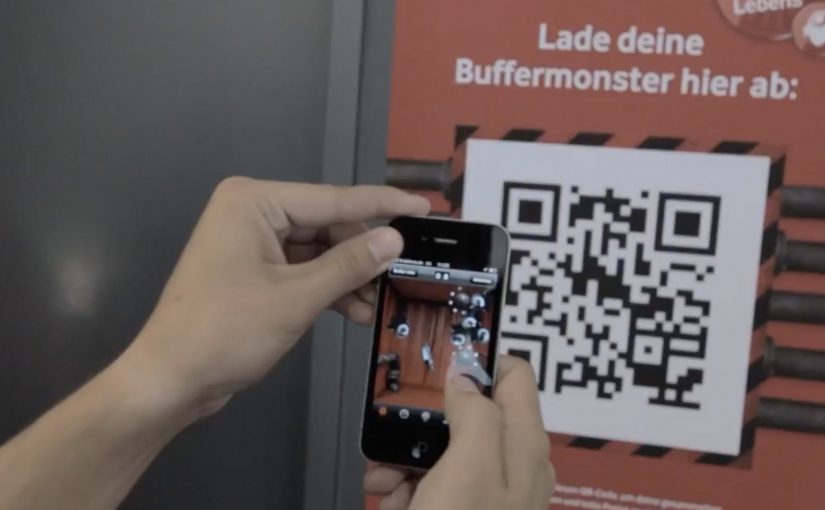
The pitch is familiar: “fastest network.” The execution is not. Vodafone Germany turns the claim into a street-level AR game where your city becomes the arena and “Buffer Monsters” become the enemy.

You walk around with an iPhone or Android smartphone, spot the monsters through the camera view, and capture them. Once you’ve banked 50, you take them to a nearby Vodafone store to “dump” them and keep playing. Top performers compete for a lifetime plan.

Gamified AR is a neat way to convert an abstract network promise into something people can experience with their own movement and time.

Turning buffering into a villain you can catch

The smartest move here is the metaphor. “Buffering” is a universal pain, so the campaign gives it a face, then gives you a job: remove slowness from the streets.

That story does two things at once. It makes the “fast network” positioning emotionally legible. It also creates a reason to keep playing beyond novelty, because the monsters represent a real frustration.

The mechanic: capture loop, then a store-based reset

The gameplay loop is intentionally simple:

  • Discover: find monsters while moving through real locations.
  • Capture: use the phone view to trap them.
  • Capacity cap: collect up to 50 before you hit the limit.
  • Reset in retail: visit a Vodafone store to unload the bank and continue.

The cap is not just game balance. It is the bridge to the business goal: repeat footfall into stores without making the experience feel like a coupon hunt.

In German consumer telecom marketing, a speed claim becomes believable when people can test it with their own time and movement.

The real question is whether you can turn an abstract promise into a repeatable challenge people want to complete and retell.

Why it lands: it makes speed social and competitive

This works because it turns “my network is fast” into a contest people can prove with their own time and movement. Players are not only consuming a message. They are choosing when to play, where to hunt, and how hard to push the leaderboard, which makes the brand message feel earned rather than delivered.

Extractable takeaway: When your promise is hard to verify, build a simple loop that lets people demonstrate it, then let competition and viewer control do the persuasion.

What Vodafone is really optimizing for

On the surface, it is an AR advergame, meaning a branded game built to carry a marketing message through play. Underneath, it is a store traffic engine plus a positioning reinforcer. The store visit is framed as part of the fantasy, so retail becomes a checkpoint, not an interruption.

It is also a clean way to recruit advocates. The people who do best are the ones most likely to talk about it, because the game gives them a score they can brag about.

Steal this capture loop for your next launch

  • Personify the pain point so the product promise has an enemy to defeat.
  • Add a capacity cap to create natural “reset moments” that map to business actions.
  • Make the brand touchpoint a checkpoint, store, event, or partner location, not a forced detour.
  • Design for retell, “I caught 50 monsters and had to dump them at a store” is a complete story.

The TVC supporting the initiative is also well done, and helps explain the mythology quickly for people who never touch the app.


A few fast answers before you act

What is Buffer Busters, in one line?

An AR street game from Vodafone Germany where you hunt “Buffer Monsters” with your phone, then reset your collection by unloading them at Vodafone stores.

Why does the “50 monsters” limit matter?

It creates a loop. Players hit a cap, then have a reason to visit a store to continue, which turns gameplay momentum into retail footfall.

What business problem does this solve beyond awareness?

It converts a network claim into participation, drives repeat store visits, and builds competitive motivation through leaderboards and prizes.

What makes the story-device strong here?

Buffering is a universal frustration. Turning it into a villain gives the “speed” promise a concrete, memorable meaning.

What is the biggest failure mode for AR hunts like this?

Friction. If discovery is unreliable, capture feels inconsistent, or permissions and setup are confusing, people drop before the loop becomes rewarding.
Volkswagen virtual Golf Cabriolet app

Volkswagen virtual Golf Cabriolet app

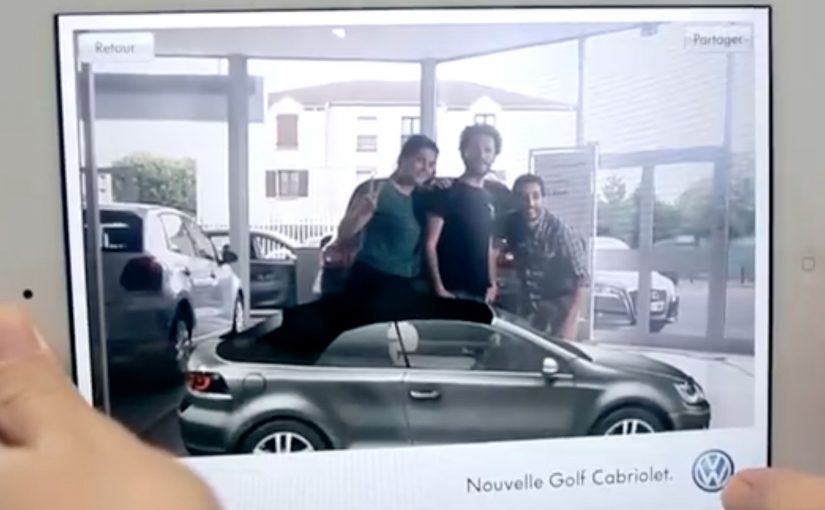
The Golf Cabriolet is back after 9 years of absence, since production was stopped in 2002. Volkswagen together with Paris based agency ‘Agency.V.’ have come up with the worlds first augmented reality car showroom app for the iPad2, iPhone and Android. Here, augmented reality means using the phone or tablet screen as a lightweight showroom for a virtual version of the car.

The app lets you explore the vehicle and play with it’s features like opening the soft-top roof, rotating the car, checking the vehicle’s details, changing the body colour or the style of the rims. You can even take a picture of yourself with the virtual car and share each step of this experience through your social networks.

Why this is a useful AR showroom idea

This is a clean, practical use of augmented reality. It gives people a way to “handle” the car without needing a dealership visit. The experience stays focused on the things people actually want to try first. The roof open and close. The rotation. The color and rim changes. Because the app turns the screen into a hands-on showroom, the product feels easier to explore and share.

Extractable takeaway: AR product demos work best when they compress first-touch exploration into a few obvious actions people already want to try.

In car marketing, that shifts the first product interaction from the dealership to the viewer’s own screen.

What Volkswagen is really demonstrating here

The business intent is not to recreate the full dealership experience. It is to move the first high-interest product interaction into a portable format people can control, personalize, and share.

The real question is whether that kind of lightweight showroom removes enough friction to make early product interest feel immediate and worth passing on.

What to take from this if you are building AR product demos

  1. Prototype “touch” moments first. Opening, rotating, and quick configuration are the behaviors people expect before they care about specs.
  2. Keep the interaction set small and obvious. A few high-intent controls beat a feature dump in early-stage AR.
  3. Make sharing a natural outcome of exploration. A photo-with-the-product moment is a low-friction distribution mechanic.
  4. Use AR to remove the dealership barrier. The value is access and play, not realism for its own sake.

A few fast answers before you act

What is the Volkswagen virtual Golf Cabriolet app?

An augmented reality car showroom app for iPad2, iPhone and Android that lets people explore and customize the Golf Cabriolet.

What can you do inside the app?

Open the soft-top roof, rotate the car, check details, change body colour, change rim styles, and take a photo with the virtual car to share socially.

Who created it with Volkswagen?

Paris based agency ‘Agency.V.’.

Why is this a useful AR showroom idea?

It brings the core product exploration moments onto a personal screen, so people can interact with the car before any dealership visit.

Where could people download it?

From the French iTunes Store for iPhone and iPad 2, and from the Android market for Android devices.

Google Goggles: Translate Text in Photos

Google Goggles: Translate Text in Photos

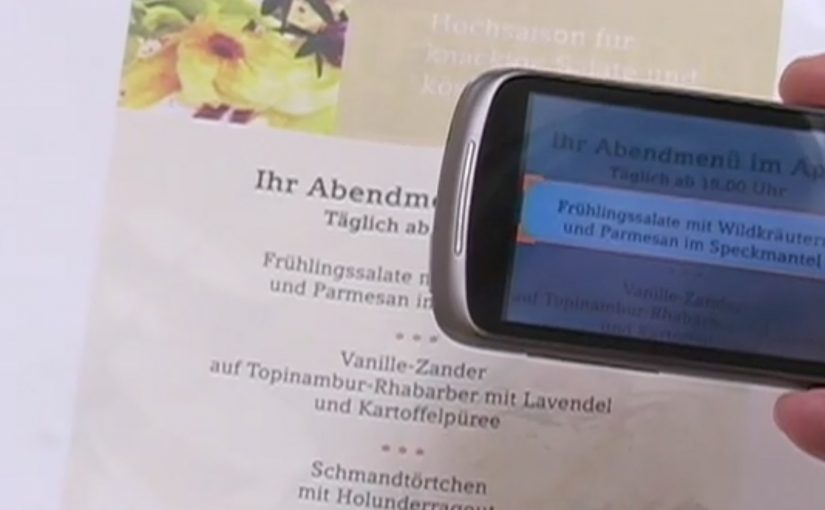
A user takes a photo of text with an Android device, and Google Goggles translates the text in the photo in a fraction of a second.

It uses Google’s machine translation plus image recognition to add a useful layer of context on top of what the camera sees.

Right now, it supports German-to-English translations.

What Google Goggles is really doing here

This is not “just translation.” It is camera-based understanding. The app recognises text inside an image, then runs it through machine translation so the result appears immediately as usable meaning.

In everyday travel and commerce, camera-first translation removes friction at the exact moment that text blocks action. By camera-first translation, I mean pointing a phone at printed text and getting a translated overlay instantly in the same view. Because the result appears in place, people do not have to retype or switch apps, which is why it feels immediate.

In European travel and retail settings, camera-first translation turns printed text into immediate, actionable guidance.

The real question is whether your interface can turn raw capture into meaning without making users switch contexts.

This is the kind of feature worth shipping because it removes friction exactly where action stalls.

Why this matters in everyday moments

If the camera becomes a translator, a lot of friction disappears in situations where text blocks action. Think menus, signs, instructions, tickets, posters, and product labels. The moment you can translate what you see, the environment becomes more navigable.

Extractable takeaway: When you translate what people see in the same view they are already using, you turn blocked moments into forward motion.

The constraint that limits the experience today

Language coverage determines usefulness. At the moment the feature only supports German-to-English, which is a strong proof point but still a narrow slice of what people want in real life.

The obvious next step

I can’t wait to see the day when Google comes up with a real-time voice translation device. At that point, we will never need to learn another language.

What to copy from camera-first translation

  • Remove friction at the moment of intent. Translate or explain text exactly when it blocks action, not after users detour into search.
  • Keep meaning in the same view. Overlay the translation in-place so people stay oriented and do not have to retype or switch contexts.
  • Expand coverage before polishing edges. Language breadth determines usefulness more than UI refinements.

A few fast answers before you act

What does Google Goggles do in this example?

It translates text inside a photo taken from an Android device, using machine translation and image recognition.

How fast is the translation described to be?

It translates the text in a fraction of a second.

Which language pair is supported right now?

German-to-English.

What is the bigger idea behind this feature?

An additional layer of useful context on top of what the camera sees.

What next-step capability is called out?

Real-time voice translation.