
MTV Under The Thumb: second-screen TV for Europe

MTV Under The Thumb: second-screen TV for Europe

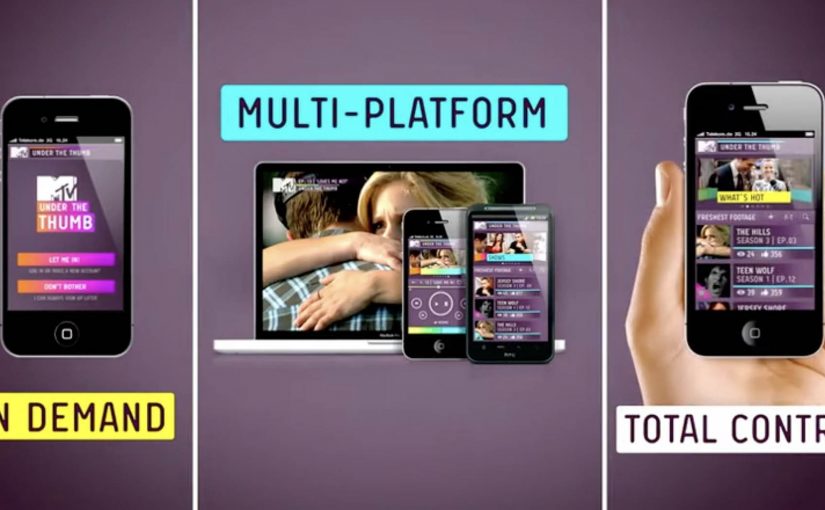
A social TV app that moves with you

MTV’s Under The Thumb is positioned as an interactive platform that changes how Europe’s digital teenagers watch and share entertainment across devices.

One product, three viewing modes

When you’re out and about, MTV shows can be streamed on demand on your phone.

When you’re at home, the app turns into a remote control by pairing with a browser on a PC, laptop, or connected TV, so you can drive playback on a bigger screen from your phone.

When you’re feeling social, it syncs viewing with friends so you can watch the same show and chat together in real time, even when you are in different places.

Why the mechanism is the message

The “platform” claim only holds if the app earns repeat use in different contexts. The real question is whether it becomes a repeatable daily habit, not just a clever demo. Under The Thumb does that by bundling three habits into one interface: portable streaming, at-home viewer control, and co-viewing chat. Here, “second screen” means the phone acts as the controller while video plays on a larger display, and “co-viewing” means friends watch the same content in sync while chatting. That combination turns a media brand into something closer to a routine than a channel. This is a stronger product bet than treating second-screen features as a one-off gimmick.

Extractable takeaway: Under The Thumb combines on-the-go streaming, at-home phone-as-remote viewer control, and real-time co-viewing chat in one app, so the same service stays useful across the day.

In European youth entertainment, the phone is where attention, conversation, and control converge, even when video shifts to a bigger screen.

Launch momentum, before the ads even land

The app is unveiled at the Mobile World Congress in Barcelona. In the launch window, it is described as spreading fast among tech and TV audiences, with download velocity reported as strong even before MTV’s supporting advertising campaign fully kicks in.

For more visit www.mtvunderthethumb.com.

Second-screen patterns worth copying

  • Design for context switching. Keep the same service useful when people move from mobile bursts to a bigger screen at home.
  • Make viewer control the default. Let the phone run playback on the larger display so attention stays on the show, not on setup.
  • Layer in social without breaking flow. Sync co-viewing and chat so conversation stays aligned with what is on screen.

A few fast answers before you act

What is MTV Under The Thumb?

It is a social TV app for MTV that combines on-demand mobile streaming, second-screen remote control for larger displays, and co-viewing with chat.

How does the dual-screen remote feature work?

The phone pairs with a browser on a PC, laptop, or connected TV. Your phone then controls playback on the bigger screen while the service continues to run through the app experience.

What does “co-viewing” mean in this context?

Co-viewing means friends watch the same content at the same time while chatting in-app, with viewing synchronized so the conversation matches the moment on screen.

Why is this a smart move for a youth entertainment brand?

It follows real behavior. People watch in short bursts on mobile, shift to bigger screens at home, and want to talk while they watch. The app is designed to keep MTV present across all three situations.

What should product teams copy from this model?

Design for context switching. Make the same service valuable in multiple moments of the day, and give users clear viewer control plus a lightweight social layer that does not interrupt playback.
LEGO: Life of George

LEGO: Life of George

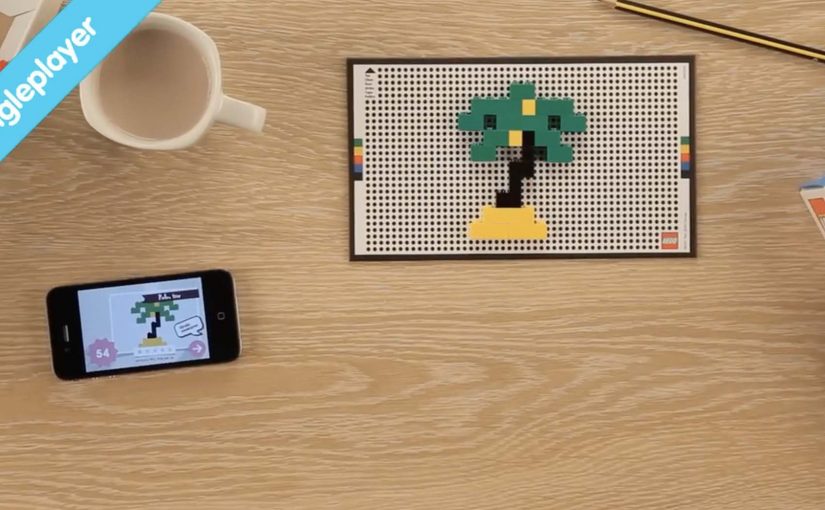
George shows you a photo from his travels and challenges you to rebuild it, fast, using real LEGO bricks. You scramble through a small set, build the scene on a dotted playmat, snap a picture, and the app scores you for speed and accuracy. The game is pretty useful as kids do not need to lug their entire LEGO collection around. While for parents the game helps in teaching counting and hand-eye coordination as you need to find blocks as quickly as possible and then put them together.

It is an exciting time for 12 year olds as they witness the first wave of electronic gaming. Digital-to-physical gameplay. Last year Disney announced a new line of toys called Disney Appmates that worked in tandem with the iPad. Now with “Life of George”, LEGO combines real bricks with an app for iOS and select Android devices.

Definition tightening: Digital-to-physical gameplay uses a screen to set the challenge and validate the outcome, while the actual play happens with real objects in the room.

The mechanic that makes it feel like a “real” game

The loop is clean. The app presents a reference image. You recreate it with 144 pieces. You photograph your build on the dotted playmat. The app reads the build using image recognition, then awards points based on how close you got and how quickly you did it.

In global toy categories where screens compete for attention, hybrid play wins when the device camera becomes a bridge back to hands-on making.

The real question is whether the app uses the screen to replace LEGO play, or to make physical LEGO play faster, clearer, and more replayable.

Why it lands for kids and parents

For kids, the fun is the time pressure and the treasure hunt. Finding the right brick and placing it correctly becomes the challenge, not navigating menus. For parents, the value is that the rules structure the chaos. Counting, pattern matching, and hand-eye coordination are baked into the race.

Extractable takeaway: The strongest digital-to-physical games treat the screen as referee, not as the playground. They keep the “doing” physical, and use the device only to prompt, verify, and reward.

What to steal from this format

  • Make the rules visual. A single reference image beats a paragraph of instructions.
  • Use the camera as validation. Let players “submit” their physical work in one tap.
  • Keep the kit portable. A small curated set can travel, unlike a whole LEGO tub.
  • Reward speed and accuracy. Those two levers create replay without adding complexity.

A few fast answers before you act

What is LEGO Life of George?

A hybrid LEGO game where the app shows a picture challenge, you rebuild it with real bricks on a playmat, and the app scores your photo using brick recognition.

What is the core mechanism?

Prompt with an image. Build physically. Photograph on a patterned play surface. Use computer vision to validate and score speed and accuracy.

Why does the dotted playmat matter?

It standardizes the photo capture so the app can recognize scale and placement more reliably, which makes scoring feel fair.

What is the main benefit versus classic LEGO play?

Structure and portability. A small set plus timed challenges creates a “game” you can play anywhere without carrying a full collection.

What is the most reusable lesson for digital-to-physical products?

Use the device to create clear prompts and instant feedback, but keep the core activity tangible and social in the real world.

Augmented Reality: Hyperlinking the real world

Augmented Reality: Hyperlinking the real world

A French company called Capturio turns a t-shirt into a business card. You point your phone at what someone is wearing, and the “link” is the fabric itself. No QR code required.

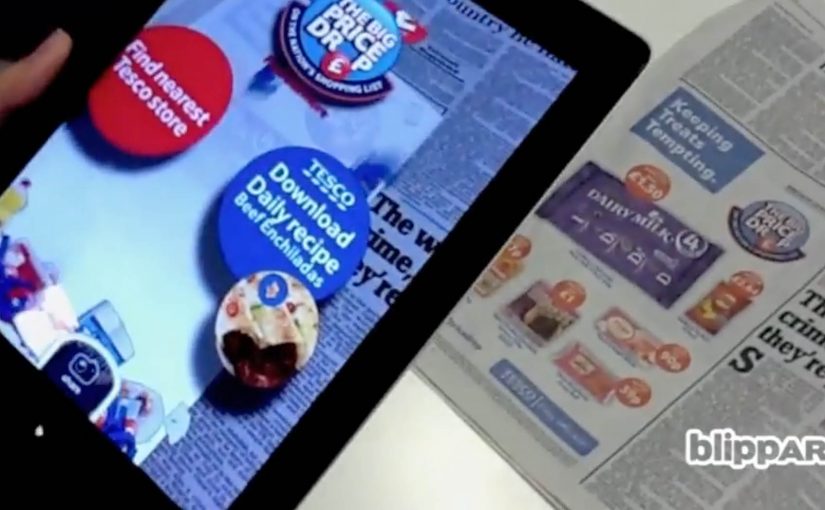
Right after that, Blippar in the UK takes the same idea to printed images. A newspaper page, poster, or pack becomes the trigger. The result is a 3D augmented reality overlay that appears on-screen the moment the image is recognised. Again, no QR code.

From visible codes to recognition triggers

QR codes get put to good use in countless innovative projects. But the drift is towards technology that produces similar results without visible codes. QR codes are not “dead”. Recognition-based triggers win whenever you can control the surface and want the interaction to feel seamless.

How “invisible links” work in practice

Capturio’s concept is simple. The physical object becomes the identifier. A t-shirt behaves like a clickable surface in the real world.

Blippar applies the same pattern to print. Image recognition here means matching what the camera sees to a known reference image so the system can anchor content to that surface.

The interaction is straightforward:

  1. Download a custom app, in this case the Blippar app.
  2. Scan a Blippar-enabled printed image, identifiable by a small Blippar logo, using an iPhone, iPad, or Android device.
  3. Start interacting with the augmented reality 3D overlay on the screen.

In India, Telibrahma uses the same approach to increase experiential engagement for brands via traditional media like newspapers and posters.

In consumer marketing and retail environments, this pattern turns owned surfaces into low-friction entry points for digital experiences.

Why recognition beats visible codes

A visible code is a visual tax. It signals “scan me”, but it also interrupts design and can feel bolted-on. When the surface itself becomes the trigger, the mechanism and the message align. The scan feels like discovery, not compliance. That mechanism is exactly why this pattern tends to spread once teams see it work in the wild.

Extractable takeaway: If you want people to scan, remove the decision point. Make the object itself the identifier, and make the reward immediate.

The bigger idea is not the novelty of 3D overlays. It is that physical surfaces become links. Clothing, posters, newspaper pages, packaging, storefronts. Anything that can be recognised can behave like a gateway to content, commerce, or interaction.

What this unlocks for brands

This is useful when you need a bridge from “attention” to “action” without adding friction. It can turn traditional media into a gateway for:

  • Content. Rich product stories, demos, or tutorials that do not fit on-pack or on-page.
  • Commerce. A route into product detail and purchase flows from packaging or print.
  • Interactivity. Lightweight games, utilities, or experiences that create repeat engagement.

What to steal for your next activation

  • Pick a surface you own. Packaging, print, or wearable assets work best when distribution is in your control.
  • Make the trigger legible. Even without a QR code, users need an affordance like a small mark, instruction, or demo.
  • Design the “first 5 seconds”. Recognition must lead to an immediate payoff, or people will not try twice.
  • Decide what success means. Share, sign-up, repeat use, or store visit. Do not ship without one primary metric.

A few fast answers before you act

What does “hyperlinking the real world” mean here?

It means using image recognition and augmented reality so physical objects like shirts, posters, and print behave like clickable links without QR codes.

Which companies are the concrete examples in this post?

Capturio (France), Blippar (UK), and Telibrahma (India).

How does Blippar work at a high level?

Download the app, scan a Blippar-enabled image marked with a small Blippar logo, then interact with a 3D AR overlay on-screen.

Is this actually “the end” of QR codes?

No. QR codes remain useful. But recognition-based triggers are often preferred when you want the surface to stay clean and the interaction to feel seamless.

What types of media does this apply to?

Newspapers, posters, packaging, and other printed or visual surfaces that can be reliably recognised by a camera.

What should you measure first if you try this?

Start with activation rate, meaning how many people who see the surface actually trigger the experience. Then track the next action, such as shares, sign-ups, or clicks into commerce.