
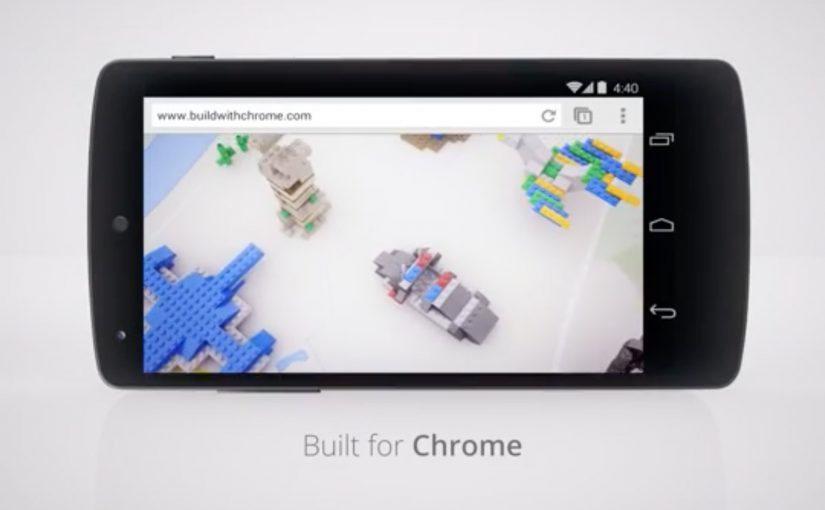
Build with Chrome: LEGO Chrome Experiment

Google earlier this week released their latest Chrome Experiment in partnership with LEGO called “Build with Chrome”.

Now anybody who visits www.buildwithchrome.com via their Chrome browser can use their mouse or touchscreen to build something out of the virtual LEGO bricks and share them directly on Google+.

Why this is a smart Chrome Experiment

This is a simple product demonstration disguised as play. It shows off what the browser can do by putting it in service of something people already understand. Building with LEGO.

  • Low learning curve. If you can drag and drop, you can participate.
  • Touch-ready by design. Mouse and touchscreen both make sense for “building”.
  • Social distribution baked in. Sharing is part of the experience, not an afterthought.

What to take from this if you are building interactive brand work

  1. Make the capability tangible. Don’t explain performance. Let people feel it.
  2. Choose a familiar metaphor. Familiar mechanics reduce friction and increase time spent.
  3. Design sharing as a natural next step. If the output is personal, people want to show it.
  4. Keep the experience single-purpose. One clear activity beats a feature kitchen sink.

A few fast answers before you act

What is “Build with Chrome”?

It is a Google Chrome Experiment built with LEGO that lets people create virtual LEGO models in the browser using a mouse or touchscreen, then share them online.

Why partner with LEGO?

Because LEGO is an instantly understood building system. It makes the digital interaction feel intuitive, playful, and worth sharing.

What is the core marketing mechanic here?

Hands-on participation. The experience turns a browser capability into a personal creation that people can publish socially.

What makes a Chrome Experiment effective?

It demonstrates a technology through an interaction people enjoy, without requiring explanation, and it encourages sharing through an output people feel ownership of.

What is the transferable lesson for digital teams?

If you want people to remember a platform capability, wrap it in a simple activity that creates something personal and shareable.

Augmented toys and games from Toy Fair 2013

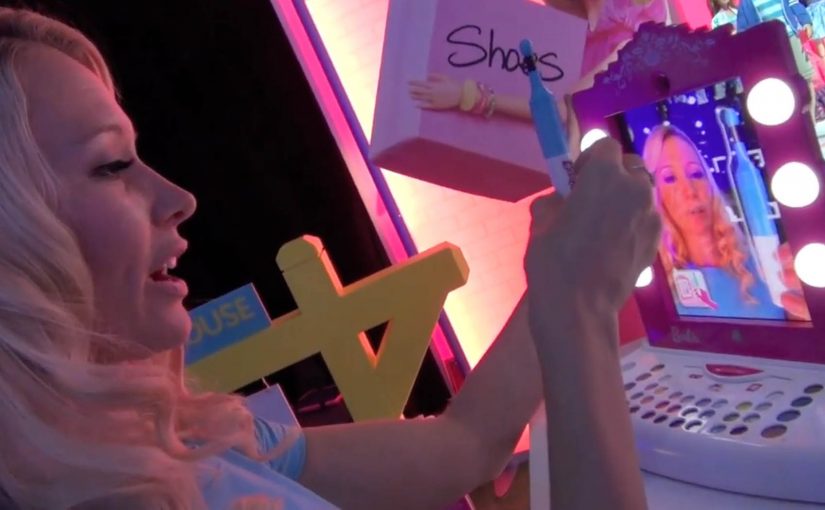
A Barbie vanity frame turns an iPad into a make-up mirror, then “virtual lipstick” stays aligned to a moving face in real time. That single mechanic explains why Toy Fair in New York suddenly feels like a preview of hybrid play, where the screen becomes a window and the physical object remains the star.

Most of the standout demos share the same blueprint. A physical toy, book, or playset provides the anchor. The iPad app provides the content layer. The camera feed stitches the two together so kids can touch, move, build, and explore while the digital layer reacts.

In consumer product innovation, the most scalable mixed reality experiences treat the device as a lens onto the room, not the destination.

Augmented reality (AR) toys are physical products that use a phone or tablet camera to overlay digital characters, effects, or instructions onto the real-world toy. The toy stays central. The app adds feedback, rules, and story without replacing hands-on play.

Why these “phygital” toys land

Parents get a familiar promise. Less passive viewing and more active play. Kids get something that feels like magic because it responds to the real world, not just taps on glass.

From a design perspective, the winning pattern is low-friction onboarding and immediate payoff. Put the device in the frame, scan the page, point at the ball, then something delightful happens fast.

The Toy Fair shortlist

Barbie Digital Makeover Mirror

Lets kids try out make up while avoiding all the mess. The iPad camera tracks a face in real time so the “makeover” sticks as the head moves.

Mattel Disney Princess Ultimate Dream Castle

Billed as a first mass-market doll house to support augmented reality, with app-triggered activities layered onto the physical rooms.

Popar 3D Books

A line of children’s books that use AR to make pages “come alive” with virtual 3D objects and animations that appear to pop off the paper.

Sphero Ball and Sharky the Beaver

Billed as the first app ever to let you take a virtual 3D character for a walk around your house. The physical ball becomes the anchor for an on-screen creature you “walk” around the room.

Imaginext Apptivity Fortress

Combines playset and app play in one, with the iPad physically inserted into the fortress so the device becomes part of the toy and the adventures unfold around it.

NeuroSky

Brain waves control furry ears.

Lego Mindstorms EV3

User-created robots that can be controlled by various sensors and smartphones.

Cubelets

Magnetic blocks that snap together to make an endless variety of robots with no programming and no wires. The “logic” is in how you combine the cubes.

Sifteo Cubes

A magical interactive game system built on the timeless play patterns of LEGO, building blocks, and domino tiles, but with screens and sensors inside each cube.

What to steal if you are designing interactive products

  • Make the physical object the controller. When hands are busy, attention stays in the room.
  • Design for instant delight. The first 10 seconds should prove the concept without instructions.
  • Use the camera as a sensor. Anchors, markers, and recognizable shapes are a simple bridge between atoms and pixels.
  • Plan for replay. New levels, new stories, and collectible content keep the “magic” from wearing off after day one.

A few fast answers before you act

What is an AR toy in simple terms?

An AR toy is a physical toy, book, or playset that becomes more interactive when viewed through a phone or tablet. The camera feed shows the real object, and the app overlays digital characters, effects, or instructions on top.

Do these experiences replace “screen time”?

Not really. They redirect it. The screen becomes a lens onto physical play, so the child is moving, building, and exploring while the digital layer reacts.

What is the most repeatable pattern across the examples?

A physical anchor plus an app-based content layer. The physical piece gives tactile play and structure. The app provides animation, rules, progression, and feedback.

What should a brand learn from this wave of toy innovation?

Interactivity scales when the physical product is useful on its own, and the digital layer adds meaning rather than acting as a required destination. The best experiences feel like an upgrade, not a dependency.

What is a common failure mode for “phygital” concepts?

Too much setup and too little payoff. If the experience needs long instructions, special lighting, or frequent recalibration, the magic breaks fast and replay drops.

LEGO: Happy Holiplay

Holiday attention built from imagination

In global consumer brands with strong fan communities, the most effective holiday campaigns often turn the audience into the media. LEGO’s execution is a clean example of that approach.

To create positive attention around the LEGO brand, a global digital social campaign challenged people to take their imagination with the well known LEGO bricks one step further and share the results via digital media.

The campaign was dubbed Happy Holiplay and was run for three weeks. LEGO fans from 119 countries participated actively and uploaded pictures to www.happyholiplay.lego.com.

How Happy Holiplay worked in practice

The mechanism was community-powered. LEGO provided a clear prompt and a simple submission behavior. Build something imaginative with bricks, capture it, and share it digitally.

The campaign site acted as the collection point. The internet did the distribution. Every upload became both participation and promotion.

Why it landed for a global fan base

LEGO was naturally suited to participatory storytelling. The product already trained people to invent, remix, and share. Happy Holiplay did not try to manufacture behavior. It amplified what the community already loved doing.

The holiday timing mattered too. December is a period when people are already in “make and share” mode, and when families have more reasons to create together.

The business intent behind Happy Holiplay

The goal was to generate positive brand attention during a competitive seasonal window by turning the community into the main media channel.

Rather than paying for attention, LEGO earned it by creating a platform for fan creativity, and by making participation feel like a celebration instead of a promotion.

What to steal for your next social campaign

  • Use a behavior that is already native to the brand. If the audience already creates, design the campaign around creation.
  • Keep the action simple. Build, capture, share. Low friction increases global participation.
  • Give the community a home base. A clear destination makes participation feel official and collectible.
  • Let contributors be the content engine. UGC scales faster than brand-made assets when the prompt is right.

A few fast answers before you act

What was LEGO’s Happy Holiplay?

A global digital social campaign in December 2012 that invited fans to create imaginative LEGO builds and share them online.

How long did the campaign run?

It was run for three weeks.

How many countries participated?

LEGO fans from 119 countries took part and uploaded pictures to the campaign site.

Why did the campaign work so well for LEGO?

Because it amplified a natural LEGO behavior. Building and sharing creations. It aligned with the community’s existing motivations.

What is the key takeaway for other brands?

Design participation around an audience behavior you already own, then make sharing simple enough to scale globally.