
Coca-Cola: FM Magazine Amplifier

Coca-Cola: FM Magazine Amplifier

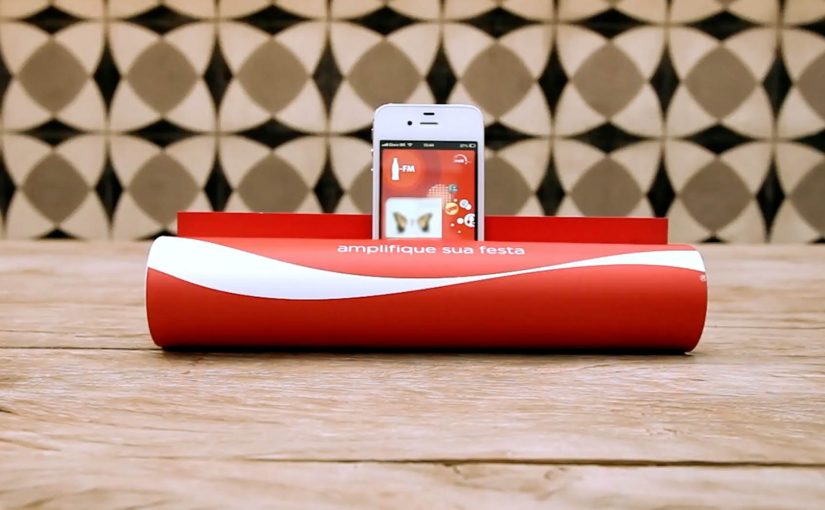
Coca-Cola to promote its FM app in Brazil allowed readers of the Capricho magazine to simply roll up the magazine and transform it into a portable amplifier for their iPhones. All the readers had to do was insert the iPhone into the spot indicated and tune into the Coca-Cola FM application. By “portable amplifier” here, I mean passive acoustic amplification from rolled paper, not electronics.

Why this is clever

The idea turns print into a functional accessory. No electronics. No QR-code dependency. Just smart physical design that rewards curiosity and makes the app the natural next step. Because the rolled magazine forms a simple acoustic horn, it directs the phone’s speaker output and makes the sound feel louder right away.

Extractable takeaway: When a piece of media becomes a working object, the “ad” turns into a demo and the digital step feels inevitable.

  • One simple action. Roll the magazine, insert the iPhone, hit play.
  • Instant utility. Louder sound is a real, immediate benefit.
  • Media becomes product. The magazine is not only a channel. It is the device.

In global consumer brands, analog-to-mobile bridges like this help when you need an obvious path into an app without adding new tech.

What to learn from it

This is a strong reminder that “mobile activation” does not always need a screen-first mechanic. When you can create a physical trigger that is obvious and satisfying, you reduce friction and increase shareability. People demonstrate it to others because it is surprising, and because it works.

The real question is how to make the next mobile step feel like a continuation of what people are already doing in the moment.

The strongest activations put physical utility first and let the app be the immediate follow-on.

  • Start with utility. Give people a benefit they can feel instantly, then invite the app as the next step.
  • Design one obvious move. Keep the interaction to a single action people can copy and demonstrate.
  • Make it easy to show. If it reliably “works”, people will hand it to someone else and replay the moment.

A few fast answers before you act

What is the Coca-Cola FM Magazine Amplifier?

It is a Capricho magazine execution in Brazil designed to be rolled into a tube that passively amplifies iPhone audio, used to promote the Coca-Cola FM app.

Why does a paper amplifier work at all?

The rolled shape acts like a simple acoustic horn, directing and concentrating the phone’s speaker output so it sounds louder.

What makes this effective as an app promotion?

The app is not advertised as a feature list. It is experienced. The physical utility creates a reason to open the app immediately.

What is the transferable pattern?

Turn media into a usable object, then connect that object to a single, obvious mobile behavior that completes the experience.
Lexus GS: NFC-Enabled Print Ad in WIRED

Lexus GS: NFC-Enabled Print Ad in WIRED

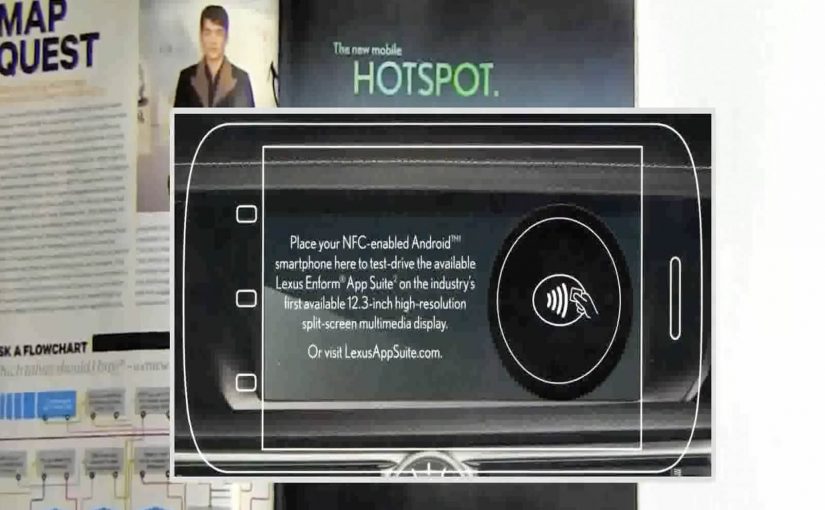
A print ad sits inside WIRED, but it behaves like a link. Hold an NFC-enabled phone (NFC is short for near-field communication) to the page and a Lexus GS demo opens on your device, without scanning a code or typing a URL.

Brands like Mercedes Benz, Reporters Without Borders, Volkswagen etc have all been working hard to create clutter breaking and engaging print ads.

In this latest example of an interactive print ad, WIRED magazine and Lexus have teamed up to create what they describe as the first mass-produced print ad embedded with an NFC tag. The ad, reported as appearing in 500,000 subscriber copies of WIRED’s April issue, lets readers with NFC-enabled phones access a demo of the Lexus GS 2013’s Enform App Suite simply by holding their phone up to the ad.

A tap replaces the scan

The mechanism is straightforward. An NFC tag is embedded into the page, and the phone reads it when placed close to the printed area. That single “tap” launches a mobile experience that can demonstrate features and apps without requiring camera alignment or extra steps. Because the tap collapses multiple steps into one, the handoff feels effortless.

In global publishing and automotive marketing, bridging print to mobile works best when the handoff is faster than habit, and simple enough to do without thinking.

Why this matters for print innovation

Most interactive print relies on behavior people already associate with effort, like scanning codes or typing. NFC flips that. The interaction feels like “just place phone here”, which is closer to natural curiosity than task completion.

Extractable takeaway: NFC works in print when it replaces effort with instinct. Design the handoff as a single tap that proves value immediately.

Definition-tightening: NFC tags in print are typically passive. The page is not powered. The phone provides the energy and reads a short payload that triggers a destination on the device.

What Lexus is really buying

This is a modern product story told through a legacy medium. The GS positioning leans into connected experiences, so demonstrating an app suite through a connected print interaction reinforces the message at the exact moment of discovery.

The real question is whether the tap reinforces the product promise at the moment of discovery.

Steal this pattern for interactive print

  • Design for one gesture. If it takes more than a tap, many readers will not try.
  • Reward instantly. The first screen after the tap should feel like a payoff, not a loading screen.
  • Make the print do real work. Print should provide context and desire. Mobile should provide depth and demonstration.
  • Plan for non-NFC readers. If the print idea relies on a capability not everyone has, ensure there is still a clear alternate path.

A few fast answers before you act

What makes this WIRED ad “interactive”?

The page contains an embedded NFC tag. Tapping an NFC-enabled phone to the ad launches a Lexus GS mobile demo experience.

Why use NFC instead of a QR code?

NFC removes the camera step. A tap is faster and tends to feel easier than scanning, which can increase participation.

Do you need a special app to use an NFC print ad?

Typically no. If NFC is enabled, the phone reads the tag and opens the linked mobile experience using standard system behavior.

What is the key benefit for the advertiser?

A lower-friction bridge from print attention to a measurable digital demo, without breaking the reading flow as aggressively as “go type this URL”.

What is the biggest execution risk?

Compatibility and clarity. If readers do not have NFC, or do not understand where to tap, the interaction collapses back into a normal print ad.

Interactive iPad ads: five touch-first patterns

Interactive iPad ads: five touch-first patterns

New research from the IAB has shown that when it comes to advertising on tablets, interactivity is the key. And once you look at what the best iPad units are doing, that conclusion makes intuitive sense.

Take Microsoft’s iAd for Windows Azure. Instead of explaining “code in the cloud,” it lets you touch and change code inside the ad, and the layout responds. That is the core pattern for tablet advertising. Don’t describe the value. Let the reader experience it in seconds.

On tablets, display works best when the ad behaves like a small piece of product UI rather than a static interruption.

The IAB point, translated into creative

If your audience is holding a touchscreen, your ad has an extra superpower. Touch-first is the creative posture where the first meaningful thing the unit asks for is a gesture, and the response delivers the point. Drag, swipe, tap, reveal, simulate. The objective is not “more features.” It is to earn attention by giving the user a simple action and an immediate payoff. Because the payoff is immediate, the value lands without needing a paragraph of claims.

Extractable takeaway: On tablets, design the first gesture so it proves one promise immediately, then let everything else be optional.

In tablet-heavy retail and media environments, the strongest units turn touch into a tiny product moment that pays off in seconds.

The real question is whether your tablet creative proves the promise through a single gesture, or just says it in copy.

Interactivity should be the default assumption for tablet display, not a bonus layer.

Five iPad ad interactions worth stealing

White Collar

As a simple use of touchscreen behaviour, users solve a puzzle by dragging an icon across the screen to locate answers to questions displayed in the banner. It’s lightweight, but it turns a passive placement into an active moment.

Volkswagen Park Assist

To experience the Volkswagen Tiguan’s Park Assist, users touch two targets on the screen. The car then reverses and parks itself between those targets. A feature demo becomes a two-tap “proof” moment.

Visa Signature

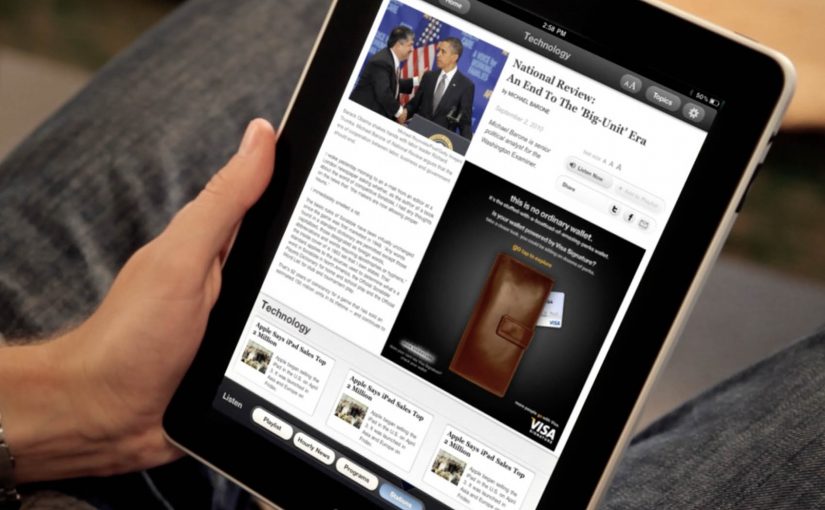
Built in HTML5, the ad presents a virtual wallet that lets users browse and plan a holiday, buy theatre or cinema tickets, or reserve a hotel. It behaves like a mini service experience rather than an ad.

Toyota

Using the slogan “Filled with People,” the ad lets users drag a slider to watch an unfinished Toyota move through the factory floor while it is assembled. The interaction makes the narrative feel earned, not narrated.

Microsoft

Microsoft wanted developers to understand that Windows Azure allows code to be created in the cloud. So they built an iAd that lets readers alter its code, which in turn changes the layout. It’s a direct translation of message into mechanism.

What these examples have in common

  • One obvious gesture. Drag, tap, swipe. No tutorial needed.
  • Fast payoff. The response is immediate, so the user feels in control.
  • Feature-as-experience. Parking, planning, building, assembling. The “meaning” is in the interaction.
  • Tablet-native pacing. These units assume longer attention than mobile banners and reward it.

Touch-first moves to reuse in your next tablet ad

  • Make the first interaction the headline. The opening instruction should be one short verb. “Drag.” “Tap.” “Swipe.”
  • Use interactivity to prove one point. Pick one promise and build one satisfying micro-demo around it.
  • Design for fat-finger reality. Targets must be generous. Feedback must be unmistakable.
  • Keep exits graceful. If someone watches but doesn’t interact, the unit should still communicate the core idea.

A few fast answers before you act

Why does interactivity matter more on tablets than on desktop banners?

Because touch is the native input. When an ad uses the same gestures as the device, it feels more like content and less like a bolt-on placement.

What’s the simplest “interactive” pattern that still works?

A single drag or tap that reveals something meaningful. A before/after, a quick feature demo, or a short guided reveal with instant feedback.

What’s the most common way interactive tablet ads fail?

Too much complexity. Multiple steps, unclear targets, or slow loading kills the moment before the user gets a reward.

Do interactive ads always beat static ads?

No. Interactivity helps when it makes the message easier to understand or more satisfying to experience. If it’s interaction for its own sake, it becomes friction.

How do you decide whether a tablet idea should be a “mini app” like Visa’s example?

Only do it when the brand’s value is in navigation and choice. If you need users to explore options, then a mini UI can be the product story. Otherwise, a single micro-demo is usually stronger.