
Ford C-Max Augmented Reality

A shopper walks past a JCDecaux Innovate mall “six-sheet” screen (poster-format) and stops. Instead of watching a looped video, they raise their hands and the Ford Grand C-MAX responds. They spin the car 360 degrees, open the doors, fold the seats flat, and flip through feature demos like Active Park Assist. No printed marker. No “scan this” prompt. Just gesture and immediate feedback.

What makes this outdoor AR execution different

This is where augmented reality in advertising moves from a cool, branded desktop experience to a marker-less, educational interaction in public space. Marker-less here means the experience does not need a printed marker or “scan this” prompt to start. The campaign, created by Ogilvy & Mather with London production partner Grand Visual, runs on JCDecaux Innovate’s mall digital screens in UK shopping centres and invites passers-by to explore the product, not just admire it.

The interaction model, in plain terms

Instead of asking people to download an app or scan a code, the screen behaves like a “walk-up showroom.”

  • Hands up. The interface recognises the user and their gestures.
  • Virtual buttons. On-screen controls let people change colour, open doors, fold seats, rotate the car, and trigger feature demos.
  • Learning by doing. The experience is less about spectacle and more about understanding what the 7-seat Grand C-MAX offers in a few seconds.

How the marker-less AR works here

The technical leap is the move away from printed markers or symbols as the anchor for interaction. The interface is based on natural movement and hand gestures, so any passer-by can start immediately without instructions.

Under the hood, a Panasonic D-Imager camera measures real-time spatial depth, and Inition’s augmented reality software merges the live footage with a 3D, photo-real model of the Grand C-MAX on screen.

Because the interface responds to natural hand movement, the interaction starts without instruction and keeps the focus on learning the product, not learning the UI.

In retail and out-of-home environments, interactive screens win when they eliminate setup friction and teach the product in seconds.

The real question is whether your outdoor screen is a passive impression machine or a walk-up product experience that teaches in under 30 seconds.

Why this matters for outdoor digital

If you care about outdoor and retail-media screens as more than “digital posters,” this is a strong pattern. This pattern is worth copying: design for viewer control and fast product education, not just looping impressions.

Extractable takeaway: Remove setup friction first, then use a small set of high-value interactions to teach one product truth quickly.

  • Lower friction beats novelty. The magic is not AR itself. The magic is that the user does not need to learn anything first.
  • Gesture makes the screen feel “alive.” The moment the passer-by sees the car respond, the display stops being media and becomes a product interface.
  • Education scales in public space. Showing how seats fold, how doors open, or what a feature demo looks like is hard to compress into a static ad. Interaction solves that.

Practical takeaways if you want to build something like this

  • Design for instant comprehension. Assume 3 seconds of attention before you earn more. Lead with one obvious gesture and one obvious payoff.
  • Keep the control set small. Colour, rotate, open, fold. A few high-value actions beat a deep menu.
  • Treat it like product UX, not campaign UX. The success metric is “did I understand the car better,” not “did I watch longer.”
  • Instrument it. Track starts, completions, feature selections, and drop-offs. Outdoor can behave like a funnel if you design it that way.

A few fast answers before you act

What is the core innovation here?

Marker-less, gesture-driven AR on mall digital screens that lets passers-by explore product features without scanning a code or using a printed marker.

What does the user actually do?

They raise their hands to start, then use on-screen controls to change colour, open doors, fold seats, rotate the car, and trigger feature demos like Active Park Assist.

What technology enables it?

A depth-imaging camera measures real-time spatial depth, and AR software merges live footage with a 3D model of the vehicle.

Why does “marker-less” matter in public spaces?

Because it removes setup friction. Anyone walking by can immediately interact through natural movement and gestures.

What should you measure to know it worked?

Track starts, completions, feature selections, and drop-offs so you can see which interactions people choose and where they bail out.

Yellow Pages: Location Based Banner

Here is the next generation of interactive web banners. Tel Aviv agency Shalmor Avnon Amichay/Y&R promoted the Yellow Pages augmented reality location-based app by creating a banner that does the same thing. Here “location-based” means it surfaces nearby businesses based on where you are.

The banner opens your webcam and lets you see the businesses around you. Wave your hand to switch between businesses. Click a business to jump straight to its Yellow Pages listing.

A banner that behaves like the product

The clever part is that this is not “interactive” for decoration. It is a working demo of the core value proposition. If the app helps you find what is near you, the banner proves that promise immediately, inside the placement, without asking you to imagine anything. Utility products should be advertised by demonstrating usefulness, not by describing features.

The mechanic: webcam as context, hand wave as UI

The flow is intentionally simple. Turn on the camera. Overlay nearby business options. Use a wave to move through results. Use a click to convert curiosity into action via the listing page.

In local discovery experiences, the strongest persuasion is a live, context-matched preview of usefulness rather than a feature claim.

Why it lands: it removes the “so what” gap

Most directory and local-search advertising dies in the space between promise and proof. The real question is whether your ad can turn a promise into proof without leaving the page. This banner collapses that gap, because it starts with your own context, then shows results, then lets you act. The interaction is the explanation.

Extractable takeaway: The fastest way to make a utility app feel essential is to let people experience the “aha” moment before they ever leave the page they are on.

What Yellow Pages is really trying to achieve

The business intent is to reposition Yellow Pages as modern, digital, and situationally useful, not just a legacy directory brand. The banner also creates a clear performance path. Engagement inside the unit, then click-out to a listing that can drive calls, visits, or follow-on app consideration.

Steal the demo-first local discovery pattern

  • Mirror the product in the ad. If the product is a tool, make the ad behave like the tool.
  • Use one gesture people understand. A wave as “next” is instantly legible. No tutorial needed.
  • Keep the ladder of commitment short. Preview. Browse. Click through. No extra steps.
  • Make the experience readable for bystanders. Obvious motion plus clear on-screen change sells the mechanic in shared environments.
  • Watch privacy optics. If you turn on a camera, be explicit that it is for interaction and context, not identification.

A few fast answers before you act

What is a “location based banner”?

It is a banner ad that adapts its content to the user’s situation, typically location or environment cues, so the ad can show relevant nearby options instead of generic messaging.

How does this Yellow Pages banner work?

It opens a webcam view, overlays nearby business options, lets you wave to cycle through businesses, and lets you click a result to open the corresponding Yellow Pages listing.

Why use a webcam at all?

Because it makes the experience feel immediate and personal. The ad becomes a live “finder” interface rather than a static claim about finding things.

What makes gesture-controlled banners risky?

Friction and variability. If the gesture detection fails or is unclear, users assume the ad is broken. The interaction must be forgiving and the feedback must be instant.

What is the safest way to replicate the idea today?

Keep the mechanic to one simple input, provide clear on-screen feedback, and ensure the user can still get value even if they do not enable the camera.

Augmented Reality Calendar by Audi

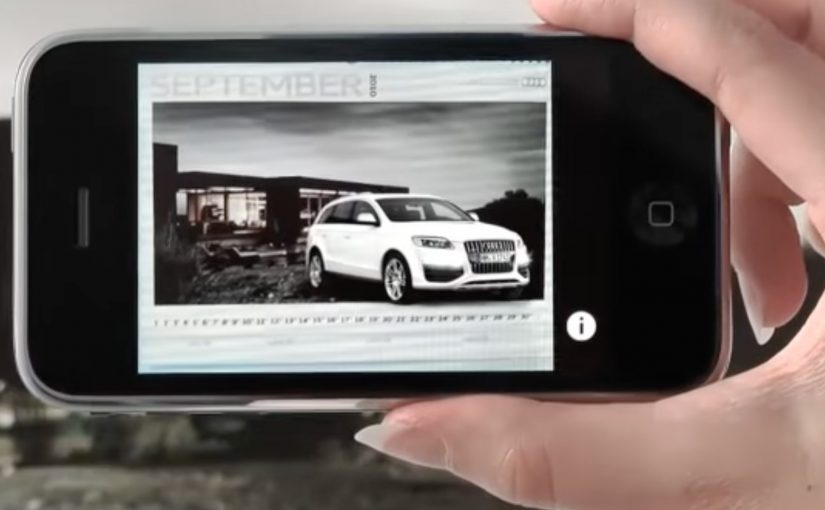
An Audi calendar arrives and it looks almost wrong. Each month is a beautiful landscape, with a deliberate empty space and no car in sight. You open Audi’s iPhone app, point the camera at the page, and the missing piece appears. An Audi A1 fills the blank area in augmented reality, sitting inside the printed scene as if it belongs there. Here, augmented reality means the app renders a 3D car model aligned to the printed page.

The idea. A car calendar without cars

Audi takes a familiar format. The premium calendar. Then it removes the expected hero asset. The car. The calendar becomes an invitation to discover, not a static brand object.

The real question is how to make a physical brand object earn interaction without adding friction.

How it works. Print as trigger, iPhone as lens

  • The printed calendar pages feature landscapes and intentional negative space.
  • People download and open the dedicated Audi iPhone app.
  • They point the phone’s camera at the calendar page.
  • The app overlays a car into the empty area, turning the page into a live scene.

The interaction is simple, but the effect is surprising because it uses a physical artifact as the interface. The calendar is not just content. It is the marker that activates the experience. Because the page is the trigger, the reveal feels like it belongs to the object, not like a separate digital stunt.

In brand marketing, the hardest part of physical brand objects is earning a second interaction without adding friction.

Why this works. A tangible product that earns a second look

This is not augmented reality for the sake of augmented reality. It is a clean integration of print and mobile that rewards curiosity. The calendar builds anticipation with absence, and the app completes the story in the moment you engage.

Extractable takeaway: Design intentional absence in the physical layer, then use mobile to deliver one earned reveal that completes the scene with minimal effort.

Augmented reality earns its keep when it completes a physical moment, not when it competes with it.

This idea is developed by Neue Digitale / Razorfish Berlin and executed for Audi.

What to take from it. Designing the reveal

  • Use restraint to create intrigue. Removing the obvious element can be more powerful than showcasing it.
  • Make the physical object the trigger. When the real-world asset is the interface, the digital layer feels earned.
  • Keep the action obvious. Point camera. See result. Low friction beats complex onboarding.
  • Build around a single wow moment. One crisp reveal is often enough to make the experience memorable.

A few fast answers before you act

What is Audi’s augmented reality calendar?

Audi’s augmented reality calendar is a printed calendar designed to work with a dedicated iPhone app, where pointing the phone camera at a page reveals an Audi car overlaid in augmented reality.

What is the core creative twist?

The creative twist is a car calendar without cars. The car appears only when you view the page through the app.

What role does the calendar page play?

The calendar page acts as the trigger, using the printed layout and empty space as the designed area the AR overlay “completes.”

What makes it effective as a brand experience?

It turns a passive object into an interactive reveal, linking print, mobile, and product desire in one simple action.

What is the transferable pattern for other brands?

Create curiosity in a physical artifact, then use mobile to deliver a single high-impact reveal with minimal friction.