
Augmented toys and games from Toy Fair 2013

Augmented toys and games from Toy Fair 2013

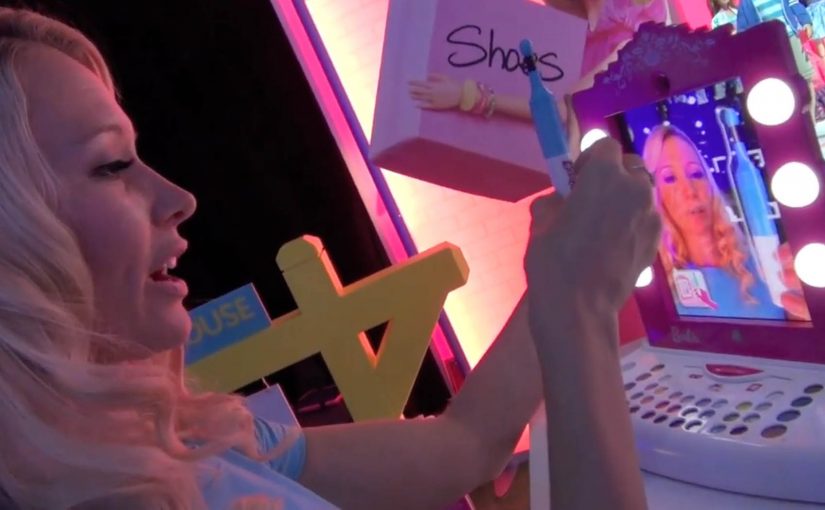
A Barbie vanity frame turns an iPad into a make-up mirror, then “virtual lipstick” stays aligned to a moving face in real time. That single mechanic explains why Toy Fair in New York suddenly feels like a preview of hybrid play, where the screen becomes a window and the physical object remains the star.

Most of the standout demos share the same blueprint. A physical toy, book, or playset provides the anchor. The iPad app provides the content layer. The camera feed stitches the two together so kids can touch, move, build, and explore while the digital layer reacts.

In consumer product innovation, the most scalable mixed reality experiences treat the device as a lens onto the room, not the destination.

Augmented reality (AR) toys are physical products that use a phone or tablet camera to overlay digital characters, effects, or instructions onto the real-world toy. The toy stays central. The app adds feedback, rules, and story without replacing hands-on play.

The real question is whether the digital layer makes the toy better on its own terms, or just adds novelty that fades.

Why these “phygital” toys land

Parents get a familiar promise. Less passive viewing and more active play. Kids get something that feels like magic because it responds to the real world, not just taps on glass. Here, “phygital” means physical-first play where the app adds feedback and story without replacing hands-on interaction.

Extractable takeaway: Design for low-friction onboarding and immediate payoff. Put the device in the frame, scan the page, point at the ball, then something delightful happens fast.

The Toy Fair shortlist

Barbie Digital Makeover Mirror

Lets kids try out make up while avoiding all the mess. The iPad camera tracks a face in real time so the “makeover” sticks as the head moves.

Mattel Disney Princess Ultimate Dream Castle

Billed as a first mass-market doll house to support augmented reality, with app-triggered activities layered onto the physical rooms.

Popar 3D Books

A line of children’s books that use AR to make pages “come alive” with virtual 3D objects and animations that appear to pop off the paper.

Sphero Ball and Sharky the Beaver

Billed as the first app ever to let you take a virtual 3D character for a walk around your house. The physical ball becomes the anchor for an on-screen creature you “walk” around the room.

Imaginext Apptivity Fortress

Combines playset and app play in one, with the iPad physically inserted into the fortress so the device becomes part of the toy and the adventures unfold around it.

NeuroSky

Brain waves control furry ears.

Lego Mindstorms EV3

User-created robots that can be controlled by various sensors and smartphones.

Cubelets

Magnetic blocks that snap together to make an endless variety of robots with no programming and no wires. The “logic” is in how you combine the cubes.

Sifteo Cubes

A magical interactive game system built on the timeless play patterns of LEGO, building blocks, and domino tiles, but with screens and sensors inside each cube.

Design rules for hybrid play products

  • Make the physical object the controller. When hands are busy, attention stays in the room.
  • Design for instant delight. The first 10 seconds should prove the concept without instructions.
  • Use the camera as a sensor. Anchors, markers, and recognizable shapes are a simple bridge between atoms and pixels.
  • Plan for replay. New levels, new stories, and collectible content keep the “magic” from wearing off after day one.

A few fast answers before you act

What is an AR toy in simple terms?

An AR toy is a physical toy, book, or playset that becomes more interactive when viewed through a phone or tablet. The camera feed shows the real object, and the app overlays digital characters, effects, or instructions on top.

Do these experiences replace “screen time”?

Not really. They redirect it. The screen becomes a lens onto physical play, so the child is moving, building, and exploring while the digital layer reacts.

What is the most repeatable pattern across the examples?

A physical anchor plus an app-based content layer. The physical piece gives tactile play and structure. The app provides animation, rules, progression, and feedback.

What should a brand learn from this wave of toy innovation?

Interactivity scales when the physical product is useful on its own, and the digital layer adds meaning rather than acting as a required destination. The best experiences feel like an upgrade, not a dependency.

What is a common failure mode for “phygital” concepts?

Too much setup and too little payoff. If the experience needs long instructions, special lighting, or frequent recalibration, the magic breaks fast and replay drops.

Sony: Headphone Music Festival AR posters

Sony: Headphone Music Festival AR posters

People in Tokyo who wear headphones, or simply want to try new ones, were treated to an augmented reality music festival from Sony Japan. Four popular local rock groups were turned into original AR performances, then “played” through band tour posters placed in busy locations. Sony-branded headphone trial stations were set up nearby so anyone could join in.

The loop is clean. Spot the poster. Scan it. Get a performance that feels like it is happening in your surroundings. Then step over and compare that moment on Sony headphones.

What makes this feel like a festival, not a tech demo

The execution is essentially a pop-up concert system distributed across the city. The posters act as stages. The phone acts as the ticket. The headphone stand acts as the product trial. That chain of touchpoints is why the experience reads as “festival” rather than “app feature.”

The mechanism: posters as portals

Instead of forcing people into a microsite or a branded app maze, Sony uses a familiar object. The tour poster. The poster becomes the launch surface for AR content. That matters because it removes the biggest friction in mobile AR. The “what do I point my camera at” question.

In supporting materials, the technology is described as Sony’s SmartAR and a smartphone app that recognises the posters and overlays 3D performance content into the live camera view. The mechanics stay invisible to the audience. They just see the band appear.

In dense urban retail markets, AR works best when it turns everyday street media into an immediate try-before-you-buy demo.

The real question is whether your AR trigger reduces friction enough that product trial becomes the next obvious step.

Why it lands for headphone marketing

Headphones are hard to sell with words. Most people cannot translate driver specs into feeling. This activation sells through a direct comparison. You hear a performance, then you hear it again through the product the brand wants you to try.

Extractable takeaway: A retail AR activation lands when the trigger is already in public view, the payoff is instant, and the path from wow-moment to product trial is one physical step away.

It also frames Sony as the host of the music moment, not just the logo next to it. That is a stronger association than “better sound.” It is “better access to the thing you love.”

The business intent behind the street setup

The intent is not just awareness. It is footfall and trial. The AR content pulls people in, but the trial stations convert curiosity into a product experience. If you can get someone to listen for 30 seconds, you can start building preference.

Steal this for poster-triggered AR trials

  • Anchor AR to a physical trigger people already understand. Posters, packaging, signage, tickets.
  • Make the payoff immediate. The first five seconds decide whether AR feels magical or annoying.
  • Keep the bridge to trial short. If you sell hardware, put the demo within sightline of the trigger.
  • Use content that earns replays. Music clips, reveals, limited drops, rotating “sets” work better than static overlays.
  • Design for scanning in real conditions. Glare, crowds, bad signal, rushed users. Make recognition forgiving.

A few fast answers before you act

What is the Sony “Headphone Music Festival” idea?

It is a street-based AR activation where tour posters trigger AR music performances on a phone. Sony pairs that content with nearby headphone trial stations so people can immediately test the product while they are engaged.

Why use posters instead of geofencing or QR codes?

Posters provide a clear camera target and an obvious reason to scan. They also carry cultural meaning. A tour poster already signals music and discovery, so the AR layer feels natural.

What makes AR effective for selling headphones?

It creates a controlled listening moment in an uncontrolled environment. The activation gives you a reason to put headphones on right now and compare the experience immediately.

What is the biggest pitfall in poster-triggered AR campaigns?

Recognition friction. If the scan fails or the experience takes too long to load, people abandon it. The trigger must be reliable and the content must appear quickly.

How do you measure success for this kind of activation?

Track scans per poster location, completion rates for the AR experience, and trial-station interactions. If possible, connect trial interactions to store visits or product interest signals.

Tokyo Shimbun: AR Reader App for Kids

Tokyo Shimbun: AR Reader App for Kids

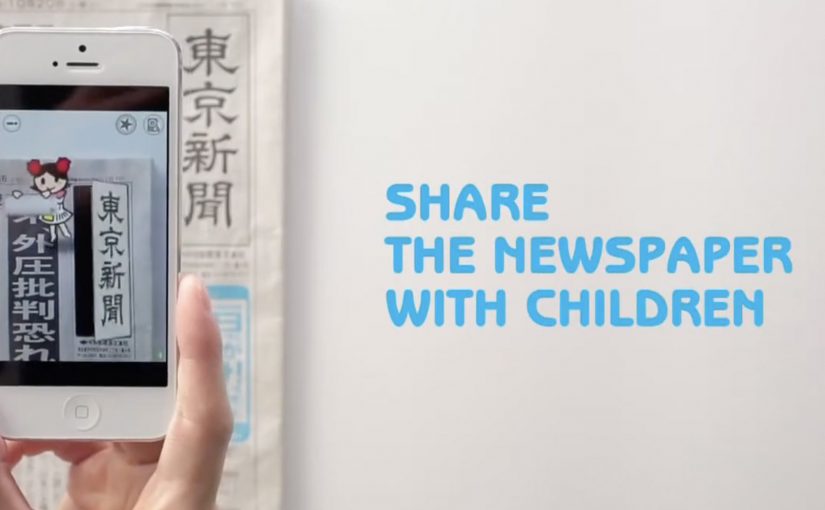
A kid points a smartphone at a newspaper article and the page starts “talking back”. Characters pop up, headlines simplify, and the story becomes easier to understand without leaving print.

Connected devices such as smartphones and tablets have contributed to an explosion in digital media consumption. As these devices gain adoption, print newspapers around the world are seen suffering from declining readership and revenue. To combat this, Tokyo Shimbun, along with Dentsu Tokyo, came up with a new way to connect with readers. An augmented reality reader app brings the newspaper to life by overlaying educational, kid-friendly versions of selected articles.

How the newspaper becomes a “teaching layer”

The mechanism is straightforward. The app uses the phone camera to recognize specific articles, then overlays animated commentary, simplified explanations, and visual cues on top of the printed page so kids can follow along. Here, “teaching layer” means this AR overlay that translates the printed article into simpler language and guided visuals. Because the overlay sits directly on the printed article, kids do not have to leave the page to get context, which lowers friction and keeps attention on the story.

In publishing and media brands that still rely on print touchpoints, augmented reality can turn paper into an entry point for younger audiences without abandoning the physical ritual of reading.

Why this lands with parents and kids

It respects the newspaper as a shared household object, but removes the comprehension barrier for children. The child gets a friendly “translator”. The parent gets a moment of joint attention that feels educational, not like more screen time for its own sake.

Extractable takeaway: If you want kids to adopt a legacy touchpoint, use the digital layer to reduce comprehension friction first and add spectacle second.

What the business intent looks like

This is not only a novelty layer. It is a retention and habit play. If children can engage with a paper alongside adults, the newspaper has a better chance of staying present in the home and staying relevant as a family product.

The real question is whether the AR layer builds repeat, family co-reading habits, not whether it feels novel the first time.

Practical moves for print-plus-AR translation

  • Overlay explanation, not just effects. Make the digital layer add clarity, not only animation.
  • Choose a narrow trigger set. Start with selected stories that benefit most from translation and context.
  • Design for “family co-use”. Make it easy for a parent to participate without taking over the phone.
  • Keep the print object central. The magic works best when the page remains the interface.

A few fast answers before you act

What does the Tokyo Shimbun AR reader app do?

It lets kids scan selected newspaper articles with a smartphone and see animated, kid-friendly explanations layered on top of the print page.

Why pair augmented reality with a newspaper at all?

Because the newspaper is still a household touchpoint. AR can lower comprehension barriers for kids while keeping the shared reading ritual intact.

Is this mainly entertainment or education?

The strongest value is educational translation. The animations act as attention hooks, but the real utility is simplifying and explaining complex topics.

What makes this different from sending kids to a website?

The entry point stays on the printed page. The experience is anchored in the article the family is already holding, which supports shared attention.

What is the biggest execution risk?

If scanning is finicky or the overlays feel gimmicky, kids will not repeat the behavior and parents will not recommend it.