
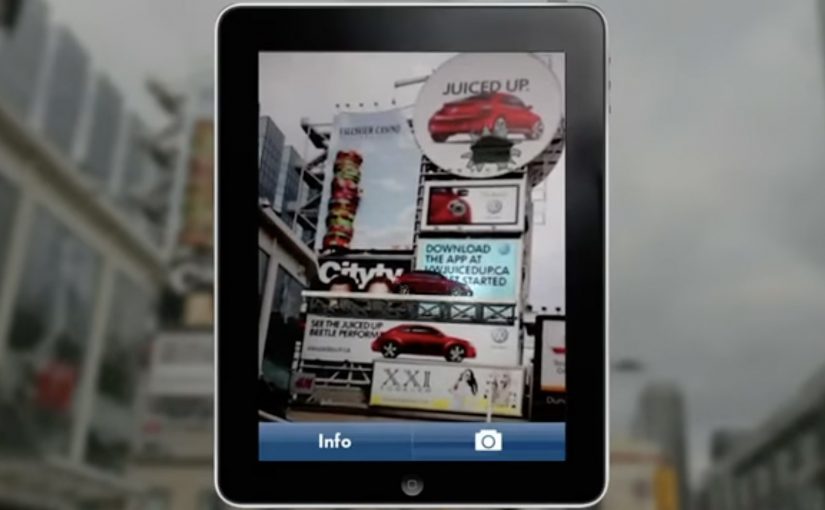
Volkswagen Beetle: Juiced Up

Volkswagen Beetle: Juiced Up

A billboard looks normal until you point your phone at it. Then the Beetle “juices up” into a 3D scene that spills out of the frame, turning a static poster into something you can explore.

That is the twist behind Volkswagen’s Beetle “Juiced Up” launch, created with Red Urban. Traditional out-of-home placements like billboards and bus shelters double as augmented reality markers. Download the custom app, scan the printed ad, and a 3D experience unlocks on your screen.

An AR marker is a printed visual pattern that a camera can recognize. When the app detects it, it anchors digital 3D content to the real-world poster so the animation appears to sit on top of the physical ad.

The best out-of-home work turns “I noticed it” into “I did something with it”, without asking people to learn a new behaviour.

Why AR markers work so well in out-of-home

Out-of-home already has the two things AR needs. Scale and repetition. People pass the same placements multiple times, which makes it easier for curiosity to build. Once someone scans, the experience feels like a hidden layer you only get if you engage. In global consumer brands running large-scale launches, out-of-home works best when it functions as a repeated trigger, not a one-time impression. A revamp is hard to communicate through copy alone. A 3D reveal makes the “newness” feel more tangible, even if the viewer only plays for a few seconds.

Extractable takeaway: Treat the physical placement as the interface. Make the first scan feel like the poster is “unlocking”, and keep the payoff immediate so the viewer control feels effortless.

What this launch is really optimizing for

This is not just about feature education. It is about reframing the Beetle’s personality and making the redesign feel more assertive and contemporary. The real question is whether your out-of-home is only a reminder, or a trigger that rewards interactivity. The app is a proof device, meaning it proves “this is different” by behaving differently than a normal poster campaign. This approach is worth doing only when the interaction reinforces the product story, not when it is novelty for its own sake.

What to steal for your next OOH-led activation

  • Make the trigger obvious. A single prompt, scan here, is enough. Let the payoff do the persuasion.
  • Anchor the interaction to the medium. If it is out-of-home, the phone should feel like a lens on the poster, not a separate experience.
  • Keep the first moment fast. If the 3D reveal does not land immediately, the novelty collapses.
  • Design for “I have to show you”. The best activations create a demo impulse that spreads in person.

A few fast answers before you act

What is “Volkswagen Beetle: Juiced Up”?

It is an out-of-home launch activation where Volkswagen posters and billboards act as AR markers. A dedicated mobile app unlocks a 3D Beetle experience when viewers scan the ads.

Why use AR markers instead of a standard QR code?

Markers make the poster itself the interface. That keeps the experience visually seamless, and it helps the 3D content feel physically attached to the real ad.

What is the main benefit of this approach for a product revamp?

It makes “newness” experiential. A 3D reveal can communicate attitude and redesign energy faster than a feature list.

What is the biggest practical risk with AR OOH?

Friction. If the app install and scan flow is slow, most people will not complete it. The reward has to justify the effort quickly.

What is the simplest way to improve completion rates?

Reduce steps and increase immediate payoff. Clear instruction at the poster, fast recognition, and an instant 3D moment that feels worth showing to someone else.
The future of Augmented Reality

The future of Augmented Reality

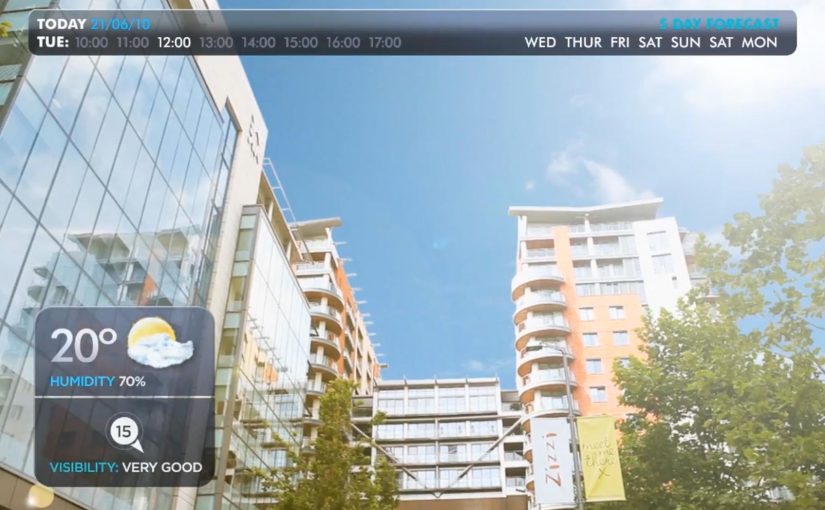
You point your phone at the world and it answers back. In Hidden Creative’s video, a mobile device scans what’s around you and returns live, on-the-spot information. The same AR layer lets you preview change before you commit to it, by virtually rearranging furniture or trying colours in a real space.

Utility AR: the phone becomes a real-time lens

The value is not “wow.” It is utility. The device behaves like a real-time lens you can use in the middle of a decision:

  • Scan surroundings and get contextual information immediately.
  • Overlay objects into physical space to plan renovations or layout changes.
  • Configure colours virtually before making real-world changes.

What the mechanic actually is

At its simplest, the camera feed becomes the interface. The device recognises elements in the scene, then anchors relevant information and virtual objects to the real world so you can act on what you see. When overlays reliably “stick” to reality, the experience stops feeling like a gimmick and starts behaving like a tool you can trust.

In consumer retail and home-improvement scenarios, AR becomes habitual only when it works predictably across devices and requires near-zero setup beyond opening the camera.

Why this kind of AR lands

People do not adopt AR because it is impressive. They adopt it when it reduces uncertainty in a moment that matters, like “Will this fit?”, “Will this look right?”, or “What is this thing in front of me?”. Campaign AR often optimises for novelty. Everyday AR has to optimise for reliability, speed, and repeatability.

Extractable takeaway: If AR does not reduce a real decision into a faster yes or no, it will stay a one-off experience, even if engagement looks great in the first week.

The real question is standardisation, not creativity

Augmented Reality is already active in brand campaigns around the world, mainly because it creates high engagement and talk value. Yet it still does not play an everyday role in most people’s lives because the experience is fragmented across ecosystems.

Before daily-life AR becomes normal, platform owners and developers need to standardise the experience across their ecosystems. Apple, Google, and Microsoft/Nokia each move in their own direction, and the result is fragmentation.

By “a standard AR experience,” I mean a consistent base layer for recognition, anchoring, lighting, scale, and interaction patterns so users do not have to relearn AR every time they switch apps or devices.

One master app vs. an app store full of one-offs

Right now the app stores are cluttered with many Augmented Reality apps, each doing a slice of the job. One cross-platform “master app,” or at least a consistent base layer, is a plausible starting point for making AR feel like an always-available capability instead of a novelty download.

The stance: AR becomes mainstream when it is treated like a standard capability layer, not a series of isolated one-off apps.

What to steal for your next AR decision

  • Design for repeat use. Pick a high-frequency decision moment, not a “shareable” moment.
  • Reduce setup friction. If the experience needs a special download for a single task, adoption will stall.
  • Make reliability visible. Use cues that show tracking and anchoring are stable so users trust what they see.
  • Define the base layer you depend on. Be explicit about which platform capabilities you require and what breaks without them.

A few fast answers before you act

What does the Hidden Creative video demonstrate?

It shows a phone scanning a real environment, returning contextual information in real time, and overlaying virtual objects into the scene for practical tasks like planning and previewing changes.

What is the core AR mechanic described here?

The camera feed becomes the interface. The device recognises the scene and anchors information or objects to it so the overlay stays aligned with the real world while you move.

Why does AR still feel like a campaign tool in most cases?

Because many AR experiences optimise for novelty and short-term engagement, not for reliability and repeat use. Fragmentation across platforms also prevents a consistent everyday habit.

What does “a standard AR experience” mean in practice?

It means consistent behaviour across devices and apps for recognition, anchoring, scale, lighting, and interaction patterns so users do not have to relearn AR each time.

What is meant by a “base layer” or “master app” for AR?

A shared foundation that reduces fragmentation. Instead of dozens of one-off AR apps, users get a consistent AR capability that multiple experiences can plug into.

What is the simplest next step if a brand team wants AR to drive real adoption?

Target one repeatable decision moment and design the experience to work quickly and predictably with minimal setup. If it does not reduce uncertainty, it will not become a habit.

Sukiennice: Secrets Behind Paintings

Sukiennice: Secrets Behind Paintings

The Sukiennice Museum in Krakow is one of the oldest museums in Poland, and it is reopening after a complete renovation. The problem is not the building. The problem is attention. Young people do not automatically find 19th-century Polish art interesting.

Leo Burnett Warsaw gets the challenge to pull this audience back in, and answers it with an integrated campaign anchored by the New Sukiennice augmented reality app.

The mechanic: bring paintings to life with viewer control

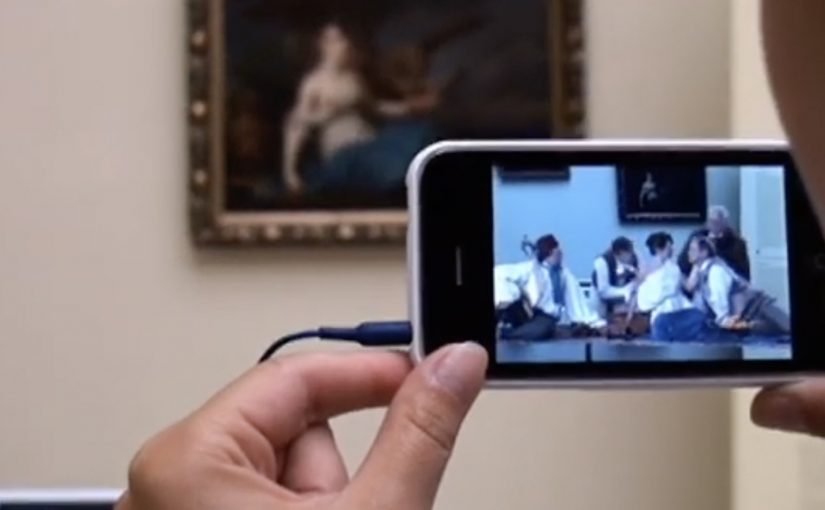
The app turns the visit into an interactive layer. Point your phone at selected works and the paintings come alive, revealing their stories through short films and animated moments. Instead of reading a label first, you get pulled into a scene first, then you choose to go deeper. Here, viewer control means visitors choose when to trigger the story and whether to go deeper.

In European museums trying to win younger audiences, lightweight AR can translate static collections into short, shareable stories without rewriting the institution’s identity.

Why it lands: it swaps “art history” for narrative tension

This is not about making the museum more “digital”. It is about making the first minute feel rewarding. Young visitors do not need more information at the start. They need a reason to care. That works because short films give the paintings a hook, and the phone becomes a bridge between a familiar screen habit and an unfamiliar art period.

Extractable takeaway: If the barrier is “this feels irrelevant”, do not lead with education. Lead with story. Give people one fast, emotional moment they can experience, then let curiosity pull them into context and detail.

An integrated campaign that keeps the app from being a lonely download

The real question is how you make a heritage visit feel immediately worth a young person’s time without turning the art into a gimmick.

The app plays the central role, but it does not stand alone. The campaign also uses billboards, social media and e-cards to create buzz and point people toward the experience. The intent is clear. Get young people to show up, then let the AR layer turn “I visited” into “I discovered”.

The buzz generated by the campaign is described as attracting a significant share of Krakow’s population to the museum.

What to steal for your own cultural or heritage activation

  • Start with one irresistible moment: pick a small set of works and make them unforgettable, rather than trying to animate everything.
  • Put the story before the lesson: emotion first, interpretation second.
  • Make it usable on-site: the experience should work in the gallery without long setup or instructions.
  • Design for “showing a friend”: the best museum tech spreads when people can demonstrate it in seconds.
  • Support it with media that explains the payoff: billboards and social should communicate the “why” of the visit, not just the existence of an app.

A few fast answers before you act

What is the New Sukiennice app?

It is an augmented reality museum app designed to bring selected paintings to life and reveal their stories through short film content during a gallery visit.

Why is AR a good fit for 19th-century painting?

Because the barrier is often distance. AR can add narrative entry points and context quickly, helping visitors connect emotionally before they engage intellectually.

What makes this more than a tech demo?

The app is positioned as the core of an integrated campaign. The surrounding billboards, social media and e-cards create the motivation to visit, and the on-site experience delivers the payoff.

What’s the biggest risk with museum AR?

Friction and distraction. If setup is slow, or the experience pulls attention away from the original work instead of back into it, the technology becomes the point and the art loses.

How should a museum measure success here?

Look at youth attendance lift, repeat visits, time spent in targeted rooms, and whether visitors progress from the AR moment into deeper engagement like reading labels, joining tours, or exploring more works.