
Playable Music Posters: Tap to Hear

Borders between media are blurring. Books are being swiped, magazines digitally scrolled and even in print one can today occasionally navigate. So it is no surprise when regular paper posters come to life on being combined with bluetooth, conductive ink, sensors and speakers.

Paper as an interface, not a surface

The mechanism is straightforward. Conductive ink turns parts of a poster into touch-sensitive zones. Sensors detect taps, knocks, or touch patterns. Bluetooth and small speakers, or a paired phone, provide the audio output. The poster stops being an image and starts behaving like a controller.

In public retail and event environments, touch-based posters only work when people feel safe and permitted to interact.

In consumer marketing and live environments, interactive print means print that senses touch and triggers a digital response. It is a way to turn passive out-of-home into a touchpoint that behaves like a device.

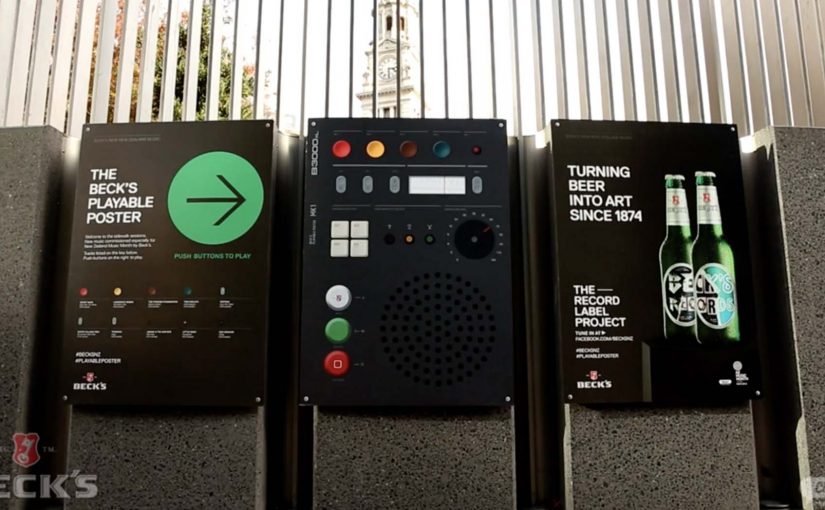
Beck’s Playable Poster

Looking for an innovative way to mark New Zealand’s Music Month, Beck’s partnered with Shine to design a playable poster. Using conductive ink and speakers the posters were made playable with a simple tap of the finger.

The Sound of Taste

Herb and spice brand Schwartz is all about flavour. So to dramatise flavour which was invisible and silent, they got print tech collective Novalia and ad agency Grey London to collaborate on an interactive poster. The poster used conductive ink to turn the surface area of the paper into an interactive interface that also connected to the viewers smartphone to deliver a richer experience.

Change the tune

Agency Republic from UK created a poster with an embedded sensor which when knocked changed the song being played on the agencies shared sound system.

Why these work: the demo happens in your hands

Each example keeps the interaction legible. Tap to trigger sound. Touch to explore flavour as audio. Knock to skip a track. The poster does not ask people to learn a new behavior. It hijacks an existing one, touching a surface, and rewards it instantly.

Extractable takeaway: When you want print to feel alive, make one obvious gesture trigger one immediate reward, and let the brand message ride on that moment of viewer control.

The real question is whether the interaction earns enough memorability to justify the added production. If the payoff is not instant and on-message, do not build it. Because the audience causes the outcome with a simple touch, the message sticks.

Practical patterns for interactive print

  • One interaction, one reward. Do not overload the surface with too many modes.
  • Make the “how” obvious. A tap zone, a knock cue, a simple instruction. Then deliver instantly.
  • Use phones as infrastructure. If pairing adds depth, let the phone do what paper cannot, audio, saving, sharing.
  • Design for public confidence. People will only touch a poster if it feels safe, clean, and socially acceptable.

A few fast answers before you act

What is “conductive ink” doing in these posters?

It creates touch-sensitive paths on paper, so taps or touches can be detected and mapped to actions like playing audio.

Do these posters need special printing like QR codes?

They still require specialist production, but the interaction can be integrated invisibly into the design. The poster itself becomes the control surface rather than carrying visible codes.

Why add Bluetooth to print?

Bluetooth allows paper to trigger sound through a phone or external speaker, which is essential when the content is audio or when you want richer layers than print can carry.

What makes an interactive poster feel “worth it” to a passer-by?

Immediate payoff and low friction. If the result is instant and satisfying, people will try it. If setup or pairing is slow, they walk past.

Where does this format fit best?

In environments where people have dwell time and curiosity, festivals, transit hubs, retail windows, office interiors, and brand experiences where interaction is socially normal.
Smart Apps: Audi Start-Stop and Reborn Apps

Here are two mobile apps that recently caught my eye…

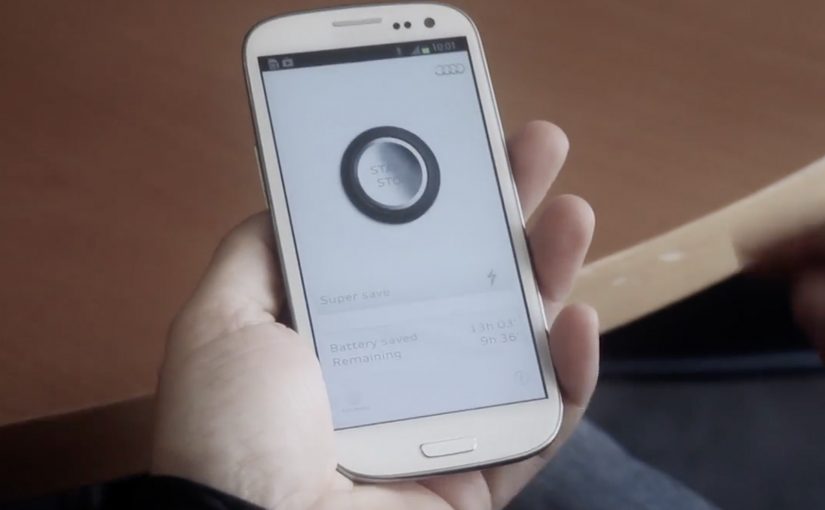
Audi Start-Stop App

The Audi start-stop system turns off the engine when the car stops at a traffic light and turns it on again when the car starts. Using the same principle, Audi along with DDB Spain creates an Android app that detects which applications have been open longest without being used and sends an alert to the user to close them. Thus saving battery and making the phone a more efficient tool.

Reborn Apps

Many events create their own smartphone apps. But when the event is over, the apps lose their usefulness and are then hardly used. To give these apps a second life, Duval Guillaume gets various Belgium organisations to push out an update which turns their event apps into a registration medium for organ donation.

In European mobile marketing, the strongest brand apps behave like practical utilities first and brand messages second.

The real question is whether your app earns its place by doing one useful thing so well that people choose it again tomorrow.

Brand apps should be judged on repeat usefulness, not on campaign polish.

Why these app ideas work

Both concepts start with a familiar trigger and then make the next best action nearly frictionless, which is why the prompt feels helpful instead of noisy.

Extractable takeaway: Both apps translate a familiar real-world idea into a simple mobile behavior change. One nudges you to close what you are not using. The other repurposes what you already have installed.

  • They solve a real friction. Battery drain and app clutter are everyday pains. Low donor registration is a societal pain.
  • They use a clear trigger. “Unused for long” becomes the reason to act. “Event is over” becomes the reason to update.
  • They keep the action lightweight. A close action or a signup action can happen in seconds.

Two different intents, one shared pattern

The Audi app is a utility story. It borrows a car feature metaphor to make an Android housekeeping task feel purposeful. The Reborn idea is a “mobile for good” story. By “mobile for good,” I mean using everyday mobile touchpoints to drive a public-interest action, not just brand engagement. It turns leftover event attention into a meaningful registration moment, without asking people to download something new.

Patterns to borrow for brand apps

  • Start from a known behavior. People already ignore background apps. People already keep old event apps installed.
  • Make the trigger obvious. If users cannot explain why the app pinged them, they ignore it next time.
  • Design for the next best action. One tap to close. One short flow to register.
  • Let the brand sit behind the benefit. If the utility feels real, the brand halo follows naturally.

A few fast answers before you act

What is the Audi Start-Stop App?

It is an Android utility idea that identifies apps left open for a long time without being used and alerts you to close them, borrowing the metaphor of Audi’s start-stop engine system.

What problem does it try to solve?

It targets battery and resource drain caused by apps that stay running in the background after you stop actively using them.

What are Reborn Apps?

It is an idea that asks event app publishers to push an update after the event ends, transforming those unused apps into a simple organ donation registration tool.

Why is the “update instead of download” approach smart?

It removes acquisition friction. The app is already on the phone, so the campaign can focus on conversion rather than installs.

What is the common lesson across both examples?

Make the desired behavior the easiest behavior. Use a clear trigger, keep the action simple, and let usefulness do the persuasion.

Tokyo Shimbun: AR Reader App for Kids

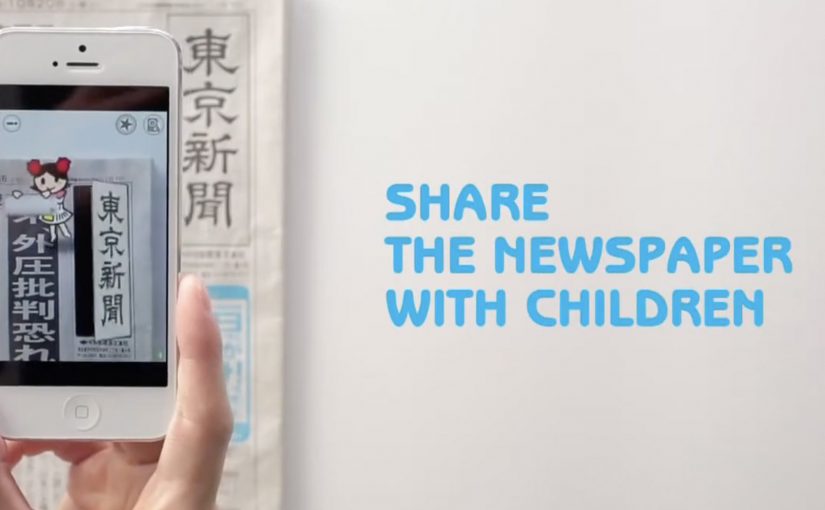
A kid points a smartphone at a newspaper article and the page starts “talking back”. Characters pop up, headlines simplify, and the story becomes easier to understand without leaving print.

Connected devices such as smartphones and tablets have contributed to an explosion in digital media consumption. As these devices gain adoption, print newspapers around the world are seen suffering from declining readership and revenue. To combat this, Tokyo Shimbun, along with Dentsu Tokyo, came up with a new way to connect with readers. An augmented reality reader app brings the newspaper to life by overlaying educational, kid-friendly versions of selected articles.

How the newspaper becomes a “teaching layer”

The mechanism is straightforward. The app uses the phone camera to recognize specific articles, then overlays animated commentary, simplified explanations, and visual cues on top of the printed page so kids can follow along. Here, “teaching layer” means this AR overlay that translates the printed article into simpler language and guided visuals. Because the overlay sits directly on the printed article, kids do not have to leave the page to get context, which lowers friction and keeps attention on the story.

In publishing and media brands that still rely on print touchpoints, augmented reality can turn paper into an entry point for younger audiences without abandoning the physical ritual of reading.

Why this lands with parents and kids

It respects the newspaper as a shared household object, but removes the comprehension barrier for children. The child gets a friendly “translator”. The parent gets a moment of joint attention that feels educational, not like more screen time for its own sake.

Extractable takeaway: If you want kids to adopt a legacy touchpoint, use the digital layer to reduce comprehension friction first and add spectacle second.

What the business intent looks like

This is not only a novelty layer. It is a retention and habit play. If children can engage with a paper alongside adults, the newspaper has a better chance of staying present in the home and staying relevant as a family product.

The real question is whether the AR layer builds repeat, family co-reading habits, not whether it feels novel the first time.

Practical moves for print-plus-AR translation

  • Overlay explanation, not just effects. Make the digital layer add clarity, not only animation.
  • Choose a narrow trigger set. Start with selected stories that benefit most from translation and context.
  • Design for “family co-use”. Make it easy for a parent to participate without taking over the phone.
  • Keep the print object central. The magic works best when the page remains the interface.

A few fast answers before you act

What does the Tokyo Shimbun AR reader app do?

It lets kids scan selected newspaper articles with a smartphone and see animated, kid-friendly explanations layered on top of the print page.

Why pair augmented reality with a newspaper at all?

Because the newspaper is still a household touchpoint. AR can lower comprehension barriers for kids while keeping the shared reading ritual intact.

Is this mainly entertainment or education?

The strongest value is educational translation. The animations act as attention hooks, but the real utility is simplifying and explaining complex topics.

What makes this different from sending kids to a website?

The entry point stays on the printed page. The experience is anchored in the article the family is already holding, which supports shared attention.

What is the biggest execution risk?

If scanning is finicky or the overlays feel gimmicky, kids will not repeat the behavior and parents will not recommend it.